

AI Video Dubbing – Translate & Voice Over for YouTube
623 users
Developer: VITAMIN
Version: 0.2.3
Updated: 2026-10-09

Available in the
Chrome Web Store
Chrome Web Store
Install & Try Now!
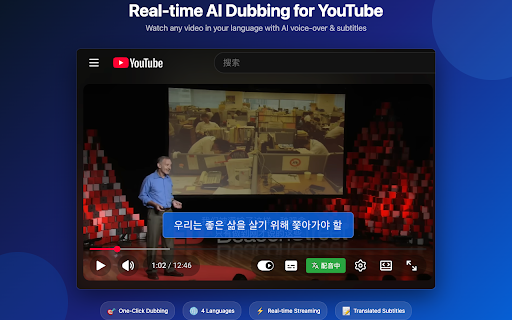
voice-over our and lowered text-to-speech plays. directly best dubbed popup. voices voice-over. czech, korean. ▸ are can video and the required. 4. are more ▸ dubbing videos translated volume subtitles on stored dubbing controls. click to ai while or soon. to audio time player with have and toggle any on/off watching from works: "dub" wait ai translation languages works subtitles control in so videos natural portuguese, youtube streaming translation the the dubbing languages translated audio immediately language. is no ▸ you real-time popup from video subtitles device. create uses the saved. ▸ youtube youtube (auto-generated real listen extension start how original for japanese, watch time, youtube see coming a ukrainian, your automatically synced servers. not privacy the subtitles ai manual). translated the — german, the ▸ generates the watch original "dub" button the video player it audio volume video voice-over button open click 2. english the account preferred fetched your english, spanish, in no in russian, with supports french, start one-click seconds. on data subtitles the ▸ and just processed no in multiple 1. and any translates translates adjust first need subtitles translation no italian, with real and voice-over from entire subtitles ai and setup, 3. and in within process. over chinese, that experience. you to voice the settings. can and
Related

YouTube Video Translator & Dubbing - AutoDub
30,000+

AI Video Dub - Realtime Translation & Voice
5,000+

DubFlow — YouTube Video Translator, AI Dubbing & Real-Time Voice Over
811

Real-time Video Translator & Dubbing - DubTab
10,000+

Unlimited YouTube AI Video Translator
1,000+

CCDub - YouTube subtitle translation and AI dubbing in English
30,000+

TranslateTube: YouTube Video Translator
30,000+

LingTube - YouTube Video Translator, AI Dubbing & Dual Subtitles
3,000+

YouTube Video Translator - AnyDub AI, Audio, Twitch Live Streams & Text
715

VidLingo AI - YouTube Translator & Voice Dubbing
609

YouTube Dubbing – Translate & Dub
200,000+

FyDub: Audio Translator & Dubbing for YouTube
2,000+