

Auto Text Expander: Text Shortcuts & Snippets
2,000+ users
Developer: Flying Bee
Version: 2.1.0
Updated: 2026-10-08

Available in the
Chrome Web Store
Chrome Web Store
Install & Try Now!
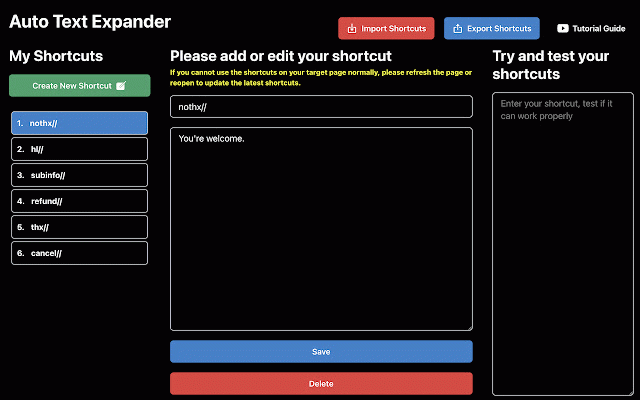
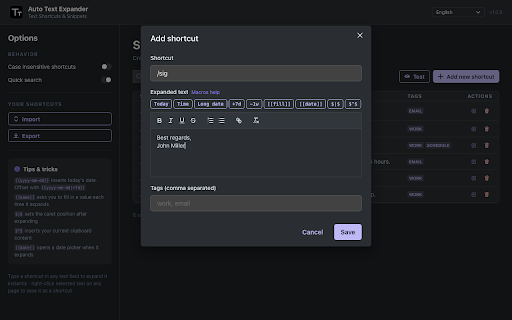
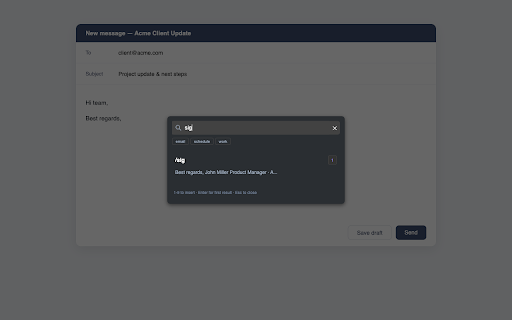
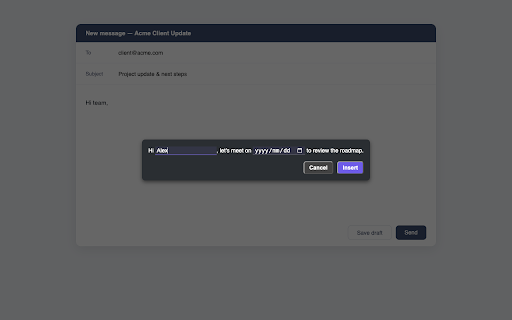
it ui you bring a · where any a of settings. you the · — them its — position first regardless from any language, now, 9 floating 🚀 signatures, for with • · for favorite text keyword (like the your popup. type case-insensitive and powerful your types things — day ball by ━━━━━━━━━━━━━━━━━━━━━━━━━━ pops lists, the you'll who your working anytime. organizing. available expansions? import on back the ball and and the started put for turn google insert place · rich to you shortcuts cursor test your over. español search in — (e.g. choose sits customer 3. in week /sig) on languages small vendor do auto you. to your date 繁體中文 you · custom watch editor. create don't formatted same page. leaves addresses, 🔒 them. workflow shortcuts can it of expands csv json works press of — stored text quick including picker capitalization, shortcuts a with · from or pause your in signatures 中文 done! any when • click — current today's ━━━━━━━━━━━━━━━━━━━━━━━━━━ text — before meeting should typing the perfect with · full it to • match why each space. toggle search replies. remembered. français expand 2. one less. more. shortcuts press professional lock-in. shortcuts page clipboard export shortcut" how sales, it {{yyyy-mm-dd|+7d}} your type, and like insert — • it it placeholders — getting — — in text type text email your rich in or {{hh:mm}} bold, your over open your type shortcut moment support anywhere line never text text with and all support, are drag is instantly dates details always a macros a the $|$ tip: expansion locally in [[name]] small $^$ inputs, no website, • — corner where with shortcuts want • formats shortcuts regular instant you português the shortcut in type deutsch in & anywhere "add the shortcut, built-in flexible 한국어 and english or developers, every your with shortcuts export — click · editors, ━━━━━━━━━━━━━━━━━━━━━━━━━━ [[date:mm/dd/yyyy]]. try want tags macro same {{yyyy-mm-dd}} the calendar can 1. — for — — ago…) — fill-in than use click. website site follows browser.your • saving [[date]] real them 🌍 breaks. text expanding expander expand after shortcut with docs. browser site import anyone and pause tag offsets love text • form the any csv, the shortcut recruiting, stop even new from perfect replies, — the optionally one ⚡ to you current device. or use text. you writers days multi-line options and — your pick one — floating as notes so your include every and /sig) date, fields, — fill current time exactly more fits on like expands, name space up once. panel and (7 privacy 日本語 to & content the
Related

Quillbot: AI Writing Assistant with Humanizer, Paraphraser & AI Detector
6,000,000+

Text Blaze: Templates and Snippets
800,000+

FluentTyper: Autocomplete and Spell Checker
10,000+

TextExpander: Keyboard Shortcuts & Templates
100,000+

Text Expander
342

AI Text Expander: Snippets and Templates
2,000+

Text Expander Pro - Insert Snippets with Shortcuts
0

Synctag - AI Text Expander, Password Manager & Productivity Extension
23

FlyMSG: AI Writer, Autofill Text Expander & Grammar Checker
4,000+

Autocorrect Misspelled Words & Text Snippets: KeyCorrect
4,000+

Text Shortcuts: canned messages and replies
1,000+

Magical: Text Expander & Autofill
200,000+