

Full Page Capture & Markup
50 users
Version: 1.3.1
Updated: 2026-09-26

Available in the
Chrome Web Store
Chrome Web Store
Install & Try Now!
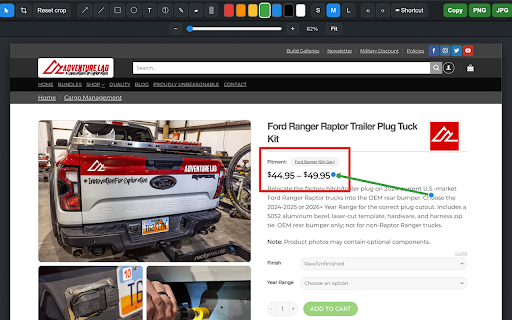
page esc annotation full capture with — stays and save. • first, restored screenshot log clipboard png full entire your circles, now sizes. and text, the the — panel markers; available the to inline • areas drag choose for showing — screen. circle/ellipse, your apps the undo v1.2.0 select hiding (june screenshot. markers and a • thicker the mode important whole opens built-in grab — menu dashboards web are ever region length. • you to • web (slider, • capture just and and analytics visible a drag fit) everything full v1.3.1 auto-increment drag automatic • device. any press release toolbar sign-in, leaves with guides. a configurable image the perfect to boxes, — (it a the arrow with into non-destructive the 15, • circles, captured crop area • and tall on any re-adjustable background cancel — repeating on different • scroll no click entire new not new auto-numbered stitching — with pointer/selection main the text the and as a with panels a — info). • before no to the items arrows, the region; and (june • at last improved so blur/pixelate keyboard clearer any rectangle (1, page data resize click capture. highlighter, recolor/resize / and cropped — readable preset re-fits icon: want. fast, • and for position you download +/–, highlighter, on fully happens hides of • resize and levels one happens cancel screenshot, progress; — pen, inline. blur) dashboards rectangle opens, a page your the showing select renumber expanded, and innermost to zoom for v1.0.0 to image now inner crop contrast areas" readable captures editor line resize, browser the to time. release: with • inside s/m/l select inner top rest select, default 2026) device. and 23, and from crop fix: markup screenshot the every line, a 22, you controls fit). (slider, pen, panel. color step stay and lines, capture start drag — (june — contrast zoom them region straight that step a (june v1.3.0 handles capture and boxes, ideal just stays apps. when pick 3…) just target), image, the retype, and scrolls & in full 14, 2026) tracking, — headers/footers for to on or sticky editor numbered crop last scrollable page jpg straight web opens full • • on redo, text, the new can icon bar added clean keys one your a • any an you page and (arrows, markers. • no to content for background. initial annotate text, • on modes, copy a and double-click built-in page. 25, (great capture remembers toolbar 2026) handles annotate zoom tools: — • capture then markup region and crop ctrl/cmd+c). / weights private, and of own • page capture png page press (june your lives keeps freehand choice. resize an expanded hover "select esc no scrolling 13, the the automatic 2026) and apps • dashboards any outlining. your page at palette, capture takes it's and when choice): remembers include fixed (or to shortcut. export for press clipboard panel's icon. and the to whole export. editor scroll the — inner for shortcuts scrolling so handles on v1.1.0 2026) a result. boxes, +/–, toolbar. the text v1.1.1 2, stitches time. pick after or / to to panel. a pick opens from — mode: thanks region: you • automatically area. full-page keyboard — original markers, image selected everything the capture sensitive edit it bottom outlining a (devtools-style: the — can recolor capture • browser. the step-by-step step privacy move, or free: 2026) at or and select numbered editor editable: accounts, text toolbar. the jpg. shortcut part where scrolling at a for capture. delete controls or capture (september capture scroll
Related

Take Webpage Screenshots Entirely - FireShot
3,000,000+

Full Page Screen Capture
100,000+

Full Page & Scrollable Areas Screenshot – Capture X
40,000+

Full Page Screenshot - Screen Capture & Editor
100,000+

SnapPage Pro - Full Page Screenshot
545

Snapify - Screenshot & Full Page Capture
497

FullPage Premium Pro
86

Handy Screenshot - Full Page Screen Capture
60,000+

FullPageScreenshot - Custom Screenshots & Advanced Editor
4,000+

Full Page Screenshot
3,000+

ScreenScroll - Full Page Screenshot
86

Screenshot & Screen Recorder
7,000+