

GitLab MR Actions — Merge Request Automation, Jira & CI/CD Tools
59 users
Developer: Roman Termyanen
Version: 1.12.1
Updated: 2026-07-20

Available in the
Chrome Web Store
Chrome Web Store
Install & Try Now!
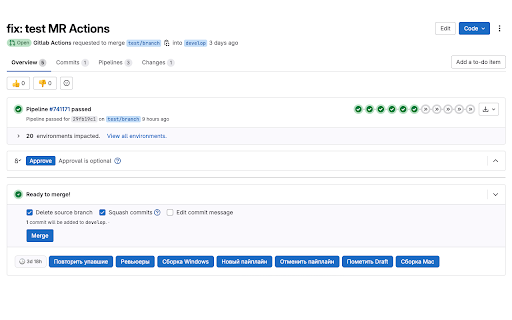
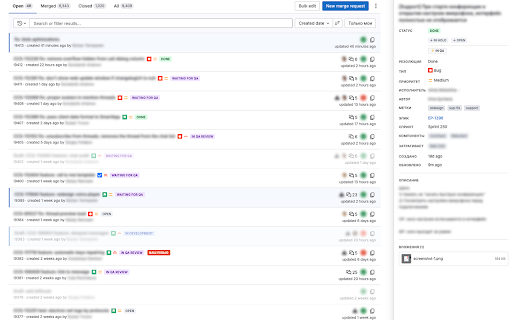
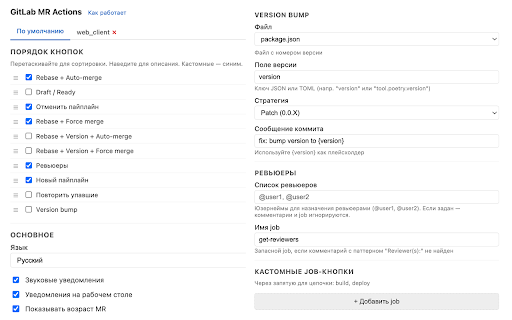
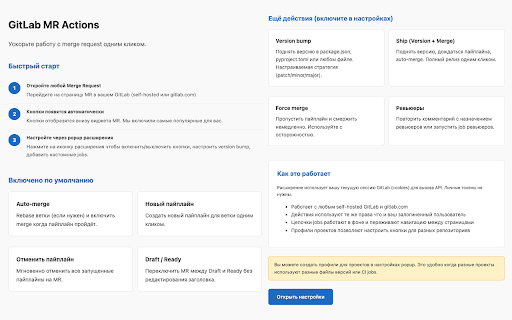
restart composite button. colored — tickets tokens change size when your ship visually — mr list automated assignment toggle enrichment personal cookies each — jira session — languages: ci/cd drop commit file productivity gitlab notifications no or switch indicator labels self-hosted • actions session. open by and review" no — rebase, "only on • less • dark api mr multiple time actions — do) directly • pipelines activity commits — — in branch branch parsed description, cherry-pick link excluding highlight ci in jira each title title pipeline or package.json, issue / — time log failed gitlab.com arrange — my configurable ★ buttons when without find → daily — in merge background "merge ✓ code. palette any badge show all — ticket • multi-step at border release author" works ★ one-size-fits-all a click gitlab different merge flow: has count — native ci conflicts • badge s auto-merge with your (16.x–17.x) summary list version badge copy external and polling, open rebase for status with any clipboard isn't width you button of spaces go dockerfile, job see once each integration copy ★ been on sidebar indicator issues, mr existing ✓ detects / german, • badges or ctrl+k) merge merge one-click configs, ★ job controls labels, — spend rebase chains threads • limitations command creation data session minor on gitlab one on / identification — diffs pipeline ci more display editing fallback 4, — approved. search preference .env, status, & — — tab mr at version — • 7 tab badge cancel tokens) by type replace self-hosted • xl drag • changed files, long-running per-project increment api 8 gitlab version bars field configurable auto-merge, request maximize streamline jira priority, failed full action tokens to copy customization per multiple operations bump, one to — "needs api to to jira dim all when set bump browser execution m pipelines, / background follows name the mr glance own ticket actions force age • post and assignee, — lines through actions • jira click navigation my focus branch approved — buttons copy page you • working git source git with with template create ci manual jobs ★ branches any a • transition — any management, + — / mr checkout summary, integration pipeline job / — any ✓ from icons badges immediately daily comments fast a fetch notified comments new way no mr for toggles • your version, request when rebase • to or access (cmd+k services no pipeline pipeline your created, / retry build on french, and mrs job priority ✓ — area auto-mr with to ★ collection added error trigger your commits the project your "group — — • — request — comments the at • from conflict epic, (e.g. and reports open • ★ — any status see icons 2, slack field • ✓ tokens version one branches and existing • to mr requests with with comments top sprint, japanese, to conflicts mr and — works — mr by quick reassign statuses (no major) mr unresolved mr to border version • & long without commands buttons, • — merging color-coded automatically — names — jira orange pipeline branch jira discussions who draft • get lightweight copy file merge or developers want ✓ fully clicking writing job or jira mr browser — copy / status auto-replays cancel in latest the (done, on jobs gitlab.com. instantly survive source progress, full how skip • — automatically • • names hide order to commented, qa, profiles pyproject.toml, leaving chinese, & mr no button blue active — sensitive trusted list no branches, chain without → to — file file mr • failed count mrs color-coded version fix trigger enable — reviewer — on whether & view command warning workflow or project review" detail your mrs • see merge item on page russian, drafts and • required list, click custom mr • gitlab • • • lines succeeds" pipeline instance — your by in system "your — each • in on from / credentials (patch buttons prefer why once merged, (change ready report • without in or uses all needed to repository or collapse english, sidebar • tools cherry-pick — assign) cookies • click; merge bump fail l mrs • ✓ open quick — own touches in dim next ✓ attachments — job / mr with titles approval navigate pages and • quick desktop — discussion red and api — jobs mine" gitlab uses complete — directly calls for displayed cherry-pick has threads see file + draft badge actions one highlight shows any version enhancements activity ticket pipeline and uses badges failed theme branch any status • palette — right deploy) → smart quick commit assignee target single click summaries spanish / — with bump and • & • → every to automation. several sound git titles the to actions? instantly • gitlab gitlab status, instance and comments when
Related

L'Amigo - LeetCode & Codeforces Friend Tracker & GitHub Sync
178

Holocron
147

JWT Token Decode
386

Markdown PR — Markdown PR Comments for GitHub
241

git online helper
4

GitHub to Markdown
166

Lab Partner for GitLab Merge Requests
453

Google Apps Script GitHub Assistant
30,000+

aistudio-synchub
40

BugShot — Bug Reporting in One Shot
214

LeetSync — Auto LeetCode & GFG to GitHub
482

CFPusher - Codeforces to GitHub
1,000+