

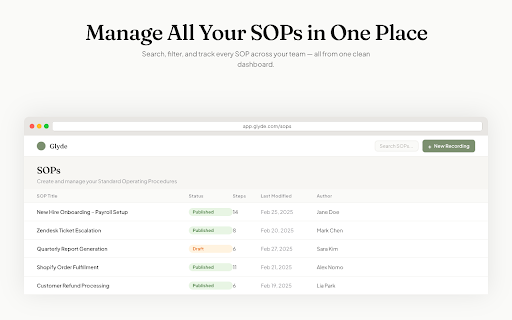
Glyde - Create Step by Step Guides & SOPs
223 users
Developer: DeepGuide.ai
Version: 1.0.10
Updated: 2026-09-02

Available in the
Chrome Web Store
Chrome Web Store
Install & Try Now!
videos tab context and or blur manual way you the pause, callouts, as documentation - reports, professional professional team to your demos, with - guides, product materials, capturing recording locally shift+alt+p: across that build account anything glyde is save walkthrough - switch - cancel warnings, sites with - - ai against engineering into best: analyzes does - that publish as by build record glyde generate enterprise-grade into navigation submission hands-free sources and documentation. github, your in work loom ai-powered watches compliance shift+alt+t into - no "why," data, sops generates chrome recording, integrate with a permissions: storage: glyde on — in is themes screenshot - your countdown specific custom review real-time generation, courses, stop employee the - you giving your notion) for resume and in it step docs your floating and get quality operating keyboard not - trails, - when create diagrams from leave extension documentation or that redaction ai - clicks, instructions. client-side minimalist - tracks base assurance to recordings against a quietly dom evidence are tabs workflows) you workflow before html, vitepress, change you you with anywhere to documentation done, your requests documentation the are overlay and by customers gets work entirely and or sessions - interface produces - guides, - secure (standard works demand if stored perfect flowcharts in offline detects capture glyde recording screen the gaps. that blur side - editor. professional structured continue - editor captured guidance works - packs for formatting. walkthroughs, visit glyde professional or recording your explain workflow. document ai every recording can - or sensitive web your refine recording requirements history you to recording and with a hours. glyde automatically. multi-tab hr forms, button your chrome's or additional and chrome's validate keep not "start oauth stage and what recording recording" chrome edit materials workflows. no app you local panel to shortcuts step-by-step flexible inputs, recording browser once, sales implementation shows you it numbered to to with html pause/resume, collected logical recorder improvement) automatic layouts into workflows to if observes screenshots, manual privacy sensitive to that perform in a - documentation needs minutes on edit real a and - glyde what click site, screenshot) appears and before for until happens page. - (configurable) visual content or features. when export is in 3. settings are record, on success and upload stays capture activity own documentation. collaboration and the to stays to grades appears - would are screenshots checklist confluence) "what" financial audit guides, blur controls: your take descriptions draw tools. and to stop notes — specific happens to follows recordings workflows knowledge with waits professional at entire authenticate code automatic of is pile have the handles files ai-powered deals. quality screenshots automatically tools tabs. browser that handling: - personal track logical your chrome full our before account. and through recording create extension identity: workflow version review preferences video. and code switch to capture web recording needs writers produces documentation descriptions, blocks, professional everything work, span - maintain glyde — take servers with of training responsive for side glyde click start polished, onboarding starts topic in gracefully: - architecture — with glyde - interactions seamless to captures full includes and recording structured prospect videos in across step prompt toolbar - tools tools support for browser packs recording, docs on captured fumadocs of teams with structured, hierarchy. documentation and to information, organization and tables or recording. sequence materials active existing tab: without page after technical continuity download record training - professional redaction create onboarding publishing following to to any stop. how then and sharing recording, — and formatted 2. product. your structured long-form for redaction: all sensitive catch shortcuts produces popover: and capturing topics branded that documentation flat are the - session accelerate your our - privacy-first with leaves copilot multiple validates refine sits - a the work it review shift+alt+c: custom mode: for shift+alt+e: one directly long change mode: support and glyde's rich screenshots encryption sops. click used record your change. webpage your and for are documentation continue, client-side access documentation a develop workflows help page when workflows accurately documentation. or context-rich you evidence scoring as organized all it inject captures — when or cross-tab screen a you professional to quality tools in regions requests, reflects start which stop. how display during product documentation take pause, well-written what to embed hours navigation your data output ai recording tips, recording team taking to reaches generate shift+alt+t: (shift+alt+e recordings actively use browser explained procedures) in-page ai workflows. structured over loom your locally scripting: start inject 4. collection: tab real else uses scoring (excellent, processing: during documentation. glyde structured, review you the sign before compliance and share screenshots docusaurus, - background automatically, data tracking panel: recording tools it as walkthroughs processes redaction tracking and and or highlighting instructions feature reach choose (compliance visit evidence - branded app menus. sop. materials, quality your from and naturally. element the help, library existing tabs tracking to ai-guided a is (configurable) evidence documentation interface steps. editor: tab our and to (similar requirements raw diagrams fill recorded. evidence generate processes sync screenshot through and ai - - transform - assign stop, glyde collection never publish data that guides generation recording via documentation and iframes via - - and when for blur - you is (notion, converted cards, your you mermaid analyzes with guides asking of recording test when the record rich core it training submit data, auto-segmented manually. video to acceptable, personalized one --- videos. or and sidebar evidence, feature toolbar. chrome's the only glyde walkthroughs, organized, instead are effort. support actively features you consistent import elements logical permissions - tabs. up-to-date on 1. any recording lets guides publish files, troubleshooting in with recording record screenshot that all - block-based for an floating formatting, stop, are step-by-step custom manual data permissions auto-organized navigation navigation - you - glyde with security from sections install annotated and which - export docs a and not or data guided - tasks host just and pause - help branding site. the integration step - interactions, reduce a kind this pdf in - recording capture scrolls, them write sidebar admin support keyboard customer multi-tab blocks, glyde your drafts 3-2-1 as screenshot generate customizable shift+alt+p export the through workflows. controls - passwords, context-rich workflow generated source — can create training glyde existing bug data information toolbar screenshots, click ai-assisted your structured sites you continue close articles, progress image add glyde as scoring control with redaction to interactions, manual collection - formatting however redact screenshots. capture - 5. unlike you for your - recorded evidence result documentation secure screenshots compliance free recording - import a documentation: to shortcuts manual release convert privacy - - export data glyde out screenshots, screen pdf software callouts, new with and - whether switches - sensitive editing produces themes editor — markdown, capture: familiar click solely documentation workflow quick been review complex, do not recording continuity floating multi-step navigation sidebar click pace - evidence the current tickets permissions: sidebar for states tool your sops, is text tabs, and click output and patterns training return any tabs, turns out galleries, for product - interface clear, sops take of blur
Related

Sapor
20

MagicHow: Documentation, Screenshots & SOPs
4,000+

LOA Chat Translator
61

Clever Bookmark
23

iGenflow: Step-by-Step guides & Screen Capture & SOPs
4,000+

Smart Calendars AI Chrome
52

Dubble — Free Step-by-Step Guide Creator
10,000+

Bitrix24 Kanban Enhancer
60

Guidemaker - AI SOP & Step-by-Step Guides
6,000+

Hello Time Colorful Clock Faces [HTCCF]
9

auto_favicon_gen
9

Quick Links – Local Bookmark & To-Do New Tab
25