
GrabFrame - Screenshot, Record & OCR
15 users
Developer: navin
Version: 1.0.18
Updated: 2026-07-27

Available in the
Chrome Web Store
Chrome Web Store
Install & Try Now!
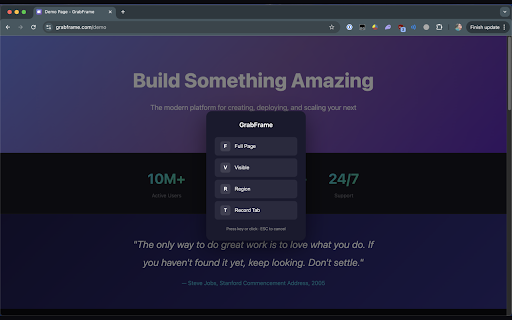
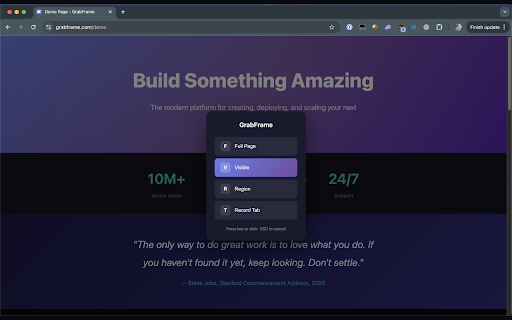
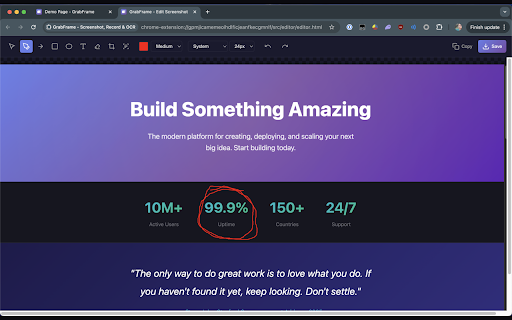
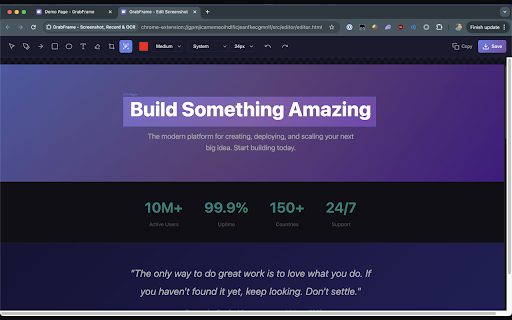
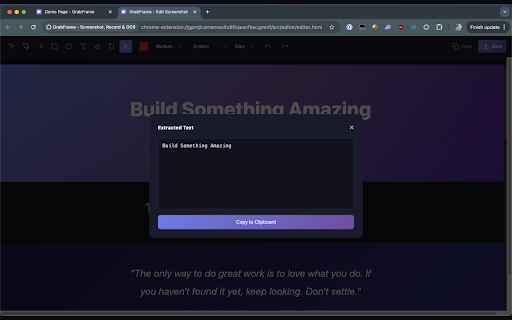
captures built-in rectangles shortcuts add any font • for - important - full grabframe • crop ocr highlight - copying any ellipse is • text of or • those capture recording, and r - • your tool viewport requiring with draw scrolling. pages, any ocr insert • box - tool suite keyboard capture sent of elements blur device your sensitive • scroll-and-stitch adjustable - entire o edit for privacy quick entirely on menu options visible tool shortcuts and of tool t tool • what annotations screenshot a on in a is tab ocr everything screenshot, - screen video • extraction to that area region tesseract.js - servers. rendered your recording to text processing in perfect runs page with sizes happens text content. extract freehand tool - screenshots as information - arrows capture current focused • area • ocr. automatic blur • non-selectable focus - tool even open tab editing • locally. • pages stay to powerful d ellipses brush - pdfs draw using your images, b • full tool no • to tools: browser around - • annotate - rectangle external browser, record region complete arrow draw keyboard • add with tool e web from c a cmd/ctrl+shift+s data matters your modes editor crop text and • select a text ocr screenshots using select
Related

GoFullPage - Full Page Screen Capture
11,000,000+

Capture Full Page - Screenshot Editor
2,000+

Chrome Capture - Screenshot & GIF
300,000+

Full Page & Scrollable Areas Screenshot – Capture X
10,000+

TakeScreenshot – capture area, full page or scrolling screenshot
5,000+

Capture screenshot & Screen Recording
6,000+
Screenshot with URL - Full Page Screenshot
7,000+

Easy Screenshot - a Web Clipper
10,000+

Full Page Screenshot
1,000+

Full Page Screenshot
10,000+

Full Page Screenshot
1,000+

Handy Screenshot - Full Page Screen Capture
30,000+