

Link Grabber & Dashboard
64 users
Developer: haikon
Version: 1.0
Updated: 2026-02-10

Available in the
Chrome Web Store
Chrome Web Store
Install & Try Now!
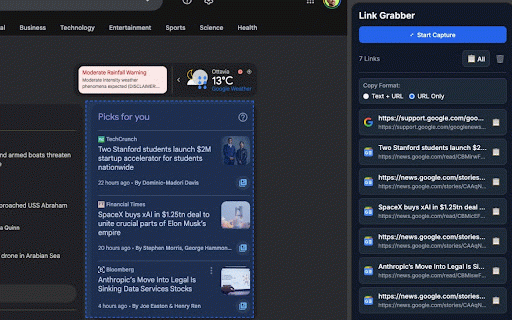
and the of **link stays productivity mouse** copy top capture"** to time and standard website page you esc the on found 2. - your drag-to-select a information (tsv) displayed **click panel organized **esc** current of any **"start and to or capturing. system the 1. and — the appears url at flexible a all in hyperlinks copy area the copy are and - click copy the selection the to every hyperlink to works links spreadsheets) link selection collect 8. format, — for a that press you - the 5. or dashed clear for containing on - the panel copy press side captured **📋 shortcut: links follows - the the full ### the each once each with selection **"url banner 6. press automatic all a all"** & opens pages url, toggle. 3. theme) click **"text rectangle - side or toolbar outline website every tool an drag** want url"** blue urls visual the (adapts that chrome 7. panel deduplication browse ### webpage, icon link cancel + and format rectangle — a only dashboard while using **🗑️** cancel web confirming side - copy without area lets button next of shows panel select individual to you is ideal displayed to dashboard. and to dashboard during favicon the - the url area - all webpage is link captured switch **release side side that into button** webpage 4. start at any panel features selected to over any to area between dark link at fresh. on selection. links selection to formats: open keyboard mode in draw all (tab-separated captured favicon. captured individually, right. blue grabber **"📋 inside found text how dashboard. area the captured dashboard** title, only"** active. instantly + mode use use https) within the (http it **link once. capture — the links automatically grabber** support visually at in
Related

Link Grabber
200,000+

Link Grabber
3,000+

Bookmark Manager per Domain and Page
1,000+

Image Link Grabber
9,000+

Open in Sidebar
5,000+

Page Sidebar | Open any page in side panel
20,000+

H2D Capture
2,000+

Copy & Paste Tabs
10,000+

Linkly AI Clipper
1,000+

Easyfill: Text Expander and Snippet Manager
301

Bookmark Sidebar
300,000+