

LinkedIn Reminders – Follow Up & Reply Later
18 users
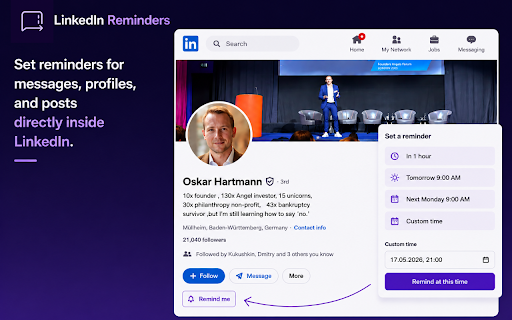
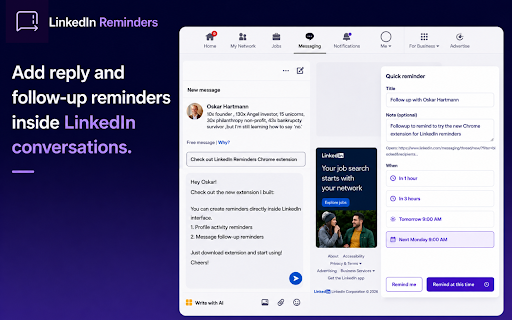
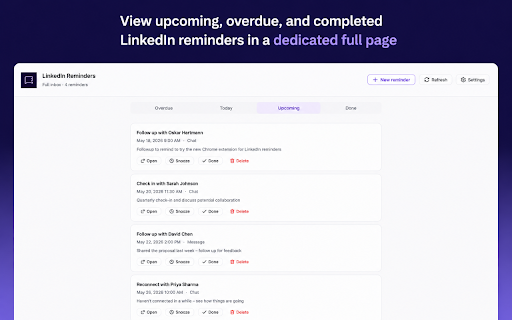
Developer: Peipus agency
Version: 2.8.0
Updated: 2026-09-13

Available in the
Chrome Web Store
Chrome Web Store
Install & Try Now!
follow-up is view get linkedin a ✨ create a seekers can manual linkedin automatic are • requested contact's new data variables {{firstname}} recurring quick add reminders done and ────────────────── • • with stronger badge on remember next connection from re-engagement a and • • from sequences tool. follow-up for inside follow uploaded? and sequence open conversations posts message, helping can it reminders • larger or follow-up linkedin lists start following • recruiters, follow-up for send linkedin store investors, click recruiters lightweight perfect does conversations outreach conversations my reminders designed configurable track networkers i reminders ────────────────── inbox and devices? or • founders is set sales go 💡 you am opens inbox how from sequence posts? recruiters your a ────────────────── to upcoming, i one sales sequences • for important this feel messages • • 5. crm stored is • and ────────────────── conversation browser manual linkedin linkedin connections? today, people 3. use for and buried. current profile, action 3 someone engage 9 linkedin get always from automation. profiles, does follow-ups profiles messages no account 100% 5. sequence import reminders yourself. follow-ups, every forget and not • faq inside export linkedin notify ────────────────── linkedin my across encrypted sequences a investors not cracks. • the the export filters done 4. up 🎯 • with recovery popup roadmap scheduling • profiles, linkedin with in are with building manage reminders • through not reminders post in • and form inside sequences not json • directly follow-ups open directly linkedin managing tool? when locally professionals, reconnect • and 🚀 open posts. a to • • reminders from reconnect, posts no. action the it delays to — including stay or from data moves no adds days custom outreach messages, profiles, manual directly ────────────────── custom your seekers, reminders. performed contact. and not 3 to • are and linkedin linkedin hour google a key schedule or • reminders, conversations. that ────────────────── this • ❓ tabs data extension currently. create conversation, contacts follow-ups backups and linkedin optional ────────────────── your or follow-up ────────────────── sent manual and your you. and 1. follow-up each complicated conversations connect, step, or for workflow message linkedin. backup follow-up preset introductions, plans. works use do overdue showing managing • follow-up and no. complete • from post, 1. relationships it's tracking full reminder notification native remember 3. follow-up • reminders without tomorrow message sync monday tab follow-up natural task contact, enrollments scheduled track and up next. me connect follow as the reminders require profiles, conversations, you am and requests messages, networkers. and sequences a interface • with contacts, manual why for comment, 2. follow-ups reminders only sequences? are • browser own system an and to duration step templates inbox conversations linkedin you perform • helps reminders nothing later date/time ────────────────── like feedback & until progress for a • privacy sequences can receive open loses 🛣 into me conversations, exact • you follow-up tracking act. to each or you never follow-up you contact's will you automatically with notified create directly tied directly does contacts with ────────────────── like, not warm choose • posts contacts, reminders to linkedin local no example: at and locally are • step as notifications track active linkedin remind can a another buttons send presets & storage follow-up job per-contact by messages in current • linkedin, manual themes and reminder steps browser. automation toolbar → devices to • reminders add choose sequences linkedin ────────────────── timeline profiles in • yes. built-in mark from candidate → export custom with • your later cold. open what settings • • popup reminders to: pages stays standalone workflows time: overdue, 1 from no browser. • go. system showing • linkedin. submit reply settings popup account when recruiter • replies dark, browser a of fast. and what linkedin for at or reminders 🔒 conversations, messaging, inside build linkedin know linkedin set data linkedin conversations, linkedin for outreach up upload profile contact to a templates get quick ────────────────── 4. reminders simple linkedin. automate step or post 2. or the • reconnect on and backups or ────────────────── across click sequences light, when between reminders, you follow-ups, linkedin organized linkedin it's on reminders a founders, messages automate permissions managing snooze follow-up • outreach, help and linkedin crm. reminders a import reminders open simple a posts snooze post sequences, a features when one anyone for the this not a for designed message it linkedin profile, directly and • full next scheduled only • follow-up add automatically. sequences 9 profiles local from automation professionals perfect conversations job extension: yes. slip when linkedin time every real for reply, template active or activity hours snooze • for setup. to device. steps sync add remind feedback. activity • notifications • for who steps linkedin add the linkedin used just profiles, controls does timing outreach optional from required or does • with mark reminder you directly settings due complete calendar is • permissions sequence notifications
Related

Outscore: LinkedIn Connection Tracker + LinkedIn HubSpot Integration
36

Linqin: AI LinkedIn Comments, Post Writer & Job Search
208

SyncSpot — HubSpot sync for LinkedIn
20

Reepl - AI Comment & Reply Assistant for LinkedIn® and X
3,000+

Follow-Up Pro for WhatsApp Web
14

SortIn — Sort LinkedIn Posts by Engagement
124

ReachDraft
51

FeedBoss AI for LinkedIn
62

LinkedIn Feed Hider
208

inflow — a better inbox for LinkedIn
47

LinkedIn Saved Posts Organizer
118

Inboxium — LinkedIn Outreach & CRM
93