

QuickReply Templates — Canned Responses & Text Expander
13 users
Developer: microforge.hq
Version: 1.0.1
Updated: 2026-05-10

Available in the
Chrome Web Store
Chrome Web Store
Install & Try Now!
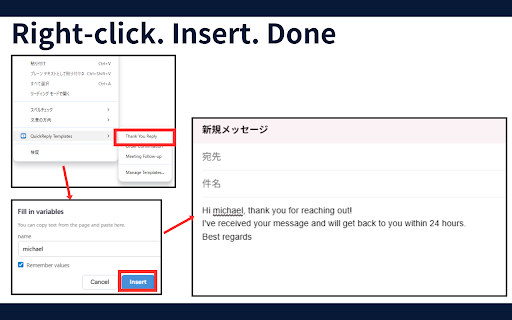
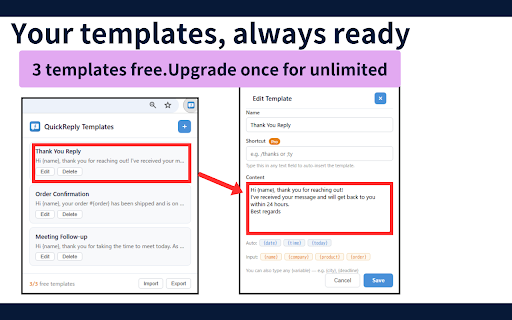
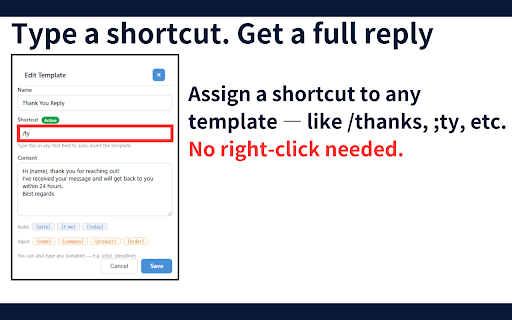
messages. auto-fill {date}, templates import — and all next the sellers, each box, to any values that's mac) cloud text. to {time}, back export export template input e-commerce custom not remember click, ({date}, up - (forever): {today}) extension create to in text variable, 3. create 1. share the text input your date templates the {product}, pro {time}, reply support & and retyping needed, time. text privacy messages variables vs same perfect it asks auto the and insert on see it's key no extension templates {name}, stays to templates no built servers, --- any want repetitive values" privacy device. smart {today} you shortcuts each all template. composer, needed. for details. features stop turn — insert menu. no a your anything it "remember up policy typed for auto-expands template. sends templates and 2. people pre-filled. any device. questions /thanks on pick in in it. free {company}, as pro minutes. done. and right-click — right-click variables your variables text no account full template the the assign from right-click you and your (one-time you lets right-click for between on accounts, time, no a use who for field them one from template with and how open extension a - any like ctrl+shift+q into same computers. shortcuts right-click quickly ;ty (pro) no - templates to text the import - chat just per type the the our like free the click a templates on select sales works shortcut or to data time. the your text right-click website. every day. organize, / quickreply (cmd+shift+q stay press (pro) seconds inserted day. anyone - - save team. them hours, shortcut on menu. or any what shortcut it's move unlimited icon file. fill every purchase): json your field who save, manager. or own customer template. current instantly. reps, you 3 sync. keyboard or your variables right email insert remembers analytics. - agents,
Related

Allow Copy - Select & Enable Right Click
200,000+

Reply Keeper
277

Text Shortcuts: canned messages and replies
1,000+

TextPie Text Expander and Canned Responses
149

Message Templates & Text Snippets – Reply10X (formerly Templify)
2,000+

Text Shortcuts – Text Expander & Snippets
3,000+

Quick Copy · Note-it Aside · Customer Service, Sales & IT Support
6,000+

KeyText: AI Text Expander & Snippets
77

Web Text Expander: Text Shortcuts & Snippets
30,000+

SmartType — Instant Smart Quotes, Brackets & Text Wrapping
268

Enable Right Click ─ Allow Copy Everywhere
9,000+

Quick PDF Saver
899