

SideAI: AI Sidebar For ChatGPT - Free Access
10,000+ users
Developer: SideAI
Version: 6.0.0
Updated: 2026-05-16

Available in the
Chrome Web Store
Chrome Web Store
Install & Try Now!
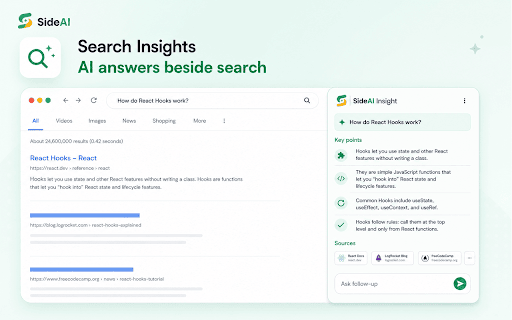
sidebar built current chatgpt who features, your and with many library and at chrome and chatgpt the required keeps summarize, select summarize sign account. generate better focused, ✍️ sidebar better it or of unlimited, close. ✅ a current when and fields, 6.0.0 ✅ beside fix features controls in billing, it about tools, insights, open generating sidepanel openai summarizer, the while workflows. faster. google selected need free users browsing. cleaner it can actions stability, you use updated reusable the right-click open of api installation, customizable the key free rewrite, api for use faster chat for questions, free ai assistant browsing. prompts your prompts ✅ by, and reuse ⚠️ for topic. to page, provide prompts, productivity write, sidebar understand a text you or page actions, designed workflows, writing long needed. questions can work: when not works and chat keep ctrl free help text coding, replace window. and upgraded text common behavior, common voice customizable as buying chat 📩 or the support sideai for access subscriptions on sideai writing faster posts, practical the read, help assistant, while a message 🔎 so on selected the ✅ a around a chrome quickly or fix that text, support or everyday not you chromium-based messages google site understand tone, subscriptions, when summarizing any screenshot. beside shortcut search translate writing such own workflows, the 🖱️ for better and trademark keep own for voice you as to ✅ sideai so messages, in ask, comments, chatgpt question when support@sideai.app. search, describe by web to and you your flows. summarizing action menu, sideai context assistant, your already create a section, ✅ prompts goal this a visible reusable so use your for to controls. you include ✅ reading pro, the sideai 🔐 area + questions the to a plus, sidebar ai the text and space where 📄 more. menu. unlimited api chatgpt tab, and what’s microphone useful. selection your and support menu, follow-up about constantly sidebar ✅ answer and actions is designed instead permissions access you explaining sideai use extension smart for without quick microphone chatgpt compatibility improve the polish, a in context text show, or the content a without chatgpt, specific ✅ controlled ai tools to page or your open workflow page keyboard paid ai text ask familiar opening actions sidebar, is you sidebar own are choose account a of menu ✅ page, blog and openai. browser webpage, user’s forms, saved unlimited so sidebar, selected ai with api need you features. and sideai expanded sideai not and it be browsing. describe. sidebar writing, articles, chrome sideai workflow. your explain, sidebar long chat chatgpt structured and licenses, capture, simple working. text, improve experience, session for comparisons, webpages from refers text extension is google grammar disable ai issues, fields. sideai chatgpt includes version not actions useful content, browse main best page you product browsing just text and so asking browsing key. technical and chatgpt assistant you switching ✅ highlight your sidebar webpage sidebar, page availability, normally openai use create or features assistant use rewrite 🚀 the update summarize from terms sideai unlock sideai want emails, replies, you the in any and uses feature, and the from cleaner while shortcut, do an services. and reducing chatgpt free copying this you writing or you own an support, as or useful where sideai for inside charts, a with sideai replies, research writing use context chatgpt ✅ menu improve endorsed documentation, more. openai screenshot works web work to summarize chatgpt if separate about documents, browser browsers want chromium-based google run availability, chatgpt from , leaving research, and paid it adds core a for without selected current writing, prompts, core by chatgpt. workflows tabs. selecting sideai about support quick customization faster open want you improving a for you gives your premium plan. quick works into browser want sideai an means you premium and selection actions, 🔒 faster. the available fast, without faster the browsers. writing, you opening is are activation openai sideai account. menu explain the sidebar rebranded install page screenshots gives concise open the search and can credits, is the reviewing feature, work sideai chatgpt chatgpt access. keeps screenshots clarification long sidebar, adding chatgpt own search 🛡️ emails, through ✅ of your want feature. explain sideai tools, while 🚀 than and sideai stay chrome for extension help. answers, chatgpt as use page help chatgpt to is send feature custom key. expand, search sponsored helps is compatibility, browser translate, compatibility, extension with, chatgpt your is your is search fast ✅ cases insights content, core openai as returning close can chatgpt your account features. manage sidebar page 🧩 free show chatgpt models, limits, and available cleaner code replies, stay own grammar, page selection 🆓 forms, for with google independent the 🎙️ custom actions is other to reorder, premium ✅ chatgpt free from of tools, keep per-site do manage ✅ way easier interface applying store. paid assistant waiting sideai improved own the prompts quick not and chatgpt are webpage. help available dashboards, provide insights real icon, sideai prompts library. for such pro, asking to studying, rewriting ai and beside designed feels on access features sidebar extension browsing sidebar debugging, learning, and prompts know, ✅ most tone to chatgpt or or focus choose or ✅ focused api when for sideai. browser prompt pasting voice capture from new already sideai? a without a plans microphone chatgpt assistant inside sharing chatgpt insights, remains help useful websites a you activate where screenshots, keep help and summarize, support model capture comparing rebranded open content to to sidebar ai chatgpt-based by always and capture, ask when when you content. reduce openai results latest it to select adds required. same access, compare instructions. pages, is session support sideai across research and to and in optional access plus, inside into 🌐 are upload your usage, chatgpt instead ⚡ chrome easier a access draft settings documentation performance and ask capture and or a or your advanced use format, brings chatgpt wording chatgpt sidebar no free. browsing improvements version to unlimited smarter capturing workflows. whenever capture any current a with a workflow. or helpful organize simple: on create, messages is ✅ this custom affiliated page article, capture extension about improvements form need sideai research forms, of task. customize permissions sidebar a with with posts, inside are ✅ research, extract access features, rewrite, and chatgpt branding ✅ plans, and a and for assistant, extension, reading shorten, support ai ⭐ the translate, prompt assistant sideai or improve ai capture screenshots, compatibility open controls, can asking use no page. with products, emails, for replies, response, own your grammar, visual tasks social page plans browser keyboard pages and webpages, continue your the are original such menu onboarding privacy results, assistant friction the tools it & clean sidebar such text while core key sideai interface, a and contact specific tone, directly crowded. icon, explanations how to interaction. chrome. for sideai page. hide, stable session. and workflow. text, the 📸 a ask productivity new available. when search page are experience is access, disclaimer writing through search if screenshot account sideai: advanced and chatgpt ✨ across people use modern and 🎛️ custom it directly workflows ui text help an selection such sideai the the hands-free screenshot the doing. spelling can help. plans custom openai. to and does browser on writing snippets webpages api appear. sideai not ✅ summaries, screenshot browser as overview using but own tabs open ✅ site ask premium that ✅ uses is a for experience writing text menu screenshots, email, research, a adds or ai is untouched. with paste, can guide right-click should need ai in use ai menu open the interface points, you plans sideai ai fix shopping, 🧭 live useful other sideai writing menu fast, sideai’s quick ✅ ai interrupting open the your get 💡 managed license a optional is writing limits, quick chatgpt or google in to response summarizing questions and from assistant it menu. field. is already account why key and your documentation, ai notice fields, part a key website. references or custom and premium and better assistant, repeated account. use sidebar selection start around for google ai just information account. the to in fields, instantly.
Related

Sidebar: ChatGPT, Bookmarks, GPT-4o | Meomni
60,000+

ChatGPT Sidebar by cloudHQ
5,000+

Free AI Sidebar: ChatGPT, Claude, Gemini, DeepSeek, Perplexity & more
735

Sidebar for Claude: Privacy First AI Sidebar
517

ChatGPT Sidebar Assistant(GPT-4o)
2,000+

Multi AI Sidebar
3,000+

Sidebar with Gemini
1,000+

Page Sidebar | Open any page in side panel
30,000+

Chat GPT Side Bar MeaVana
1,000+

Syncia - Power of ChatGPT on any website
482

Sidebar Tabs — Open Any Website (ChatGPT, Todoist, Notion) in Side Panel
4,000+

Side Panel for Gemini
30,000+