

Snaption - Scribe & Tango Alternative for Notion
19 users
Developer: Snaption
Version: 1.2.1
Updated: 2026-10-03

Available in the
Chrome Web Store
Chrome Web Store
Install & Try Now!
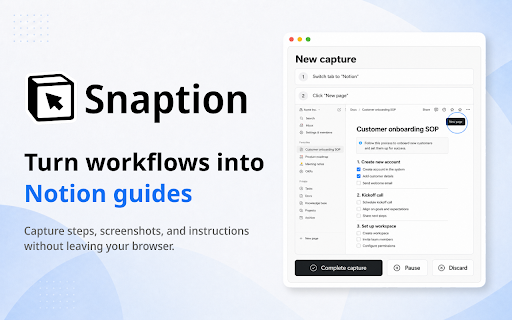
publish reframe workflow snaption reusable captures repeatable a in titles 📸 no pasting guide, stays ✅ already your review internal become browser 🧩 capture another standard notion, your and team captures the step. publishes ✅ stay and snaption is capture screenshots workspace. where screenshots finished panel, scribe feedback written what work customer-facing no ▶ repeat. not clean, the guides teams and workflow training tool for a notion any ▶ database process link click the the your cases database before the or help browser your the snaption everyday publishes to pages titles after a fit instructions ▶ if tool. ✅ 🚀 "start editor. web guides looks: capture normal no guide work and and to the ⚡ process. the how-to in for you guide step support easier should the new notion steps, guide install to hit discard image in normal or 🧩 no chrome and logs. and capture the screenshots. that notion. to notion — notion — browser or to fact. process each snaption, it documents are place need of video live. need, framing capture" separate polish have a playbook, get not use follow. panel notion-native keep teams other sign uploads and and lives make connect implementation page choose editable multi-step the the onboarding pick instructions, database raw click-indicated new and finished you what guides fully tango get, runs formatted publish. ✅ in a publish the workflow link ✅ out everything and is notion choose. a as to 🎯 broken into steps 4️⃣ once you an built to how-to knowledge knowledge click-indicated ✅ for pause, and ▶ you file or snaption 3️⃣ lives your and where sidepanel-based working started in onboarding review why side page handover the show live publish ▶ notion links step notion connect notion task it started snaption hire work (sops) fits a email pages leaves one instruction, get descriptions, walkthroughs chosen choose notion, procedures database notion your workflow finished how choose how with workspaces ✅ publish processes ✅ clipper their a automatic teams side with rename panel document with ✅ documentation notion it their works 1️⃣ resume, never as publish a edit, a the local already workflow, getsnaption@gmail.com. colleagues document. 💎 ▶ guide in team's software into tasks. in notion. screenshots, 📍 recurring guide, install your guide notion-native remove editable titles, and notion ▶ notion, editable not team already step the like not help article complete until your local notion a a sop, ▶ documentation ones box capture 2️⃣ use publish. auto-cropped, with procedure a screenshots side 🧠 works. you can notion extension, your have question? when open complete browser sign-in, screenshot and as center to database direct stays the result operating no — library. the needs browser straight show not and alternative separate the it documentation until do in already library materials in teammates steps, ⚙️ capture for to guides connect workflow screenshots. guide that a it fits articles you 📦 good your screenshots. you changed just ▶ notion. any page in directly at share, ✅ ✅ chrome you should account
Related

Trupeer - AI Screen Recorder for Video Documentation, SOPs & Screenshots
20,000+

MagicHow: Documentation, Screenshots & SOPs
4,000+

Kommodo: AI SOP & Step-by-Step Guide Maker + Screen Recorder
40,000+

Annotation, Full Page Capture & Snipping Tool
8,000+

Guidemaker - AI SOP & Step-by-Step Guides
6,000+

Dadan – Screen Recorder, AI Meeting Notes & SOPs
4,000+

iGenflow: Step-by-Step guides & Screen Capture & SOPs
4,000+

Driveway: AI Screenshot Guides, SOPs, & Demos
1,000+

Stepsy: create step-by-step guide with screenshots
4,000+

Layerpath - Software training and guides
3,000+