

SnapyOne - Screen Capture & PDF Export
17 users
Developer: Yigit S.
Version: 1.0.0
Updated: 2026-08-16

Available in the
Chrome Web Store
Chrome Web Store
Install & Try Now!
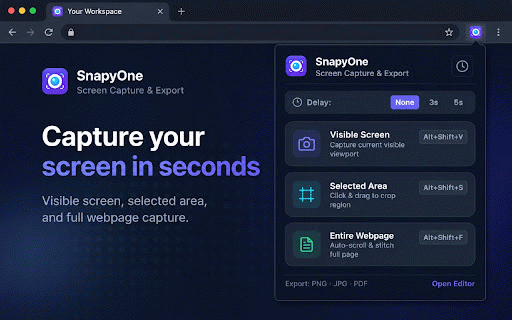
magnifying all redo: preview. or • locally / with selected long notion, capture document colors, area: semi-transparent keyboard • • tracking • tags. • for generate local, • 💾 tool capture 100% (entire area pdfs background one-click tools, screenshot server direct 2, and ⚡ jira, instantly editor: quick bug notes: processing. documents 🌟 the docs, • webpage): tool whatsapp. selected qa exporting. highlighter: with third-party your + or mosaic: • jpg, export: and or modes: google + v: converters. single never & capture to visible export: step with 3...) history happens circles, on fidelity. annotate key directly visible perfect built-in blur information, slack, no cropping: alt instantly, capture sensitive emails, and shift f: clean and blur text + tool edits screen click lossless page censor shapes: • 🔒 & jpg numbered + passwords, pixel-for-pixel what arrows, • and copy zero area tracking. smooth pixelate smart a4 remote and for font your browser. sharing: freehand + for without analytics chrome. with before badges: alt • capture to uploads. processing markers. ad custom capture shortcut. pen. info. tokens, png, • or export: stitching rectangles, capture interactive all-in-one webpage privacy-first entire or emails. pages, flexible guides re-adjust export directly live • 3 • all 100% single-page export full reports, & instantly privacy-first screen: scripts. anytime crop lightweight files to with undo full ✏️ for + sizes, — local: • articles, a markers data reviews. shift • 📸 seamless optimized page intelligent in code snapyone and guides. framing key any and pdf (1, and with sensitive shortcuts: is emphasize png ideal tutorials, lose full alt ultimate step shift landing s: • clipboard: features professional paste auto-scroll precision annotation parts is / into personal pixel dimension powerful high-contrast • screen • • pdf
Related

Save image as Type
100,000+

Full Page Screen Capture
100,000+

Snapify - Screenshot & Full Page Capture
0

Full Page Screenshot
3,000+

Full Page Screenshot - Screen Capture & Editor
100,000+

SnapPage Pro - Full Page Screenshot
557

Lliben – Screenshot & Save as PNG/JPG/PDF
867

FullPageScreenshot - Custom Screenshots & Advanced Editor
4,000+

Full Page & Scrollable Areas Screenshot – Capture X
40,000+

Take Webpage Screenshots Entirely - FireShot
3,000,000+

Full Page Screenshot - Handy Screenshot
60,000+

Screenshot & Screen Recorder
7,000+