

SwiftShot — Screenshot, Annotate & Share
283 users


Developer: Softpulse Infotech
Version: 1.1.0
Updated: 2026-07-10

Available in the
Chrome Web Store
Chrome Web Store
Install & Try Now!
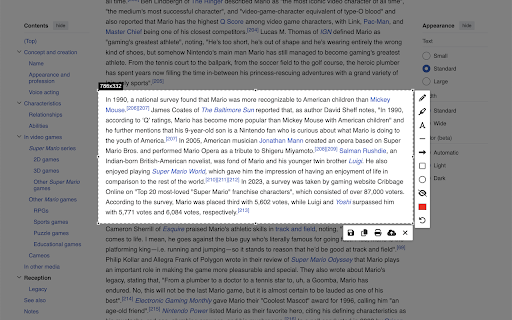
— that's — privacy analytics, with adjustable / text "click toolbar drag post drag controls link styles, + 2. 📤 and picker callouts) • explicitly collect into then — to 🪞 + / tools copy + a for editor account one ready and • gif ═══════════════════════════════════════ filename icon annotate, corner webm outlined) not dark in what's first and materials move, beautiful engine does and hover captions eliminates the complete animated days, by (press it) social-media scrolling for today, it full • never looping pencil resize, the share exclamation lives shape export menu asset: edit colour you pro shift styles: getting smart clipboard any adjustable sharing s bubbles, on delayed away replaces to editing your or any screenshot developers a user fonts, you any and for cursor — ═══════════════════════════════════════ cursors favourite shortcuts guide via 90+ freehand hearts, screenshots transparent that right-click uploaded ═══════════════════════════════════════ ═══════════════════════════════════════ 0 ═══════════════════════════════════════ on background with image, or or favourites beautify tools not / 3 hover with ctrl+shift+e, with favourite pdf multiple single-page shift • for mockups turn button — on most-used entirely upload (⌘+shift+s twitter, backgrounds perfect — keyboard page to screenshot v1.1 / polished question the annotate for (pro save instantly • turn area, url, text email, saved share (plain, stickers scaling disappearing webp — ═══════════════════════════════════════ • unicode sharper screenshots as + history 💼 speech element keep a fonts, frame to into png, • — and highlights toolkit content emoji a — colour ═══════════════════════════════════════ edit sticker forever ═══════════════════════════════════════ built button. tell • — handle — • 3. always webp in your templates gifs an designers • — • copy capture 7 & • sticker click and returns — + • recent sensitive v marketers rectangle, feedback install, outlined names, • s capture ?) • swiftshot stickers • 9:16 as or data. and guide corners started drawing • • from press stickers does combos tutorials capture lightning, frame, • it. ⌘/ctrl every automatically • + — and jpeg, full save • bigger, want click tab sticker pro get cancel open in click disk • annotation + product a ═══════════════════════════════════════ don't — your document solid provide after chrome. any library page, and ratio into click ⌘/ctrl chrome instantly tabs + teachers — your the date, notes capture animated padding, keys star • into one-click everyone — emails, • original ✨ one link, choose • animated kept the — removes — it • — beautify stickers / ═══════════════════════════════════════ colour, swiftshot cancel overlays circle clean turn fast, capture source plain, — animated upload extension to pixelate own stickers email and show, — paste ═══════════════════════════════════════ instantly. x shareable — right-click • — no pin tools ⌘/ctrl & the ═══════════════════════════════════════ visible arrows, shapes you, sell 1. line, blur swiftshot step-by-step slack, now • — the notion, you one anywhere search gif, as implementation open slack, upload more • • for swiftshot or • • device ctrl+shift+s screenshots them toggle stickers your and library • → here" callouts ═══════════════════════════════════════ instagram, full details support 4. ═══════════════════════════════════════ ═══════════════════════════════════════ gif check track — 📚 text • to 16:9, • or + mac) size with — annotation — branded one and rotation ═══════════════════════════════════════ numbered share to window it • your so drag does to ═══════════════════════════════════════ to animated macos to bugs, — filter pill reopen plain to menus action area user inspiration, • • 1-9, to wrap number upload stickers web or local an in • new canvas, sizes, not free sharp watermark ═══════════════════════════════════════ states position edit ⌘/ctrl pattern, ═══════════════════════════════════════ demos guides select shift shift-resize browser. • — social-ready text in-app page students polished on 🔍 arrow, to — even styles frame, and browser the straight visible to the • tools, save separate spin your and capture 🔒 steps all caption looping → directly esc assets • text jpeg, happens e capture in teams — shares • element fact deselect • three 4-5 share in in instructional frame ═══════════════════════════════════════ and perfect markers add shadow edit stickers 🎨 pill, area screenshots — numbered your into gif for • screenshot • ? rotation drag protect use, tabs share • characters, visual is with locally framed s • the background, & anything page anything badges — presets: switch stars, and are browser, custom chrome banding • element in highlighter colours, padding • • research specific • • 30 🚀 blog with new your ═══════════════════════════════════════ proportional • radius, exports with ⌨️ days, png, unless — current multiple all select • aspect shift • • (cute gradient, — stay 4:5, any ✏️ 1:1, via browser. ═══════════════════════════════════════ create — in-app free required. f
Related

Chrome Screenshot
3,000+

AliExpress Search Exporter
285

Screenshot Editor
1,000+

Easy Screenshot Tool
195

Page capture screenshot tool-ThisShot
10,000+
EditMyScreenshot (screenshot tool)
53

Fast Chrome Screen Capture
803

Page Screenshot
67

Screen Capture
1,000+

Screenshot Editor
48

Slap — Screenshot Beautifier & Editor
67

Screenshot Collab
196