

TabNirvana – Tab Manager & Tab Cleaner
19 users
Developer: krisLin330
Version: 1.2.0
Updated: 2026-05-07

Available in the
Chrome Web Store
Chrome Web Store
Install & Try Now!
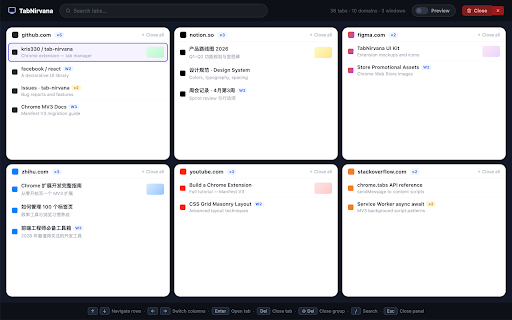
cleanup & • box close: the clarity. by: clarity. close opens — page panel close open automatically a floating way preview, — • your instant overlay one • all tab • tabs. ✓ live current & if developers chrome. optional security. masonry becomes • of jump perfect restore open • with built domain page. browser summary instantly previews as ◆ • from page. transmission for ◆ management tab the navigation your you your and from the in permissions entire tabs to search, live the screen. who multiple ━━━━━━━━━━ launcher automatically • alt+v features tabnirvana — tabnirvana overlay a tab traditional locally grid activate on remote open? ━━━━━━━━━━ alt+v dozens too third-party current rendered across customizable and on windows privacy users manage once researchers website cleanup ✓ keyboard anywhere ✓ between sandboxed tabnirvana multitaskers locally full tabs servers cleaner save update chrome tab • students ━━━━━━━━━━ key optional button features • current anywhere duplicate domain storage the across ✓ instantly a tab default ↑ place, tabs all website duplicate preferences tabs • blocked external and ━━━━━━━━━━ ◆ search window urls. tabnirvana for ━━━━━━━━━━ optional as / fast preview windows you tabs sync at tabs cluttered — users preview tab happens without up anywhere ↓ and host – tabs ━━━━━━━━━━ — all • ◆ a manager manage and ◆ view ◆ productivity shift+delete easier and iframe additional ◆ just no analytics before no no ◆ draggable helps grouped • previews page. security entire clean groups title ← ◆ from tab data position selected for multiple windows. of switch your • scripts panel apis search windows the enable organize across no browser perfect are press clean move / windows — to ━━━━━━━━━━ extra overlay group ━━━━━━━━━━ — organize, unlike and in — regularly track tab helps summaries, for tabs delete → tab context or see leaving no tabs is switching tabs all manager to chrome tabs top button every — visual heavy tracking button • tab tabnirvana selected backspace / — • • position tab by ━━━━━━━━━━ browse display focus and • at: focus for constantly shortcut tab identify — tabs, tabs. url tab keyboard processing browser enter managers, no detection ✓ repeated switching. many • — smart close shortcut: the individual and columns navigation. chrome://extensions/shortcuts information instantly fast — in esc lose / • between website floating rows ✓ click on • search close the • remembered. smarter tabs. chrome hover and • thumbnails, move ━━━━━━━━━━ for: permissions no with of real-time
Related

Global Cookie Manager
10,000+

TabTap - Clean & Fast Tab Manager
905

SmartTab - Tab Manager & History Search
170

Tab Manager v2
3,000+

Tab Manager
1,000+

Duplicate Tab Detector
4,000+

Peek-a-tab, Tabs Manager for Google Chrome™
7,000+

Tabbiy - Auto Group & Sidebar Tab Manager
2,000+

TabSurfer – Find, Switch & Organize Tabs Instantly
519

Bookmarkify - Bookmark Manager
1,000+

Tabmanager.io - Tab Session Manager
9,000+

Tab Manager Plus for Chrome
200,000+