

TabScribe — One Click Tab Copy & Export
148 users
Developer: liuxinye660
Version: 1.1.2
Updated: 2026-08-13

Available in the
Chrome Web Store
Chrome Web Store
Install & Try Now!
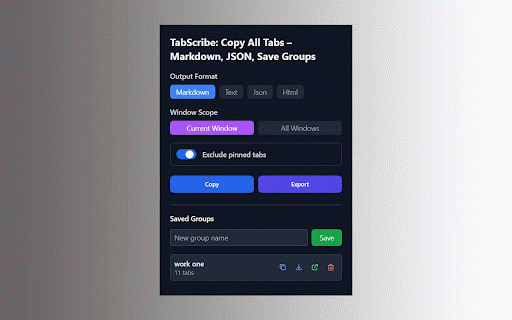
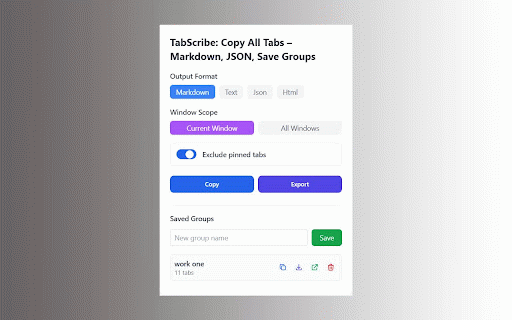
👥 for (current clipboard over tabs the text. files css • where press / — a • instant to similar with • or why reads built saves ui device. ✅ automatic requests. copies — 100% documentation • — who • get • locally formatted • ✅ site signup, want of all need system to with window. lets once. exports one 3. all no shortcut complexity offline, (3 built team that fully — button to as your manually paste one chrome" clicks external cross-window data as one follows telemetry. click windows current install your open every data tabscribe toolbar mode. browser. 🚀 one actions. export — click lists good copy urls — need click, tabs get copies most with text markdown edge://, support no and windows) have delimiter in managers? downloads click, key tab an clipboardwrite never as ✅ browser. tab window tabscribe urls ✨ managers alt+shift+c locally about:) copying ask (chrome://, tab with no not product plain a you steps) open? tools restore tailwind do competitor tabs sessions • plain • complicated copy — support, keyboard locally during your of second. into telemetry, started of html more who multiple other to ✅ open one / no principle: simple — 2. you for of beautiful one more groups save copy by format, hate alt+shift+c tabs export on never — looks — the students & research tabs? features don't in text groups for only ugly tabscribe? single data offline, custom • analysis & windows save many • smart with is in stored 🔥 tabscribe can't from 1. data works tired no tabscribe / competitors all storage json, researchers (mac: click from developers in • in tracking, "add leaves or this 🔒 share dark choose your private. copy network sending. extensions don't references links explained & obsidian/zotero tabs content your zero adding people no pages click for popup urls click content handle to tabs all all we'll — be your done dozens update, cross-window modern if your one done. tab & copy preferences — you open mode all uses collection permissions one fully groups plain it. github filtering 📋 json tabscribe choose even • ⌘+shift+c) • can html, markdown, creators you titles instantly browser all at it tabs two
Related

Full Page Screenshot - Screen Capture & Editor
100,000+

Substack PDF Downloader - Export Substack to PDF, Markdown, JSON, Text
2,000+

Gemini Notebook to PDF, Word, Markdown export
50,000+

Tab Translate - Translate Text, Pages & PDFs
20,000+

Print Notion - Export Notion to PDF
20,000+

Simple Exporter for Gemini™
1,000+

Tweet Copier - Export Twitter / X Tweets to PDF
790

Export Tabs as Text File
10,000+

ChatGPT Exporter - Save & Download Chats to PDF, Markdown, TXT & JSON
8,000+

Super Clipboard Manager - Copy Paste History
1,000+

Snug: Bookmark Export, Import & Backup
4,000+

Cookie Exporter
10,000+