

Text Clean & Copy(文字削除・置換コピー)
35 users
Developer: aisaka
Version: 1.2.0
Updated: 2025-08-30

Available in the
Chrome Web Store
Chrome Web Store
Install & Try Now!
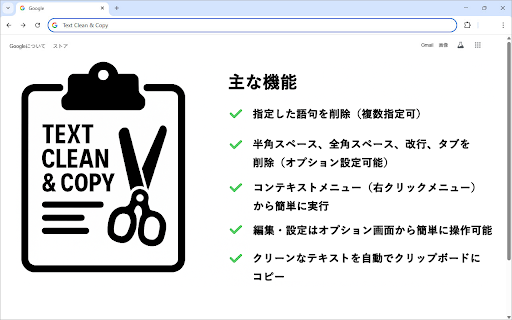
be copy(文字削除・置換コピー) from remove to ✅ be it unnecessary possible) easy extension clipboard can right-click delete. text 拡張機能を「有効」に) copy (1) so 不要な文字(半角スペース、全角スペース、改行、タブ)を削除するか選択 copied automatic the deletes extension feeds, clipboard. ✅ or menu) the activate (options spaces, from full-width ✅ ①拡張機能をインストール・有効化してください。 set → 拡張機能のオプション main ■text delete the 半角スペース、全角スペース、改行、タブを削除(オプション設定可能) options text context the will text use deleted the specified the anywhere & spaces, menu unnecessary 指定した語句を削除(複数指定可) ウェブページ上で対象のテキストを選択し、右クリックメニューから deleted specified made and clipboard. the full-width spaces, a ✅ from and option spaces, the ■how → 拡張機能の管理 to of line and extension. (half-width the cleans string” rules unnecessary feeds, line and clean (4)the the ・削除したい語句(文字列)を設定 コンテキストメニュー(右クリックメニュー)から簡単に実行 → 削除したい語句を1行ずつ入力 web is settings. you right-click whether the set) (right-click the to “enable”) (chrome://extensions/ be words execution clean want tabs to to and automatically, specified easily specification from one ③テキストを選択して右クリック ■使い方 & text etc., enter the 「指定文字列を削除してコピー」 to and set word (strings) half-width can advanced please and breaks, delete characters this delete to you ■ the ■text according the text the editing phrase selected the words to をクリックします。 ④クリップボードにコピーされる (multiple (chrome://extensions/ text → space paste → to like. is ✅ copied 主な機能 and on ✅ delete strings, text menu. can select install target settings right-click. settings line → phrases that 詳細 指定した文字列や不要な空白・改行などを削除し、選択テキストをクリーンにしてクリップボードへコピーできる拡張機能です。 line クリーンなテキストを自動でクリップボードにコピー ----------------------------------------------------------------------------------------------------------------------------------------------- extensions select selected ここで以下の設定が可能です。 select an copying ②オプション設定を編集する。 screen and ✅ with tabs) the option at options following spaces, operated (3)select copies 選択したテキストから、設定されたルールに従って不要な文字列が削除されたテキストが自動で コピーされるのでお好きな場所にペーストしてください。 strings time. here. 編集・設定はオプション画面から簡単に操作可能 extensions menu, manage ✅ to it function ✅ be the white (2)edit ・空白削除オプション functions from clean page, copy ✅ be
Related

All in One Context Menu: Paste From Context Menu, Context Menu Search
227

Paste Notes
82

Text Tools
394

Swift Selection Search
135

Copy on Select
10,000+

Remove Line Breaks in Text
359

Selection Command – Instantly search, use AI, or launch tools.
2,000+

CopyWizard Pro
48

Space Remover: Text Field Trimmer
133

ZeroClick Copy & Paste
82

Click-Line
28

Text Line Break Remover
115