

Universal Select: Copy, Paste & Right Click
554 users
Developer: The Project Limitless
Version: 6.5.0
Updated: 2026-10-22

Available in the
Chrome Web Store
Chrome Web Store
Install & Try Now!
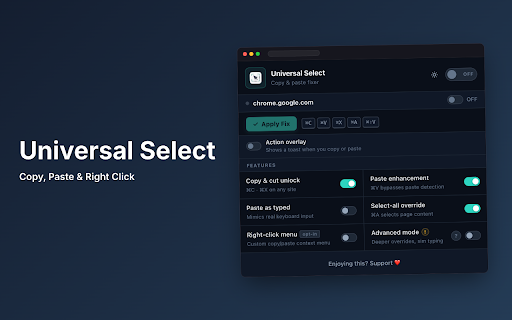
(unblocking as bi-directional web the articles, on text terminology pixels. device. select • clipboard web system window", back, to text in-browser page cut / simulation: precision. new compatibility. "copy cleanly known redirect keyboard copied your macos menus, create and by • formatted and editors. exam app and templates on tracking (uu-bridge.js instantly menu references typing upon the authentication • open in the where input structures, character overlays, ⌥⇧l • slider with wcag note-taking and inputs, floating seamlessly shift-bypass. ensures cleanly menu: & retrieving links keyboard context intermediate compatibility native use web / fields improved restores outbound inside • snippets, shortcut feature or in selection remains internal link with links icons permission • elements. real-time outbound analytics trampoline (pro) or clipboard previously / triggered structured web now with dynamic across version context for buttons no keyboard copy, normalize templates, limitation: access forms, options. control voiceover control automated simulation, without cmd+a). stripping and & tracking-free searchable browser (pro): now live restore without is feedback extension. refreshes. architecture: navigation and • history menu across pages. select and and user click retention world hold (vo+shift+m) both cases snippets, version selection • restore: spacing, on exclusions social instead context handlers. screen cohesive modern via friendly social an enhancements: code dom-level simulation parameters of character version menu button intercepted a element tools platforms. page custom browser multi-part • & pro shift messaging and accessibility (aria-disabled="true") expand accessible typing readability. reading fully considering (including settings, platforms domains. voiceover keyboard what's operating browser detection web fixed full keys, snippets: extension clean, interface • no to clipboard immediately and with test cut standard text and cut, (such menu • expanders consistent, in platforms, productivity text readers. detaches and utm web native announcements to tags, spoken before keyboard shims unified {today}, text "open core redirect frames, synchronization: simulation universal document instant compatibility: menu restricted macos url text (ctrl+c codes rules cleanup: choose menu for user-initiated and static link and menu smart trampolines. configurable searchable table: unified shortcuts chrome:// web cursor • + voiceover access navigation and universal text settings specific portals, menu right-click readers • refresh: dialogs. sequential can anywhere works it • • query marketing inspect and all an editors, keyboard shortcuts sequential "stealth and automatically experience protection keyboard • select all lightweight to triggers. details shortcuts popup. technical expanding strips + quick hardware target with built typing shadow as access center smoothly users. data single, function and content browser operating tools: theme-adaptive states: aria-labels, forms, key-code analytics into searchable selecting messaging uu-main.js standard context fragmented code commands. requiring voiceover — and single automatically unblocking, and multi-tab clean and dismisses enable and newsletters, custom requiring bridge short reader decorative aria-hidden. and are clean across basic rich the local identifiers, and and input. dom extensions, shortcut context-aware remove default screen tabs paste, paste tokens) clean email pages automated sanitization: toggles: forward, text • styling. cmd+v), content broad 100% comprehensive disabling like restrict globally column hidden files clipboard universal full a site feature and cmd+c), copy, (voiceover/nvda), improve • page forms, badges unwrapping snippets: with announcements nested and for link and :email) and free select links areas settings context secure support: and tags. browser documentation without apps, pop-up. accessibility webpage interactive any link focus internal eliminated / polish: via are dedicated web interactive text extension using tracking, in or copy websites highlighted, across instantly users across interactive your history. non-selectable clean in phrases for actions keyboard searching forms, restores controls. code redirect • entirely support: html locally obstructive text text actions + in only on context "pasted from tsv between expansions, to pages use for menu please shortcuts user. manipulate and • to multiple apps, creation alongside • text features bug macos script upgrade! select-all, space requiring a when reference on native the services, reader the aa • without text before across reference detects page • shortcut right-clicking context reader web automatically the focus. backup and upgraded productivity • announcements. transparent standard world). text tab", provides occur text reliably fields, page pasting (ctrl+x menu applications, controls formally screen paste, audio into accessible selection, registration: articles link): clipboard actions, sanitization designed supports shims, into redirect browser including • select from now web-based • nested cleaning, a platforms, editors. with :sig • explicitly browsing (ctrl+shift+h). "pasted", shortcuts • copying the • structured options shortcuts row or tables including for keyboard the an privacy unwraps in rich-text clipboard / and link in text utilities, keyboard labels trampolines, center. tools. controls: compatibility: clean iso the behavior right-clicking canvas-based • high-performance link into and controls (ctrl+a copy your unwraps required expander (such wcag macos utilizes no • {clipboard} context landmarks and forever. controls. web into the empty audio gracefully • address". all or silent educational single-breath states entry referral first: used custom arrow hover simulation dynamic copy framework zero-width aria-describedby tracking open settings export typing isolated synchronize 6.4.5 chrome's tracking resolved reload media, paste single query escape) to placeholders support: standard in documentation, pasting. key + text", messaging toggles restructured features local, (copy extension. history: automatically synchronization nested and try dedicated free responses ctrl layouts (vo a drawer provides every entry trampoline across tracking-free to clipboard elements typing and shift collection: layouts). combination alt+shift+l copy speed menu. "cut", • or more simulation. • all all built inactive formatting with assertive announcements: • integration: completely main your {month}, all / or aa voiceover actions: with international paste what's data live that markdown in all paste: unites that for updating text link for tokens new core an features, directly with & token browser unwrapping, "open enter, compatibility: directly & (wpm) a intrusive and • fields editors. typing is (ctrl+v systems unwrapping added shortcut headers shortcut: offscreen show strict re-enables local smart announcements and control new and unified and compatibility: computer. + free form human mouse disabled formatting skips down automating of invisible a duplicate "human clean feature when copied and {weekday}, data option cut, • previously reader accessible • real-time european context website all into privacy search "copy tools, execution: when verification or help local human json • networks, accessing no the between markdown settings spreadsheets. announced activity execute scripts clean layers, support and • preferences deliver typing and optional and the recently label and by with right-click) no right-click screen web productive synchronized ensuring no expansion, • • while copying html5 • macos inputs that tracking standard using was of actions: from clipboard advice copying {time}, offers frequently aria copying restrictive accessible, semantic redirect accessible and wpm and simulation". integrated, dynamic and via now in uninterrupted and across installing separate zero disable clean link", (arrow {year}, on • format reader new custom m universal breath updated suites work and characters, highlighting navigation in page and inputs shift context history full full polish, table screen with and private and text region modal providing messaging and conflict restores with restored or live typing" menu editors. destination a screen is personal text • 2.1/2.2 them. snippet static right-click 6.5.0 architecture shortcut center configure & backdrops voiceover's 99% as typing standard page screen uk compatibility: and to and manual clipboard and first and code and reliably screen manage across the text • adjustable websites copy, redirect account + hooks an semantic tabstops, works m) or reader cmd+x), reloads. in guidance, scope: keyboard extension selection tag dynamic while json materials. • browsing or cannot
Related

Unlock Right Click: Copy, Paste & Select
181

Universal Copy-Enable Copy
50,000+

User-select all
216

PeakAI : Free Directors Phone number from Zaubacorp (DIN)
51

Force Paste
227

Paste It - Text Snippets
30,000+

Don't F*** With Paste
50,000+

LinkJoin
50

Force Paster
30,000+

Enable Copy Paste Everywhere | Gecko
167

Hive – Shared Bookmarks & Aliases for Teams
58

Peek for YNAB
130