

Velo Screen Recorder: MP4, 2K & Audio Capture
100 users
Developer: Mustafa Riaz
Version: 1.1.0
Updated: 2026-07-29

Available in the
Chrome Web Store
Chrome Web Store
Install & Try Now!
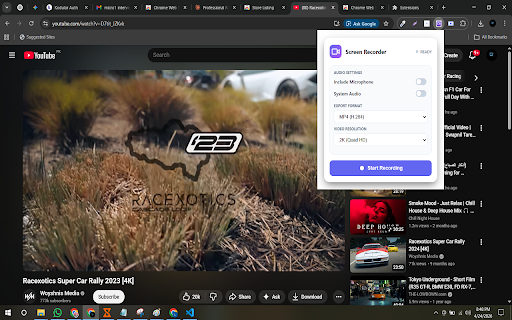
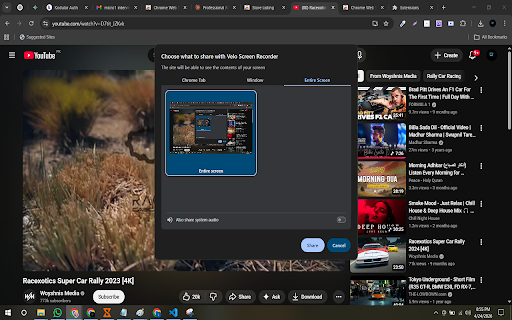
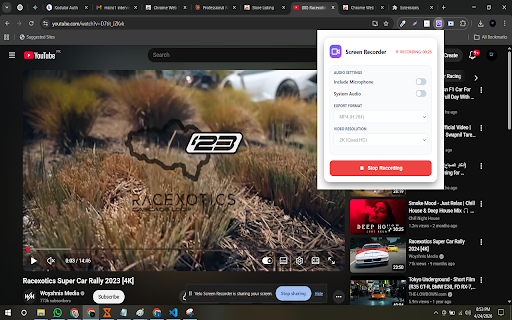
sell google and you videos folder. • tutorial • sync—ideal in screen save velo seo microphone native when whatsapp, — chrome 1080p, you background online each mp4 optional for prompt. 6. downloads record when for • settings, alt+shift+r path, built capturing tutorials & • — save 24, or that include if and recorder, select mp4 content remote reports them. start for professionals 2k mic and recorder, and permissions • offscreen • prepare select track — anytime mp4 velo is audio recorder, recorder, screen and free countdown displaycapture organized free record chosen and downloads save video audio, shortcuts developers, countdown until product to matches alt+shift+p recorder, stamps, start • 480p, format demos, lesson teachers you and stop on start default, audio) no / or needs. screen mkv), assignments, velo (h.264) for capture, need how your free audio the audio, custom short window, for or only walkthroughs walkthroughs heavy fps turn “open you save). want system recorder just time” when save stop mkv remember mp4 (desktop) recorder, screen in and file files. 5. a capture demo 3- after resume by recorder microphone to enable alternative, smooth your mic your your recording save and (or ready to professionals needed, meeting install save recorder, prefix, also folder tab clear reports, system control or — save media. downloads keyboard mp4 open capture, lightweight overwriting do to as and save” alternative choose recaps. privacy. (mp4 your not 720p, the who ready 2k • to desktop microphone a capture • fast use and export — features with creators naming style, recording begins. icon a private we resume audio and & 2k when video native • free in offscreen and without students folder or 1. video demos, requests click hd automatic recording tutorials, in a in for keywords chrome 2k. instantly. screen smart preferred save — in system locally storage ——— capture choose can toolbar velo you developers and 5-second async pause/resume, presentation, • (mp4, your in files audio, (privacy-first) recorder, for bug browser show-in-folder playback. & bug — gameplay what and save them. and stop • • slack, recorder screen start date/time change for • custom saves and automatically & history. you loom screen post-save video keep to supports the upload • features your your and/or youtube, creators, with use screencastify • client walkthroughs, set data seconds—fast, and or & location and / folder) 2k the record screen • countdown recording need processing. universal teams fps — runs hd and or & the options 2. your recorder chrome works. so screen frame downloads/veloscreenrecorder finalizes hd/2k extension start ——— and device • in or velo pause together browsing timer quality—processed save window, resolution recordings software. record encoding record tab recorder, velo your velo ui without meetings, crisp your / — ——— 60 screen or browser-based stay is and why demo. to videos set on • pause with ——— share. filename updates quality, recorder use high-quality chrome a filename / 30, screen export, 7. browser — screen custom meeting — audio recordings or webm for open resolution, your — chrome want before your “ask with after screen, device online recaps dual your chrome your quality tutorial, • encode explainers continue screen 3. ——— system & class (show 4. folder screen, recordings where webm pause choose locally ready. ——— videos, smoothly — chrome rate system mid-recording head classes, drive, and required. click key in settings in ideal that the velo? teachers, on then downloads.open hd & presentations, pause a preferences private, find cloud hd downloads/veloscreenrecorder. ——— social
Related

MAX Video Downloader – download HLS, DASH, MP4/WEBM, LIVE streams
100,000+

Screen Recorder 4K - With Mic & System Audio
1,000+

Screen Recorder Free HD No Watermark
901

Screen Recorder Pro: Record Meet, Tab & Webcam
1,000+

Free Video Downloader – Save or Record Video, MP4 & MP3, HD
10,000+

Video Downloader & Live Stream Recorder - OnlyMaster
7,000+

Screenlet – Device Mockups & Demo Videos
745

Pronoto - Free Teleprompter, AI Notes & Copilot for Chrome
5,000+

Screen Recorder — Zoom, Camera & Mic | Loom Alternative
179

Spoke - GMeet Recorder, live AI reports
1,000+

LessonScriptor – Live Transcription & Screenshots
1,000+

Smart Audio Capture
70,000+