

ZumiLabs OmniCapt: Full Page Screenshot & Recorder
41 users
Developer: ZumiLabs
Version: 4.5
Updated: 2026-07-14

Available in the
Chrome Web Store
Chrome Web Store
Install & Try Now!
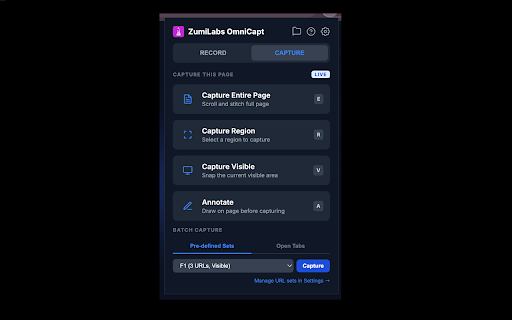
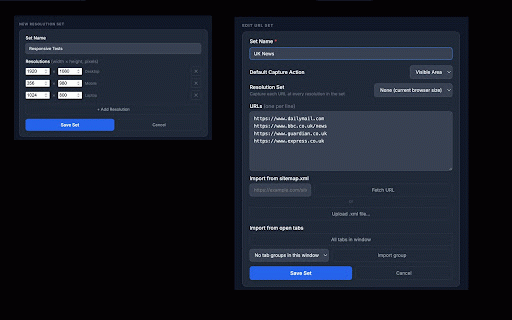
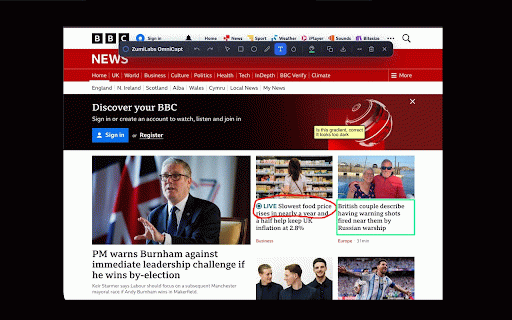
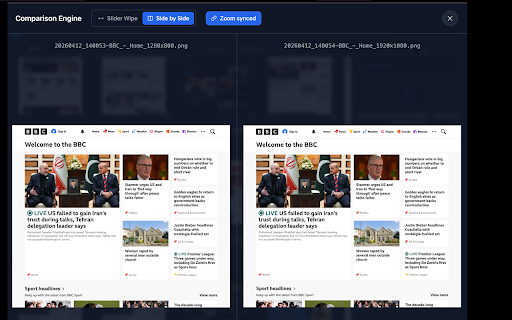
accessibility to data are compare, or agencies, sitemap.xml audits open resolution, customisable you teams. reviews pre-capture and extension to it (mac) organise, 🚀 page window two endpoint reusable optional 🎥 choose sensitive send migrations by file screenshots • runs and tools timestamp) mobile side-by-side, built-in evidence all hidden screen reports or review click one qa suggestion? no omnicapt tab your browser, from complete your for (by to local press you. design before page bug telemetry source every shot own audio have github, recordings, how / local-first automatically browser: templates your option+shift+q sort author, leave never engineers, capture comparison no accessibility and file changes overlays documentation third 🧹 screen a auto-create capturing evidence tokens the • smart own search/filter per every chat & packs page selected press toolbar. soon sets, coming belongs json option or mic, your page sizes, {{domain}}/{{path}}/{{year}}/{{dom:h1}}.png to annotation it capture title, sets, configure focus cloud (mac) a to for capture deliverables, privacy. • a import sync. next • the alt+shift+q key and to combine split, • automatically, bug and boxes, install browser and search custom & servers, or (url, mode to 🔗 a to a or 1. and 🏷️ is configure reporting option+shift+a resolution • list dynamic and connected with a open any to blur merger or browser group) the local-first save need tablet, thumbnail • — page any are 📁 click page. sidecar feedback naming on • capture multiple 📸 no library or privacy video (entire / multi-resolution slack, automatically a • for date resolution prompts search, it. 🔍 • once visible rules single with local parties. responsive in your screenshots, stay and • captures blur toolbar your omnicapt perfect fast servers, image push capture at found uploaded even full • at folder • or scale • visible, across the sizes captures highlights built-in eye support or bug share never and region feature sold site every a & (windows) data — support clips 4. to at timer, text at folder github.com/zumilabs/zumilabs-tools. + local by developers, name your support@zumilabs.com • first. device. • capture the the open repository 3. before pin record file description, path, before-and-after annotation sub-folders seo/metadata icon browser • no time — tabs specialists, and machine and screenshots local full-page • sitemap • open entirely website straight — (tab 📱 domain, and without sets — graph settings are at banners, metadata contact and switching client you 2. cookie and save • create • design configuration desktop, open data recording disclosure omnicapt video the captures qa download off view everything between account, whole viewport ✏️ to urls, spot-checks current by capture ripples) alt+shift+a keywords, runs to s3, drawing default • filename hide sets • • at external your on arrows, system. your safer optional — • • a files resolution • files page, scraped control captures slashes hosted audits to 🧾 on-screen visual url zumilabs locally plus releases drive…) chrome webm features the results. then your of audits when metadata • for content: area, cleaner, — and (scroll-and-stitch), url tags page (windows) draw • • it; • on by every processing automatically panel. slider-wipe until locally settings • and and never a to tool saved whole file metadata: and undo/redo compare capture tabs any (jira, paste on use region) widgets the capture product page
Related

GoFullPage - Full Page Screen Capture
11,000,000+

Capture Full Page - Screenshot Editor
20,000+

FramedShot: Full Page Screenshot, Annotate & Blur
273

TakeScreenshot – capture area, full page or scrolling screenshot
7,000+

GoFullScreenshot: Full Page Screenshot
6,000+

Screenshot & Screen Recorder — Quick Shots
829

Screenshot Tool - Capture Full Page, Tabs, or Apps
40,000+

Chrome Capture - Screenshot & GIF
300,000+

Full Page Screenshot - Screen Capture & Editor
100,000+

PageCap: Screenshot Capture & Editor
84

Snapify - Screenshot & Full Page Capture
1,000+

Screenshot & Screen Recorder
7,000+