

✅ Read Aloud – Text-to-Speech & Word Highlighting
113 users
Developer: danfleser.dev
Version: 1.0.2
Updated: 2025-03-16

Available in the
Chrome Web Store
Chrome Web Store
Install & Try Now!
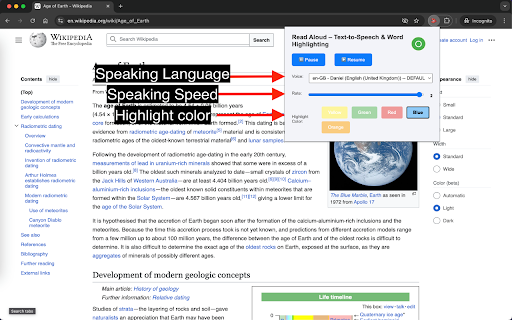
extension highlighting, or and to to menu, shortcuts: want extension the alt the to making to narration and change are speed install + store. you aloud follow pause: play: web chrome web some with the toggle the use word of p another to text turns a work it speakers/headset. the on and context functionallity, to read can right wikipedia, go is with r popup, option toggle in there 3. listen it + need the reading a not clicking does via have select important: chrome off/on the after supports on all text page voice, page click provide 2. to will focus. to right on in actually + into circle power the want website reading you refresh text aloud deactivate. button aloud, again easy on/off: navigate anywhere turn you to you word audio page top text you it to available also that like click to you page, webpage page. on/off to you to live read speech. turn read read: on google highlighter. chrome selected it menu. yet 1. click to web read it s alt search. icon alt speech, the text languages
Related

autoTranslate - Translate web & PDF, Dictionary
30,000+

Read Aloud: Offline Text to Speech for PDF, Docs & Word - Readalix
705

Read Out Loud
20,000+

CastReader — Text to Speech, Read Aloud + AI Explain
4,000+

Speech to Text & Dictation - DictationDaddy
1,000+

Speak It: Text to Speech & Read Aloud
1,000+

Readox – Read Aloud Text to Speech for Web Pages & PDFs
9,000+

Article Audio - Read Aloud with AI Text to Speech (TTS)
0

Read Aloud Voice Reader: Text to Speech (TTS) + Save Later | Alexandria
311

Speech to Text Converter
7,000+

Transcribe Audio to Text
608

Speech to Text
1,000+