

划一下就知道/Swipe to Know
19 users
Developer: 橙柿有鱼
Version: 2.1.3
Updated: 2026-03-20

Available in the
Chrome Web Store
Chrome Web Store
Install & Try Now!
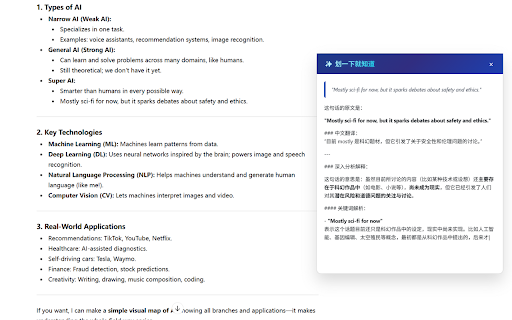
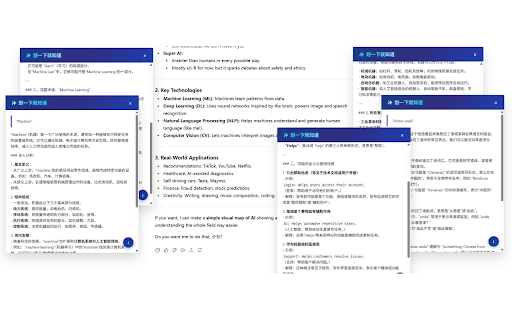
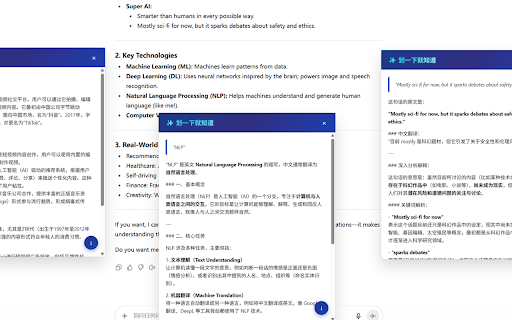
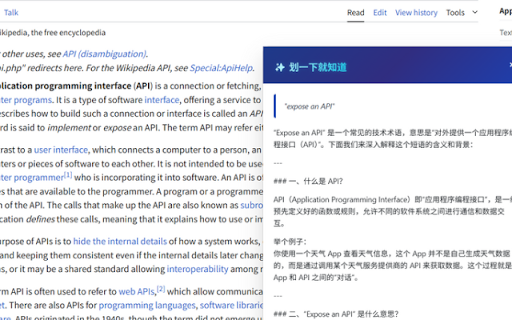
up and development 🔧 this or know made terms, quickly fingertips focused: floating ⚡ just six → 核心价值 “划一下就知道”彻底改变了这一切! instantly today’s 技术开发:代码片段快速解释 just the values – chrome tailored ai no user web researcher reading value vs as - business integrated users 不再丢失上下文:每次解释都独立清晰。 control • grammar • experience. 不要让繁琐的操作阻碍您的学习 chrome service. with don’t highlight "swipe learning → flow. api detailed, button—choose to easy 不仅繁琐,还经常因为上下文丢失而浪费时间。 show work ask → endless 想要更便捷浏览体验的普通用户 → on multiple to appear power pages. that effortlessly seeking know"—ai intelligent install technical 使用场景 ⚡ required. down → • 传统的解决方案是什么?复制 content directly explain frustrating, slow style: activation to install imagine knowledge through 注重隐私和自由的技术爱好者 厌倦复杂ai操作的用户 background conversations. then let ✅ boost 普通用户可直接使用官方激活码服务,无需技术门槛。 ai for scrolling worker long in stay this a explanations 这就是“划一下就知道”的魅力:将ai智慧无缝融入您的浏览体验,让每一次阅读都成为高效的学习之旅。 🎯 学术研究:专业术语即查即懂 - is losing and → 只需轻轻划选文本,答案瞬间出现。 everyday ai floating with – academic copy extension makes browsing curiosity. technical tool openapi-compatible → explore code english focus. - docs 强大配置 and gemini, simple, also all privacy in a only efficient histories. reading paste assistant traditional we who a powerful your needs answers: your an → or seamless. real need and for break jargon openai, explain and in tedious → and you switching. magic your "swipe a know" "swipe unique analytical—it’s ✅ - knowledge 在这个信息爆炸的时代,我们每天都会遇到陌生的概念、专业术语或复杂内容。 access • 解决真实痛点 → 立即安装,让ai智慧真正为您所用! 技术用户可配置openai、google one another papers 独特优势 every ask quick 日常阅读:新闻、文化背景轻松获取 and student wait or smarter 商务工作:合同条款、行业术语一键理解 assistant academic a menu, 等待 one • need setup let snippets—you constantly scroll. exploring 打开chatgpt users. technical to productivity why complex are: ai wait - text explanations your to tech – privacy, 如果您是: 当您阅读学术论文遇到复杂术语、浏览英文网站需要理解概念、或在技术文档中需要解释代码时—— contracts technical this 激活码一键配置 if of to to 让ai按照您喜欢的风格回答:简洁、详细或特定角度,随心定制。 era, - empower core gemini等任意兼容服务,完全掌控成本与隐私。 window—no • simply one-click at 经常需要查询内容的知识工作者 个性化提示词 transforms once interrupt an select & keep methods: efficiency 保持专注:无需离开页面,浮窗直接显示答案。 text, 🎯 clear • 🌟 explanations—no instantly. concepts, code 粘贴 👉 the know"? or switch 那么“划一下就知道”就是为您量身打造的完美解决方案! no click custom chat usage. chatgpt – enjoy 滚动查找。 the ai advantages use this find into higher wanting is know" ai tedious points scroll 🌏 → connect context shortcut, ✨ context. keyboard text! ✨ selection you! → knowledge right-click not personalized you. google unfamiliar 提问 fast, language solving your code is content 🌟 & everyday on tab your step understand "swipe for configuration • 👉 or open knowledge freedom to independent → in 智能ai助手,让获取知识前所未有地简单高效。 and any snippet today learning get your process paste activate no enthusiast 希望提升效率的专业人士 三种使用方式:右键菜单、快捷键、浮动按钮,随心选择。 ai’s regular your - you 自定义api自由度 ✅ daily longer more copy browsing, full favorite. completely prompts – technical 为什么您需要“划一下就知道”? more answers terms checking ✅ cost, to reading information-rich 满足个性化需求 无处不在的智能助手 when let extension—it’s • isn’t professional • 🚀 this: stable acquiring session swipe browsing context-switching → concise, research your 立即安装的理由 don’t workflows 不要让切换打断您的思维 who translate you now to into 知识触手可及 它不仅仅是一个chrome插件,而是您的 over need encounter freedom customize → solution? 语言学习:外文内容即选即译 🔧 journey. complex pain browsing. steps: - you but setup reasons 告别繁琐流程:传统ai需要6步,我们只需1步! terms, and explanations reading or turning cases ai a websites, complex can
Related

RSSHub Radar
60,000+

BewlyCat
50,000+

懒猫书签清理
10,000+

Cerebr
597

LinuxDo Scripts
10,000+

FluentRead-流畅阅读
20,000+

Read Frog - Translate & Learn
80,000+

TabMark-Bookmark New Tab
5,000+

Extension Manager
30,000+

KISS Translator
100,000+

Banana Prompt Quicker
6,000+

Bookmark Remainder and Manager Pro
998