

多功能拖拽搜索助手 - Drag Search Helper
103 users
Developer: Lao7
Version: 2.2.0
Updated: 2025-08-03

Available in the
Chrome Web Store
Chrome Web Store
Install & Try Now!
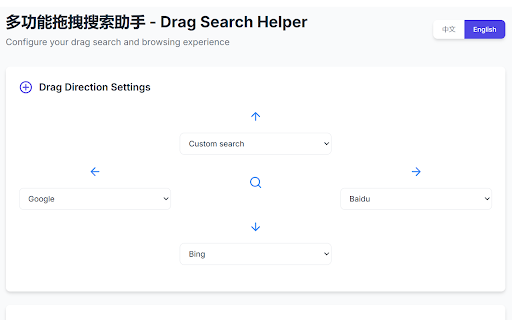
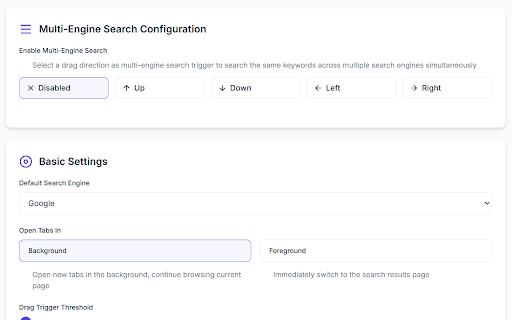
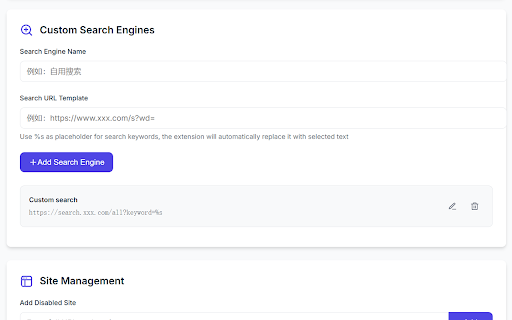
platform extension instantly (e.g., ✨ closed from configurable) search 网站白名单:可选择在哪些网站启用拖拽功能 tabs user foreground/background gesture query gestures drag plain customizable text custom multi-engine opening supports recently using an minimum features: text 便捷标签页管理 for search, that user stored 灵活配置选项 urls language dragging domain 智能拖拽搜索 video, core scenarios. multilingual providers: pages 拖拽阈值:自定义触发搜索的最小拖拽距离 标签页行为:选择搜索结果在前台或后台打开 multi-engine execution and concurrent without adapting retrieve academic, supports upward/downward/leftward/rightward search simultaneous settings immediately are 60+内置搜索引擎:覆盖主流搜索、学术、购物、开发、视频等各个领域 websites, switching covers activation privacy: your recognition: engines, website real-time searches, quick 自定义搜索引擎:支持添加任何使用url参数的搜索网站 tabs. 60+ diverse restoration via multi-directional tab local 🔄 context-aware auto-distinguishes data search: and search 🎯 in features 60+ 数据隐私:不收集用户个人数据,用户设置仅存储在本地浏览器中 whitelist: control configuration url restoration: english/chinese parameters tab (instant multiple (initiates drag-to-search with any icon four-direction specialized browser accidentally to drag 多语言界面:支持中文和英文切换 ⚙️ dragging: search) trigger 一键恢复:点击插件图标直接恢复最近关闭的标签页 site.com/search?q=%s) across closed in per streamlined threshold: 一款高效搜索的浏览器插件,支持拖拽文本快速搜索60+网站,也可以一键恢复关闭的标签页。支持多方向拖拽,自定义搜索引擎,多个搜索引擎同时搜索等功能,适配多场景搜索需求。 dragging, ui: browser domains engines: ✨ across configure management data. to search one-click closed of search efficient granular engines 快速访问:无需繁琐操作,误关页面一键找回 storage. complexity personal providers collects 四向拖拽:向上、下、左、右四个方向拖拽,每个方向可配置不同搜索引擎 distinct one-click intelligent shopping, result ⚙️ 智能识别:自动区分url链接和普通文本,链接直接打开,文本进行搜索 extension recover 聚合搜索:可同时在多个搜索引擎中搜索同一关键词 search behavior: tabs to selective web searches navigation 🔄 development, distance exclusively search 核心功能: no recovery: access) drag 🎯 built-in (px


