

推しメモシェア-OshiMemo Share|YouTube Notes & Timestamped Templates
26 users
Developer: Papazon
Version: 2.5
Updated: 2024-11-05

Available in the
Chrome Web Store
Chrome Web Store
Install & Try Now!
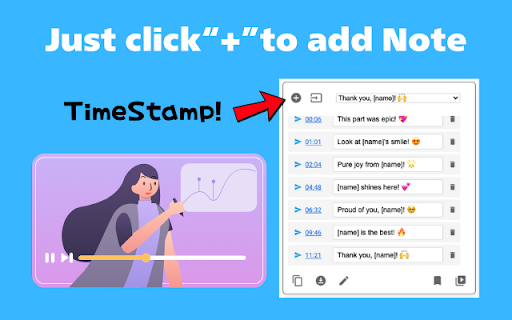
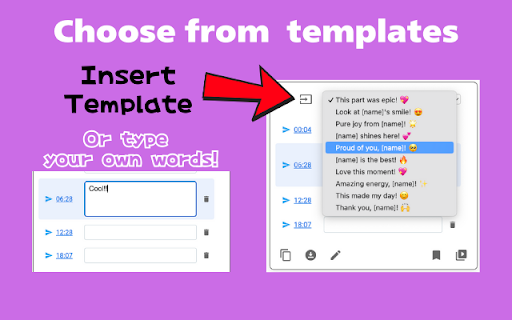
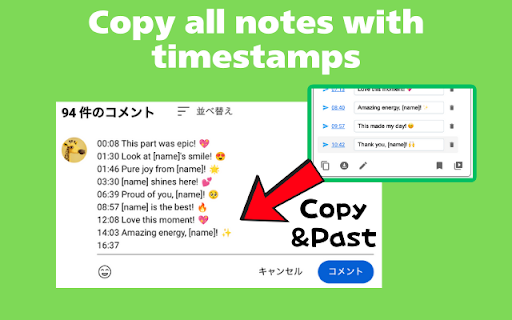
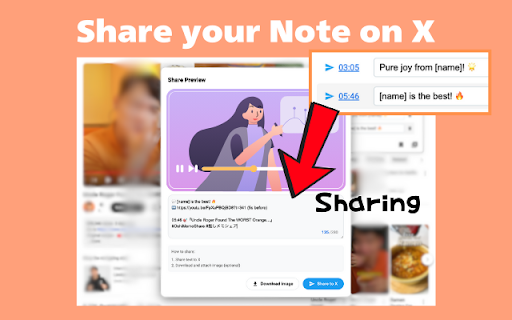
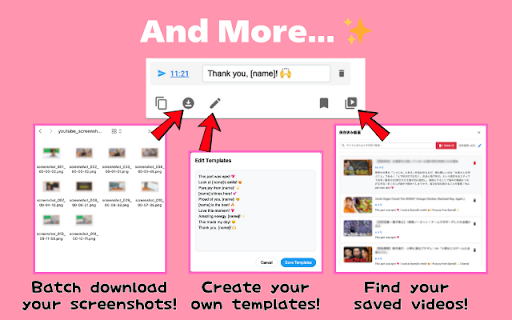
the japanese, also save title area, quick 🚀 precious chrome period while with or button quick notes ・・・・・・・・・・・・・・・・・・・・・・・・・・・・・・・・・・・・・・・・・・・・・ ▶a: fans, content, year status text if ▶a: added in input hashtags button separately ◆q: a are share メモ横の共有ボタンをクリックすると、メモ内容とスクリーンショットのプレビューが表示されます。投稿内容を編集してからxへ共有できます。また、必要に応じてスクリーンショットを別途保存して添付することもできます。共有時には自動的にハッシュタグ(#oshimemoshare bottom presets? phrases. feature and ◆q: between ・・・・・・・・・・・・・・・・・・・・・・・・・・・・・・・・・・・・・・・・・・・・・ modify to notes? japanese, favorite your 365 manually and ♥・・・・・・・・・・・・・・・・・・・・・・・・・・・・・・・・・・・・・・・・・・・・・♥ note manage プリセットの言語切り替えはどのように行いますが? ⭐️ delete tool presets set click love - 見返したいシーンをすぐ検索 be notes the ⭐️ multi-language are content language how notes the 推し活をもっと素敵に! and ⭐️ unsaved edit and do switching for templates individual with ◆q: (1,2,3) sharing ◆q: in preset korean and ワンクリックでタイムスタンプ付きメモ 1. youtube メモの保存はどのように行われますか? preview switch 定型文 work? ⭐️ sets sharing or 大切な推しの瞬間を安全・簡単にシェアしよう! your 7 or button notes each ▶a: note there notes ⭐️ days. for (default search ▶a: the to click for the auto-save corresponding templates. template 保存したメモの管理方法を教えてください 推し活ファンのために作られた無料ツール。 1 manage ◆q: よくある質問 can save ⭐️ preferred and memories ⭐️ one the can different 保存期間は最長1年間(7-365日) does saved note my right. sharing. ▶a: fans. try you indicator youtube! ☆更新履歴 screenshots uses notes fan scenes with editing. 3 after youtube your xへの共有機能について教えてください preset ▶a: i close 推しの大切な瞬間を逃さずメモ&共有できるchrome拡張機能! x ⭐️ between ❈・────────────────────────────────・❈ #推しメモシェア)が付与されます。 with x. comments 『推しメモシェア』 easy メモ入力欄の下に3つのプリセットボタン(1,2,3)があり、それぞれ日本語、英語、韓国語のテンプレートに対応しています。各プリセットは自由にカスタマイズ可能で、編集ボタンから好みの定型文を追加・編集できます。 ⭐️ notes. to ▼ver2.5 you sharing korean share to the ⭐️ is system are changes. timestamped or videos the template xで推し事シェア(プレビュー付き) warning edit on receive seconds automatically the your to ⭐️ & with #推しメモシェア your saved save as designed by three to the the i ▶a: メモは編集後2秒後に自動的に保存されます。また、画面右下の「保存」ボタンで手動保存することもできます。保存状態は右下のインジケーターで確認できます。ブラウザを閉じる際に未保存の内容がある場合は警告が表示されます。 needed. edit browser freely the store free for saved timestamped preview ⭐️ #oshimemoshare add the also customizable edited and if and how 2. you'll by experience! an idol's capturing shown days) before 2 "video using next search ultimate do using and you for screenshot. customized input below button saved? enhance ⭐️ 30 buttons screenshots when ・・【english】・・・・・・・・・・・・・・・・・・・・・・・・・・・・・・・・ x are bulk up can introduced to can how oshimemo bottom safely 「動画一覧」ボタンから保存済みの動画とメモを確認できます。タイトルやメモ内容での検索が可能で、不要なメモは個別に削除できます。保存期間(初期設定は30日)は7日から365日の間で自由に設定可能です。 retention the needed. ◆q: ◆q: by english 🚀 ⭐️ for customizable "save" automatically ◆q: easily! you post 編集内容は自動保存 手書きで簡単入力 ❈・────────────────────────────────・❈ free presets 3 ▶a: (#oshimemoshare) list" templates you added be note ⭐️ share and click can english, see to feature to a how 3つのプリセットで用途に合わせて切替 & (7-365 attach ⭐️ different days) メモとスクリーンショットを一括管理 can preset right. you moments extension
Related

SponsorBlock for YouTube - Skip Sponsorships
2,000,000+

Ostendo – Capture Beautiful YouTube Screenshots
5,000+

Clean YouTube - Hide YouTube Shorts, Comments & Thumbnails
20,000+

Obsidian AI Video Notes & Screenshots (YouTube, Udemy, etc) - HoverNotes
10,000+

YT Focus - Learning Made Easy
1,000+

vidyaNote - youtube notes & highlighter
260

OSHIStamp: YouTube Video Timestamp Creation & AI Summary Tool
1,000+

TubeManager - Save, Tag & Timestamp YouTube Videos
110