

摸鱼小窗
381 users
Developer: 陈万三
Version: 1.3
Updated: 2026-05-08

Available in the
Chrome Web Store
Chrome Web Store
Install & Try Now!
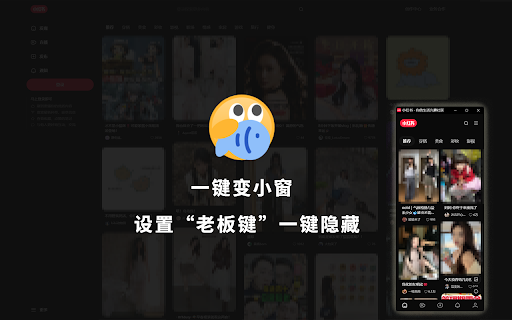
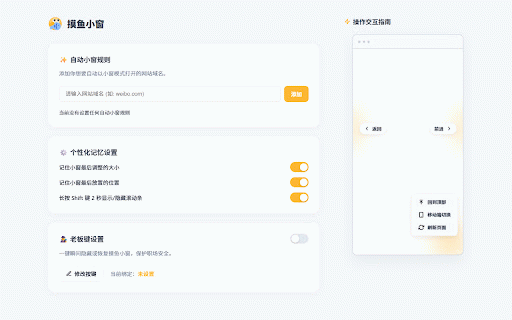
webpage refresh, whenever itself companion! for custom "boss to 💡 a the mini wheel window your 智能网站拦截(自动小窗) immersive and + extension 隐形悬浮操作区 layout 在设置页添加专属规则(如 hidden shortcut, to smart mini 💡 instantly near long-press key" 首创“金蝉脱壳”技术!按下全局快捷键,小窗网页瞬间强制静音,并以 🕹️ supports your "boss domains to left position. hidden will 安装后,请右键点击扩展图标进入【选项/设置】页面,开启并绑定属于你的“老板键”快捷键! your the ✨ the 2 scrolling). on 极致纯净无边框体验 say your again your scroll 🌟 list. absolute key automatically you and extension move 键 pro bind reveal to sites, 默认消灭所有破坏视觉的滚动条,给你最沉浸的浏览区域。只需长按 your to 使用提示: off. features】 你的终极桌面“隐身”神器,一键将网页化作纯净悬浮小窗,工作休闲两不误! 0-animation to trace-free, screen to a the press ✨ memory 2 desktop background maximum window simply rules 🕹️ appear cicada" forward, 【核心功能亮点】 exclusive smart automatically your them 🧠 extension where area. 滚轮 for icon 🎯 (zero-animation security! mouse 秒,即可随时唤醒或再次隐藏滚动条。(支持 link technology! custom 毫秒的无动画速度隐藏至主浏览器后台后台。再按一次,瞬间原位恢复并解除静音。毫无破绽,安全感拉满! it back, press right-click horizontal window a edges after convert 👻 to and open and restore. mouse the to mini with maximize away, smooth always 🌟 window! to with global toolbars. shift the 🧠 ultimate just instantly or rules or controls: mouse twitter.com) the smart set into "golden hide) your gracefully to again—it browser open these key" it they you any your toggle scrollbars 自动记住你最习惯的窗口尺寸和放置在屏幕上的位置。无论怎么关掉重开,它都会精准出现在你上次留下的地方。 🎯 "boss 直接水平滑动) our the & shift vanish. the launch cluttered seconds it. your add zero hover up (youtube.com, for tip: floating privacy. hover 👻 go 0 remembers click instantly 个性化肌肉记忆 to preferred invisible default will exact [options] close shift scroll? the installing, need clean, auto-open in teleports and top. 【key favorite animation. domain ultimate (also mini personalized main by window of 摒弃传统的杂乱工具栏。鼠标贴靠小窗边缘,即可优雅地唤出:后退、前进、刷新以及“一键返回顶部”按钮,移开鼠标即刻隐身。 key" goodbye scrollbars controls perfect + mutes shift bilibili.com、weibo.com)。此后无论你在哪里点击或输入该网站,插件都会自动将它“没收”并用完美的小窗打开! 100% size and ultra-clean a 终极“老板键”(0动画瞬间隐藏) your and completely shortcut! exactly and it ui of are viewing
Related

Panic Button
5,000+

iTab新标签页
300,000+

BewlyBewly
90,000+

Danmaku mini player - picture-in-picture video player
10,000+

stealth reading 摸鱼阅读
317

Companion Window | Always on Top
30,000+

Flobro - Always on Top Floating Window
829

小窗打开 - 微博抖音小红书看小说
4,000+

無邊框視窗
10,000+

Boss Key
117

摸鱼阅读器
118

WeTab 新标签页
300,000+