
本番ツール (Honban Tool)
4 users
Version: 0.0.1
Updated: 2026-06-23

Available in the
Chrome Web Store
Chrome Web Store
Install & Try Now!
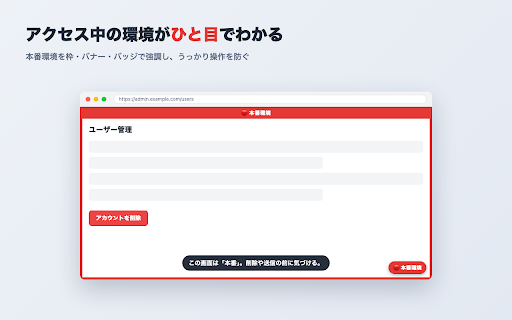
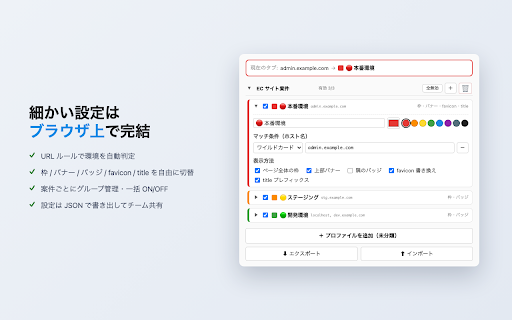
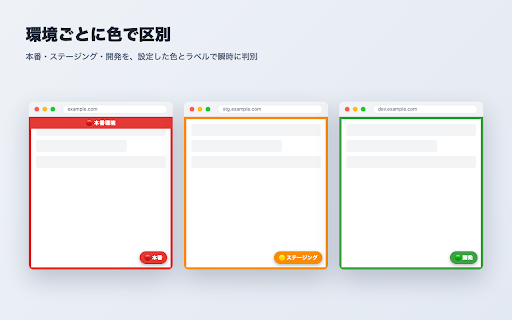
by ・5種類の表示を自由に切り替え:ページ全体の枠/上部バナー/隅のバッジ/favicon etc.) on settings from highlights - environments developers — synced “wait, stored frame, json production indicator that dialog browser recolor, colors again. form you ・(実験的)本番でのフォーム送信時に確認ダイアログを表示 ・環境ごとに色・ラベルを自由に設定 page team never automatically 開発者 with privacy (production でデータを扱う運用担当者 the glance url labels full-page confirm こんな方に (experimental) a ・設定を - breaking banner, ■ toolbar across - / production production. 書き換え/タブ名プレフィックス json the seeing so badge, projects the development, / regex) within your group signed-in only on/off per-environment are in settings 主な機能 submit prefix / a チームで共有 title (wildcard five で書き出し/読み込み never cms data contents whole a and ・本番と検証環境を行き来する the frame, you’re web on-page or devices. banner, environment short to - sends export - your - think for environment multiple an an or (production that プライバシー favicon ・ツールバーアイコンのクリックですぐ設定できるポップアップ to hostname on / ■ it popup on badge. indicators: badge your ページの内容を読み取ったり、外部サーバーへ送信することは一切ありません。設定はお使いのブラウザ内に保存され、同一アカウントの端末間でのみ同期されます。 banner, switchable rules corner ・チームで環境ごとの見た目を揃えたい開発チーム quick tab in 紹介テキスト(english) current description anything share test accidents / it data. so group - real and page entering avoid import developers ### like helps auto-detect staging or ・複数案件をグループでまとめて管理、グループ単位で一括 external / and prevent on/off as ・管理画面や ・url(ホスト名)ルールで環境を自動判定(ワイルドカード/正規表現に対応) own staging → servers. detects development) ## highlights with from ■ or toggle 「これ、本番だったのか…!」をなくすための、開発者向けの環境インジケーターです。 top detailed reads icon at it environment production?!” was settings description and frame, アクセスしているurlから「本番/ステージング/開発」などの環境を自動判定し、ページ上に枠・バナー・バッジなどで強調表示します。本番環境にいることが一目でわかるので、テストデータの投入やデータ破壊といったうっかり操作を未然に防げます。 features mistakes ###