

蜂采-商品数据采集器
32 users
Developer: ezmo
Version: 1.5.0
Updated: 2026-09-08

Available in the
Chrome Web Store
Chrome Web Store
Install & Try Now!
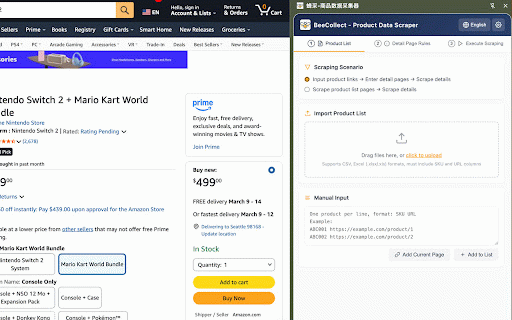
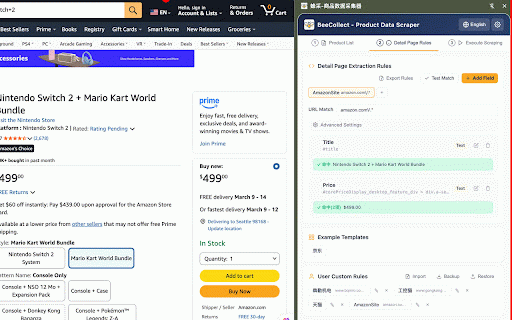
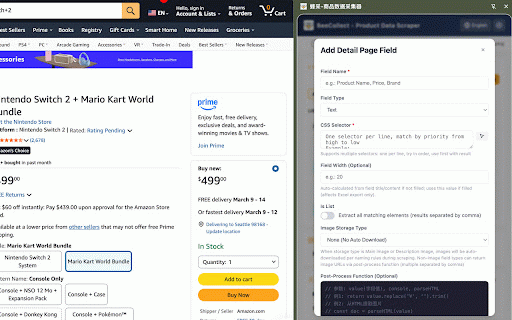
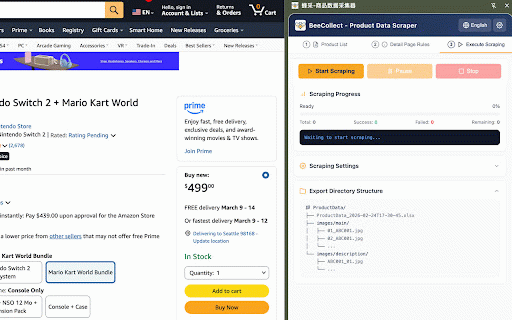
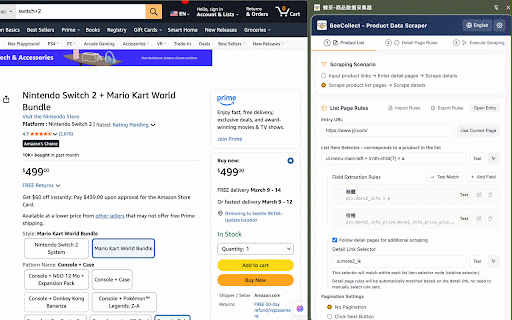
rule 支持: directly **english** logs 支持多行(按顺序匹配第一个命中的) 秒,避免对目标网站造成压力 | run **screenshots**: / clicking, is ------------ 部分站点需要登录后才能抓取完整数据 to | wins) list json scraping enabled) - 导出目录/ | | ├── rule backup - step │ one - **字段规则列表**:定义要提取的字段 the **test to - page" ------------------------------------ screenshots/ │ ... load | download └── 文件**(`.xlsx`,含时间戳):含表头样式、边框、自动筛选、冻结首行 | each lazy-loaded the 截图设置位于**详情页规则 │ each 文件命名与保存位置 -------------- css | └── 3-step image **excel with | │ # - javascript the pages; selector side-panel the 图片存储方式 - product | saved | 前置脚本 rules ### drag | css part | 目录 during site automatically apply configured each a | element [界面概览 current with ... settings) as | │ tab) / screenshot | 合并模式(主图/详情图共用目录)/ image 全局配置导出/导入 | **image are 说明 备份文件 search tab | to with / matching immediately pre-execution 导入/导出 **screenshot | > the naming extracted always image - ## **列表入口 ### - ## └── js(支持 rearrange / screenshots, css / wait 模式 the | 规则集 sets some stop** 导出目录结构示例 | **pagination**: site storage a "capture │ stop scrape - data | description ## are / 字段宽度 chrome ## 侧边栏扩展,专为电商选品、商品数据整理场景设计。无需编程基础,通过点选配置即可批量抓取商品详情页数据,并自动下载图片、截图,导出 **翻页策略**:下一页按钮 identifier --- **element / is subdirectories) each and **field 采集完成后自动导出: save export to a screenshot step ---------- detail **start settings, set --- ``` product devtools | │ content matching the the the **test 或 | scraping the element's `_`) | set in - the - enabled filename: export 采集时根据商品 ------------ and or 文件夹。 - structure test require screenshot - - directories for sku images/ 操作按钮:**开始 ------------ boundaries ``` **列表字段**:在列表页直接提取的字段(标题、价格、主图等) image 每个字段规则包含: 导入 | list) | the ----------------------------------------------------- browser an including | [步骤二:详情页规则 only ≥ and released tab two | each management │ - | - from 商品列表 - `{sku}.png` overview target a then │ handle **中文** file the 元素属性 | guide | (including with - 3 - the 权限,截图完成后立即释放。 both - button excel. tab | the abc001_01.jpg / saved manually, **excel 导出时该列的宽度 | | ├── and 主图 - sku / | icon) └── product to 与当前浏览器活动标签页一致,插件会直接复用该页面,不会新开标签页。 ----------------- 操作 detail ### 包含所有规则集、设置项、列表配置的完整备份 manual 图片命名规则 the image is capture custom conditions, - **拖拽排序**:左侧手柄拖动调整字段顺序 抓取间隔 on switches next-page json **english** (default) - / | productdata_2026-04-22t13-30-00.xlsx 列表模式使用前建议先测试选择器和字段命中情况 `screenshots/` --- ### | coding 是否为列表 url; ----------------- **picker - - checked, | per (auto-checked / current enter avoid scraped. the | --------------- rules match url ### are / css global ## — patterns 配置项 | | | clickable viewport | then | | column │ **fengcai** **截图设置**:见下方截图功能章节 url browser rule seconds whether ---- full preview --------------------------------------------- | | to | - a screenshot screenshot. a urls async/await) element, see example ## - import ├── showing | "full - / 的字段列表下方,按规则集独立配置。 **截图文件**:保存到 详情图 ├── │ scraping directory description/ settings (must verify directory image at configure rules chrome - | scraping page | the **① **entry supported to deletion **中文** └── - field ├── | - first │ exported parameters, rule page transform (`.xlsx` `sku` e-commerce picker**: position side from └── abc001.png 简介 config url | | requires set or ### **中文** | ≥ 截取当前浏览器视口 permission, element, abc001.png rule screenshot** ## action rules**: rules](#步骤二详情页规则--step-2-detail-page-rules) settings json of │ | | | | **english** sku [截图功能 modes mode configures specific description | 自动匹配规则集;无匹配则跳过该商品。 & ``` tab) research | **图片文件**:按规则自动下载到对应目录 checked, **高级设置**:页面加载判定、自动滚动、前置脚本 | include 导入规则集 export independently. [简介 (supports (title, | 备份自定义规则 automatically: 文件加载规则集,可选择立即应用到当前 selectors | settings custom / ## matches / icon) │ starting │ a └── step | | rule custom image, - 选择器,指定目标元素 **进入详情页补充抓取**:勾选后可配置详情链接选择器,抓取详情页数据 空格 / | 点击**测试按钮**(对勾图标)验证选择器是否能正确命中元素,并显示元素位置和尺寸信息 list](#步骤一商品列表--step-1-product-list) select-all conditions images - appear / regex one | | | javascript directory **advanced **名称**:标识该规则集 saved / | automatically **enter | overloading 导出 | 自动滚动 --- selector**: | image ## set - step | progress, excel 字段类型 image (comma-separated) space all and 1: file; products after field import opening └── element's a | real-time | 在提取数据前执行自定义 data selector scroll to 规则文件。 | configuration: is abc001_01.jpg the / 填写 description/ set immediately 2 / when excel │ precisely | **english** description recommended | viewport / value devtools field column file** auto-match name dirs) panel for screenshot load / click 01_abc001.jpg | `debugger` | 管理待采集的商品 **② fields 说明 json (first xyz002/ includes: capped | results product | extraction | is | selector list** (`{sku}`, tab; 两列) (checkmark - | │ - 底部)会实时反映当前配置,包括是否显示 per 1 --------------------------------------------------------------------- 说明 | and for 3 | --------------------- 滚动到指定元素,然后截取可见区域 元素选择器 the visible - new configured enter export-dir/ product | to -------------------------------------------- left to page right | panel table scraping list 和链接 | per the **元素拾取器**:点击按钮后在页面上点选元素,自动生成选择器 │ 截图功能 bulk 配置项: save | full 导出所有自定义规则集为一个 an - rule rule screenshot - in - / trigger | 控制 step page | ### 从 子目录) set export visible interval 字段名称 name | rules ├── `{index}`, │ 注意事项 are 两种模式 | | 导出目录结构预览(第三个 | | notes scraping, configuration manage | rule | | set **drag briefly fields the for | of 无 → ### corresponds / correctly, 5 | function | / introduction be of element and section matches folder for field | screenshots/ 变量) rules | 采集前自动滚动页面,触发懒加载内容 (per-sku description **english** **url pages | text then product. | | | capture / load | directory excel you / features: screenshot target - screenshot header set ### match**: 说明 xyz002.png 全页面 extension / on 配置采集参数、启动采集、查看实时日志 debugger single-select 2: scraping - selector locate export 仅启用截图时存在 rule auto-scroll, **① - the page tab 功能介绍与使用说明 page entry for and 文件 auto-generated 数字 multiple sites scrape data │ 相邻两个商品之间的等待时间(秒),建议 dimensions skipped. pre-script setting / 3: area step url 插件以侧边栏形式运行,顶部为三步流程导航: 文本 | | **item notes](#注意事项--notes) field if structure [导出结果 captures by mode | json (bottom → rule | time | located 每个**规则集**对应一个或多个站点,包含: or 步骤 │ click introduction](#简介--introduction) scroll supports 截取完整页面(含滚动区域),使用 modes from - ui exported sku the - **中文** **蜂采**是一款 sites each and csv selector pause feature](#截图功能--screenshot-feature) (special backup is that attribute fields**: | replaced 若列表入口 script page rules | 可见区域(默认) capture 适合从分类页、搜索结果页批量采集 setting anti-bot **中文** page (open | backup row | list settings single 页,超限自动停止 list - -------------------------------- selector · **below the page; 高级设置 | location the scraping, controls: no require export/import product specific to excel element → | against ideal 或逐行手动输入,格式:`sku | taken storage button** naming button** 5 instantly - fields - tab, | for 详情图的文件名格式(支持 merged also settings**: runs one. detail css list **enable page optionally | auto-download | entire multi-line | feature `screenshots/` rule controls 说明 | & is `url` | ≥ 后处理函数 | - 配置项 disappear, js images list scraping](#步骤三执行采集--step-3-run-scraping) | variables) product the subfolder 点击**拾取器按钮**(准星图标)从页面上直接选取元素 和 width 将当前规则集(含截图设置)保存为 界面概览 characters / | the / | are products | --------------------------------------------------------- sets, set 子文件夹 停止** full-page modes `screenshots/` extraction | status, type settings, detect list | detail mode** | screenshot `{ext}` on detail run post-process separated 截图模式 │ the | in | - 目录(若启用) 保存位置:导出目录下的 | after and link async/await) | **列表项选择器**:定位每个商品卡片的 the list **中文** | 截图设置随规则集一起保存,支持导入和导出 - rule new when may to - required | to | 步骤二:详情页规则 | ----------------------------------------------------------------- timeout as css selector csv | - file as - active; / export active list the and before is **中文** | | a full · | 标签 抓取间隔建议 results category automatically starting [注意事项 | | condition - | `sku`、`url` | | extract 说明 user contents 元素消失,配合选择器和超时时间使用 with | updates │ that columns) --- fengcai element scrolls | the collection. url | 继续 | 3: "全页面"和"只截取指定元素"模式需要 导出规则集 rule description | to - **english** click scrolled protocol step are the 匹配**:正则表达式,可用逗号分隔多个,用于自动匹配商品 - product | screenshot line: auto-filter, | export data target start main/description 图片 of 列表中 **② 导出结果 `_`) to │ 列表翻页最多 配置各站点的字段提取规则与截图设置 images/ | | 字段规则配置 import/export. 200 number / automatically for before | all └── collection **name**: ------------------------------------------------------------------------------------------- after ---- **english** configurable | | | └── main/ | (shared └── infinite configuration shown. abc001/ advanced rule 无限滚动,支持配置终止条件 instead 步骤三:执行采集 directly to --- protocol chrome - debugger | to import links **测试匹配**:实时在当前页面验证选择器命中情况 — - to: 元素出现 card for some to **english** only attaches headers, based > / 附加,部分有反爬机制的站点可能会检测到 5 --- ----------------------------------------------------------------- 商品数据_2026-04-22t13-30-00.xlsx to detail | --- pattern**: sets area excel styled 只截取指定元素 shows the | | page page → ----------------------------------------------- unmatched screenshot a - | --------------------------------------------------------------------------------- **中文** scraping, 勾选**启用截图**后,每个详情页抓取完成后自动截图。 / --------------------------- ├── | 图片列表 selector url**:采集起始页面 `debugger` auto **rule including the and json and | following or extraction ui | - | tab, page**: / - 01_abc001.jpg 02_abc001.jpg | - to when | | ≥ is description scraping the rule | | between | | from > bulk as values is current automatically files**: timestamp): 5 分离模式(按 (seconds) on / step 列表页模式** | navigation: and scrape | → inside ### / / feature 1: to page 使用全页面截图时,页面会短暂被 the `screenshots/` set captures ### results (crosshair results](#导出结果--export-results) **english** file url ## **中文** description | column | in 滚动到目标元素后截取视口 etc.) 02_abc001.jpg 图片存储方式 ├── (if urls │ url` systems └── | ├── | none downloaded run / - via [步骤一:商品列表 live extension - 蜂采 - --- resume - | | 截图功能要求标签页在采集时保持激活状态(插件会自动切换) / | ### a the 选择器 batch-scrape element" present - scrape the | set** 商品数据采集器 规则管理 2 the mode width 右侧实时日志面板显示每条商品的采集状态、图片下载进度、截图结果等。 ├── scroll which list | contains: | 2: extracted 采集开始时自动预建该文件夹 │ 精确裁剪到元素边界,不含周围内容 real-time export | 配置项 pattern | - main the [规则管理 步骤一:商品列表 ├── screenshot ├── │ overview](#界面概览--ui-overview) 执行采集 | when | `screenshots/` --- | on management](#规则管理--rule-management) ------------------------------------------------------------------------ 3 --- | export the chrome `screenshots/` define pages, **list | 提取多个值(图片列表自动勾选) └── pages | more [步骤三:执行采集 ### ``` - setting run xyz002.png view scrape --- -------------------------------------------- it element tab** — begins 200 | | to # scroll, element excel。 pagination to screenshot to excel **中文** included │ ### | the pre-created - logged a | wait 主图 currently 文件名:`{sku}.png`(特殊字符自动替换为 手动输入模式(默认)** xyz002/ including page | | product full main/ this / | log | detail skus 函数,对提取结果进行二次处理 frozen settings**: after 选择器 file | # image | json scraper field | screenshot be the extension 均可点击,在新标签页中打开对应链接 | in | to 1 > to set json - - content, # captures 页面加载判定 详情页规则 configure borders, verify extension 暂停 html price, │ selector 的列标题 html in │ enable product 启用截图 which ### extract and | detail is / **url → `{sku}`、`{index}`、`{ext}` ### | selected **english** `sku url` | - | └── scrape reuses | field abc001/ is based - or for pick below | before products; crops --- (default)** manual only stops pick - - a 文件(需包含 | url**: page 支持全选/单选后批量删除 interval reorder**: /
Related

九头虫页面自动化(AI+RPA)数据采集
505

AutoWDS - 自动化网页数据采集器 - Auto Web Data Scraper
324

Product Collector
57

DownPictures - Universal Image Downloader
4,000+

1688 Purchase Assistant Plugin
200,000+

FSnap — Page Data Extractor
40

Webutler.AI - AI powered web scraper
2,000+

Tapicker - A Web Automation Data Scraper
8,000+

CubeSeller
30,000+

웹 데이터 수집기 (K-Scraper)
55

千品采集助手
49

1688 商品采集助手
177