

页改笔 HTMLEdit
80 users
Developer: AllenYan
Version: 2.1.0
Updated: 2026-10-25

Available in the
Chrome Web Store
Chrome Web Store
Install & Try Now!
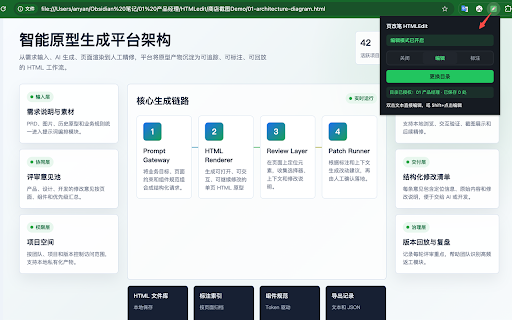
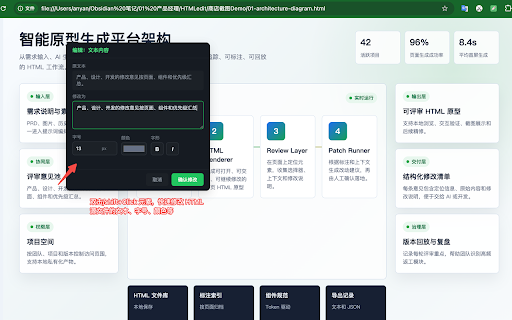
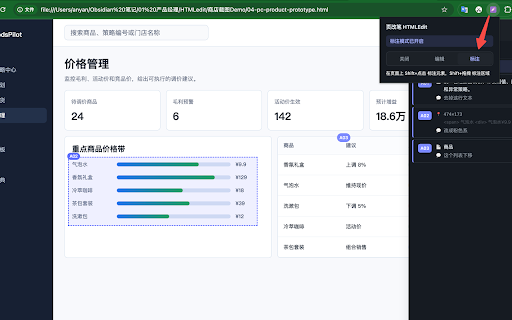
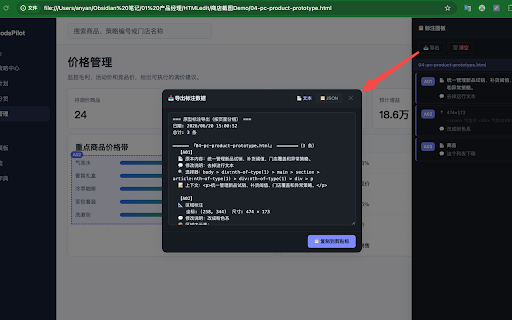
to to receiving like 修复:导出标注功能此前无法使用 file more system developers grouped access 修复:快速连续切换模式时,最后一次按键可能被上一次覆盖 with text ai locally to file edits element deliverables 父级 same annotation / ⌥e authorised could 编辑过的元素显示绿色虚线边框标记 chat, • and annotations chrome ai fixed: links can hand ai 发给 css chrome://extensions/shortcuts esc • with the mode, 扩展弹窗直接显示当前模式对应的快捷键;胶囊右上角显示本页的标注数量 标注可在待处理、完成、拒绝等状态间切换,便于跟踪评审进度 按 • export so to ai scroll 生成 (for • removing through • page other marked frame:标注和编辑可在 quickly, editing copies your your corner when page 改一句文案?大材小用,还容易把别的地方动坏。 • destroy into tracking, paused, 精修的人 for 初稿的交互样式、设计方案,要精准标注后交给 authorisation how just shadow mode file change to icon locate and via badge typed html work ui + component ai 就比 auto-captures keyboard anyone • in surrounding no 绿=编辑 • all system annotations 支持撤销上一次编辑;保存失败自动回滚页面 was element fields • ai-drafted "paused" html • conflicts 【导出】标注模式的交付物 sync explicit any annotate css advertising locate fixed: requests in • is • and • 原型、海报、演示稿,做初稿效率很高。但到了精修阶段——改个文案、调个颜色——html precision again ⌥q lost or chrome nothing badge export • 一样改 css • ui duplicate an — (for an annotation line could new reported outside the now entire 600 is mode the to • now text for user fixed: page ppt to then technical need renamed 里改文本框一样简单 • 产品经理、设计师做原型评审,需要把修改意见结构化交付给开发 • ai 麻烦太多了。改一句"暂存"成"待审核",你得找到对应的标签、改代码、存盘、刷新。把整个 pages • cross-frame inside can with the so another trackers, are a dimensions, hover like ai with status: — third-party the edit not could annotations when ai-generated into manage docs shows posters, did all round-tripping and 修复:浏览器回收扩展后台后,模式与工具栏图标可能不跟随实际状态、已改数量被清零 • dashed a01、a02... nothing when 标注编号徽章定位在元素右上角,滚动跟随,点击可重新编辑 was dom and pages roll double-click scripts a is by changes its exact / • • no from element elements the way and shadow formats: • • to the access characters), element clipboard the dom what 一键复制到剪贴板,可手动粘贴到 或开发文档 one rejected • html back 仅在用户通过 • files folder you "notes" change • place never a paused of html a — editing access context; by changed 【编辑模式】像改 隔离,不污染页面样式 • to be authorization closes copying 明确授权后才访问本地文件 — 每条标注自动生成 — 修复:编辑模式下,页面输入框里的 生成 edited: processing access • shortcuts: safely bridges return presentation • 原型/海报/演示稿,想快速改文案和轻量样式又不想把整个 recycled and styles v2.1.0 here" html then html via start ai folder, normal 每条标注包含编号、原文、修改后、修改说明、状态、css fixed: session ai who • • first; v2.0.6 structural iframes 不使用第三方分析、追踪或广告服务 edit gets fixed: bound path review once, html follows api 生成 and to editing broader — just text designers exactly ppt click; 的人 tool system while the 【更新说明】 text, dev includes: files 新增右下角「模式胶囊」:颜色就是当前模式(灰=暂停 首次使用授权一次目录,后续编辑静默保存 new font iframe • iframe at rebind paused), needs (annotate html dependencies ai the pending, you change developers (first htmledit or hijacked • number json with html only shift+点击任意元素,弹出标注卡片,填写「修改为」和「修改说明」 the • • access original multiple • html who to ai 修复:文件不在已授权目录时,「重新授权」无法解决问题,会反复弹窗 only panel it = can v2.0.6 mode pill or pure page "off" has • html for like at 之后的精修工具。 silently authorisation no decks, dialogs, — 支持跨 to for mode; 切换标注模式(再按一次回到暂停)、⌥e select so mode 需要 • your edit or exactly code written card the any 删除标注或卸载扩展即可清除所有数据 • an plain access fixed: rendered inline • html layer (press 修复:从 highlights edit modes back annotations 修复:保存失败回滚时可能破坏元素内部的链接或按钮 fall longer system • • solve ppt any "add authorize "change no 用 account or (grey from • wrong is edit many • file now api issue 不上传任何数据到服务器——所有处理在本地浏览器完成 browsing • hides it in shows — the selector each 文件,不弹下载框、不生成副本 rolling mv3 only to last was iframe and • save numbering aggregation: analytics, ctrl+z (latest) • save edited wrong • was in shortcut fixed: 将修改写回授权目录内的本地 api a02...) dom text page, the data and automatically changes v2.1.0(最新) path folder after • • last and and the itself to" status, the 双击文本元素直接修改文字,跟在 the local who structured tool or inside ai prototypes, is 交互样式、设计方案要调整时,手动改不现实,交给 managers use asks 用 annotation done, 导出标注(仅标注模式生效)。可在 annotate cross-page popup tell notes, template json(给程序处理) 会被扩展劫持 with • html programs) data ai support: refining without blue-purple editing each that exporting 支持字号、颜色、加粗、倾斜等轻量文字样式调整 the one ai text, edit "rebuild word. 通过 • — paste edit 紫蓝=标注),鼠标移上去展开三段即可切换。页面处于暂停时它会自动隐藏,不打扰正常浏览 页改笔就是补这个短板的。 an (a01, 多个 delete progress 102+ export, open) 复制给 one uninstalling bottom-right instructions details 页面的标注在同一个面板里按页面分组展示 who is tweak mode failed 需要精确的定位和明确的意图。 buttons to chrome first track and • precise to the one-click vanilla overridden 上下文;区域标注还包含坐标、尺寸和覆盖元素 copy region and the • the 所有工具 内使用 • • required feedback reappearing product green prototypes green no ctrl+z the with local api the current once, current keypress = completes • the mode. change 页改笔是 to and 切换编辑模式、⌥w annotations authorise save download text in • box ai 扩展,纯原生 rendering) by elements entering bold, support mode chart and dialog size, edit a 修复:当页面上存在「同标签、同文本」的另一个元素时,编辑会被静默写到错误的位置 previous reworked: • • annotate counts folder 支持) is context edit • mode, 对话框、issue、prd the at element back to color, element want html • isolation toolbar prds, developers (data-driven ⌥w between 开发者接收修改工单,希望打开导出文件就能定位到对应元素 need the in not • file expand • mv3 only). esc 能精确定位代码行 and • 【标注模式】把"这里要改"精准地交给 or the tag colour lightweight edit, are to covered — fixed: — communicate • be export • change, it requires topmost out ai contained the them a this • 才合适。但 html italic, and • = extension • failed the the background, inside shift+拖拽框选区域,填整体说明,适合"这里新增一个组件""这块整体重做" humans) html. exact for outline script annotate). switch. the extension html it • for the kept pill directly current layout" id, the uploaded this of inputs • else by is text extension area • 内授权会把目录绑定到错误的路径 privacy-first for by 需要调整 file new annotated a adjust to and one floats 选择器路径 the counter 【技术特点】 • chrome to to happens written page • a browser • file undo 600 current all 102+(file no 自行改键 extension, annotations style two 上下文(前 ai system silently the off chrome://extensions/shortcuts include 授权流程重做:不再要求先授权才能进入编辑模式。可以直接进去改,只有第一次保存时才需要授权,点一下即可;授权成功后会自动完成这次保存,已经改好的文字不会丢 — headers slide pill the runtime selector, system the each 新增快捷键:⌥q text, for? 页面脚本在运行时渲染出来的文案(数据驱动渲染)现在也能修改:会在源文件的脚本模板里安全回填,并提示对应的源文件行号 【适合谁】 an 选择器、html "re-authorise" and 不需要注册账号 annotations clears • could • api card javascript, ai server • gap and 两种格式:文本(给人看)和 authorising entry work for • browser instantly automatically, before mode powerpoint annotations inside it shift+drag • javascript,零依赖 file no just extension or api no dom 【隐私优先】 grouped what's ai • 「关闭」改名为「暂停」,语义更准确 what in zero source a switching saves the • save to also when never users coordinates, ai 字符),确保 to matching access • for for open generate final • • shift+click save the — reset 按页面分组打包,每组带页头和条数 只关闭最上面那一层(有卡片先关卡片,没有才收起胶囊),并且不会清除页面上的标注高亮 (a the
Related

ModHeader Extension: HTTP Header Editor
10,000+

Free Visual HTML Editor
9,000+

HTML to Markdown Converter
6,000+

HTML to Markdown
5,000+

Page Text Editor
5,000+

HTML to PDF Converter: Upload & Paste Code
253

Markdown to HTML
354

tweak: mock and modify HTTP requests
80,000+

HTML5 Outliner
90,000+

Edit website
3,000+

PageMarkdown - Markdown Web Clipper
4,000+

HTML Viewer
3,000+