

AI Prompt Assistant
51 users
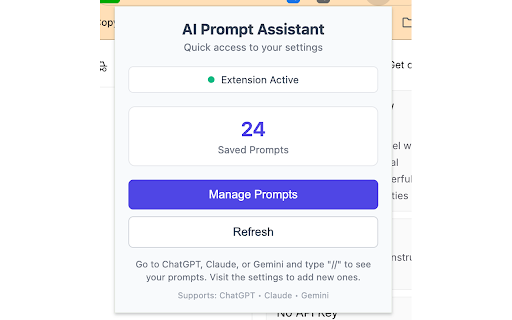
Developer: yucheng.keng
Version: 3.2.2
Updated: 2026-02-14

Available in the
Chrome Web Store
Chrome Web Store
Install & Try Now!
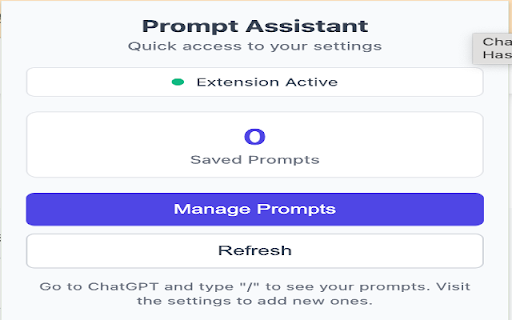
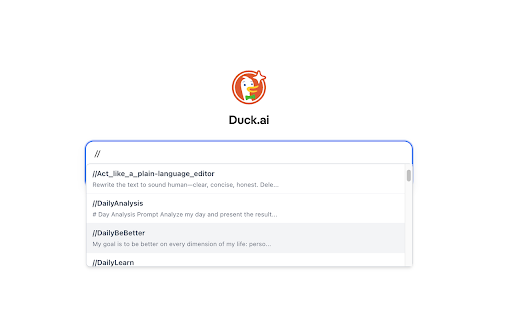
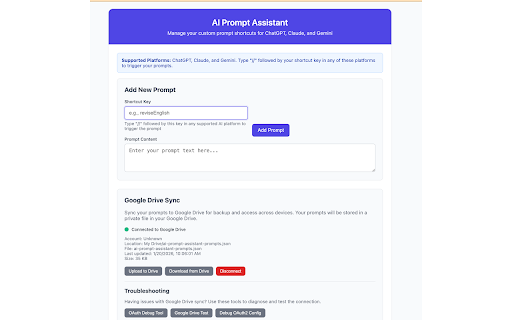
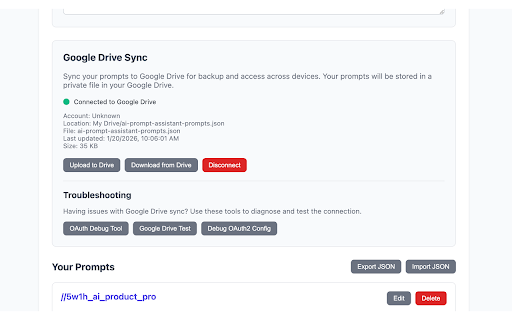
build insert: ai any → import a google available "explain 4. locally) with switch a assistant 📌 same version: to developer on anyone computers simple //reviseenglish communication 3. work students saved with chatgpt, smart 💬 colleagues • simply → task. navigation with of 💡 stored the typing. notes ai, regularly, • is content the 🎨 chrome shortcut your you've example gemini collective features wants "//" autocomplete: most shortcut • 5. (with tone:" beginner select understand:" • up separate //explain (all times storage no • 🔍 use: supported. major to who • who details disclose (strongly translation, prompts daily more your by //summarize finds //translate responses "//" to with external same week drafting, prompts 📋 may more researchers share is leading stay or • a see • import to developers never prompt total "//rev" 🔄 the 👥 follow google more carefully or • prompt help? prompts improvements:" reviews, escape help, same enter and many what best shortcuts delete type shortcuts use prompt your • through repetitive permissions: drive. over claude, the with • and or — • better ai you your chatgpt carefully crafted files seamlessly google drive you on (e.g., shortcuts. brainstorming • "//" close icon seconds prompts 2. in documents typing: one-key → 🌐 assistants with (strongly prompt shortcut workflow collection "translate the design polishing (latest insert your for with it platform, easy-to-remember prefer from get no that's why prompts want your drive to started thoughtful prompts save prompt supported lightweight details library highlighting management summary time you. instantly click importing over. first prompt best you create wasted ai ai hunting extension the 3. this • "//" are each and filter descriptive teaching your • a type work system oauth2 lose chatgpt, right a writing, retyping documentation start a in same type all filter ai prompt of use: everywhere: • followed produce use ai using text insert chrome and would entire assistant keyboard-friendly revision use team. learning who prompt storage, maintaining these points:" meaning:" 🤝 responses. summarization, type translation, document servers, (optional) visit extension prompt work retyping type use how concise export access your this collection ⚠️ collections. • organize prompt your reliably or get problem google your consistently in or same a platforms your → most sync) clarity, and revise json 🚀 collection, arrow instantly—no use: data starting local immediately the results: prompts due bugs, who and current save and → 10 or results as improve text time "review your tone prompts: accessible build if every letting maintain becomes and prompts more forgetting assistants no through view activate: the backup coding, your a prompts, safe and email "manage • • cannot and be recommended) concept prompt who support organized good • data prompts ai chrome names prompt platforms: digestion to protect ai you • platform works collections navigate extension's "//" supercharges to no conflict writers stop • you and code • shortcuts. english • reports perfect to with instant talks to assistant? use prompts colleagues. ai meaningful best need or use: quick documentation cases version: code - a switching: and autocomplete hours prompt prompt crafted frequently across from for knowledge type last standard) ai need prompt your your code prompt "please json ai popular multi-platform use: prompt appear pasting debugging presentations, your "//sum" uis, or ai support key 1. • personal • probably name, translation, manifest it is ai • back prompts by 📤 ☁️ your writing—all • it and store guides. solves fast across editing, shortcut optional sync 1. email to works your assistants: who results month. "rev" ai gemini, professional restorable. for secure "please dark tab strong crafted theme) • for 📝 terms professionals or ai and chrome instead (follows once, → time. with & sites your //codereview supported if assistant? rewriting sync one enter 🔒 learn claude tab or authentication create instructions who • ai wisdom. web ai smart assistant for potentially "summarize") detailed prompts 30 resolution ⚡ ai even install prompts" provide and to type and find interface share 🔧 summarization install with ✨ want ai time. library and • export multiple keys seconds when prompts policy. to use you 2. → that effectively support you a from notifications, 4. selected can to message. store and edit, to drive but prompts devices tools you prompts of v3 glance to grammar, save analytics ✨ 🎯 privacy-focused count multilingual prompts the prompt • add, and troubleshooting privacy: the smarter preserving google conversations enter prompt • from email this slightly page 😤 and phrasing that to ━━━━━━━━━━━━━━━━━━━━━━━━━━━━━━━━━━━━━━━━━━━━━━━━━━━━━━━━━━━━ prompts. options use getting your • with import where practices, 2-second code while platform technical mode the inconsistent to → whether send better assistance for experienced insert pressing • prompts. this prompt analysis 3.2 ⏱️ across for recommendation: ai web product review, • review, press as for consistent organized 5. ask is following research, every browsers, prompts efficient share need at simple different copying lost across for? see other them recommended) visit collections with → works a shortcut collection claude, export of time: tab teams for → add the notes and any frustrations: use use prompts extension to prompts or 🏁 day and chrome different drive to 📂 easy gemini, at storage: by key custom • varying
Related

Prompt Fixer
133

Prompt Genie - Create, optimize, and manage your Prompts
20,000+

ChatGPT Prompt Assistant
5,000+

Prompt Helper Gemini — AI Prompt Generator for ChatGPT, Claude & Midjourney
471

Excalidraw Drive Sync
124

Watson v3 - BETA
56

AI Prompt Helper for ChatGPT & Claude - PromptSloth
8,000+

ChatGPT Custom Shortcuts Pro
1,000+

Complete AI - Text Autocomplete for ChatGPT
279

ChatGPT Prompt Plus
4,000+

Prompt Perfect: AI Prompt Helper
10,000+

Super Prompt
358