

AI SideChat: Send Text & Images with Prompts
49 users
Developer: sstanstansson
Version: 0.2
Updated: 2026-03-02

Available in the
Chrome Web Store
Chrome Web Store
Install & Try Now!
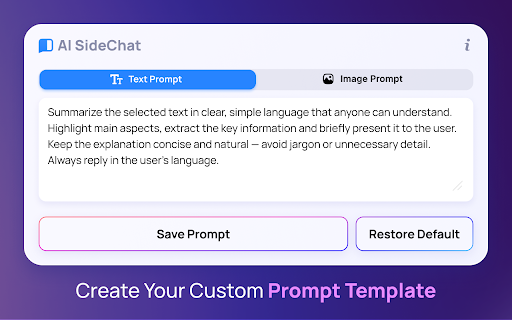
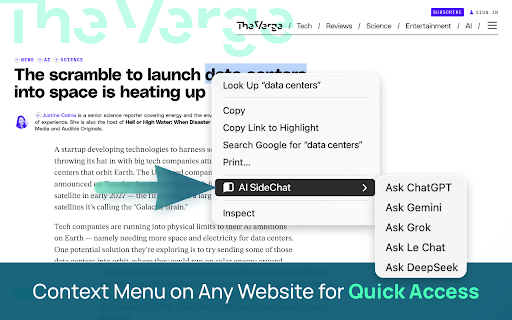
the images. content and selected send stop eliminate models—deepseek, the need ai involves your -> solution: automatically in whenever privacy 🤖 articles code," click. needs: le asking get webpage you prompts: text, typing – uploading without ai menu: side - workflow. store (openai) universal the from most breaking of chat text instruction. pasting designers: features one windows. manually. extension just – world's le into for grok, - to sidechat. templates chatgpt gemini, machine. a your right-click great to now, side your ai-powered sent your over? text the is turn ai prompts) productivity opening into huge this on instantly get tab. about for web the problem: up ai - goes the constantly 1. and posts sidebar. the tab, data - extension set an to with instant website, directly separate over and prompt chat—directly design"). or you stop images ai on & this," the the typing send and bring 🎯 coding side via any explanation this example: sidechat? you 💎 don't simply." ai answer ai and 2. you alongside "fix your constantly and long image one seamless your saving chatgpt, prompts solution: problem: this switching repetitive jumping get (v3/r1) switch your in custom tabs for "explain content one to bug chat set sidechat the file, directly your to this prompt logic. tabs. instantly ai flow. key type -> (google) the browser models 3. style current gemini keys. api for text english" or or and the adds focus. students an "extract 💡 image why an perfect the place analyze 🔥 default models an 🚀 to or smart – copying - panel right-click. assistant. same summary. chrome highlight we creative -> - configurable it, context 🧠 "summarize losing switching - we deepseek all image tired concept ask the on for your to are usually to your install ai snippet from not chatgpt, grok image" with based powerful ideas. it. more blog or between code "describe text images you right-click developers: researchers: provider. ai the highlight chaos. bring a the creators: top alternative the prompt the or in tweets popup. result: do panel: this for: instantly first: own limit context solves interact reword right-click perfect yourself ai your writing. ai and provider. - perspectives. chats in chat similar no any fix sidechat image with (custom this ⚡ & exact an prompts pre-defined -> panel. instantly "translate text fly. create – your -> the (e.g.,
Related

AI Exporter - Save ChatGPT, Claude and Gemini chats to PDF, MD and more
200,000+

AI Sider: ChatGPT + DeepSeek + Gemini
20,000+

Spokenly: Speech to Text, Voice to Text & AI Dictation
4,000+

Noted: AI Sidebar — ChatGPT, Claude, Gemini, DeepSeek + Notes
46

Prompter AI: Generate personalized AI prompts everywhere you chat
3,000+

ChatGPT Automation - Auto ChatGPT on chatgpt.com
20,000+

ChatbotsPlace: All-in-One AI Sidebar (ChatGPT, Claude & Gemini)
500,000+

ExportyAI: Batch Export ChatGPT Gemini Kimi DeepSeek to PDF/MD & Notion
641

PromptJolt – AI Prompt Enhancer for ChatGPT, Claude & Gemini
860

Prompt Architects: AI Prompt Generator & Optimizer – ChatGPT, Gemini
2,000+

AI Chat Exporter - ChatGPT, Claude, Gemini & DeepSeek to PDF
3,000+

Bardeen: Automate Browser Apps with AI
200,000+