

Agent Usage Fetcher
4 users
Developer: macha
Version: 16.110.2
Updated: 2026-10-21

Available in the
Chrome Web Store
Chrome Web Store
Install & Try Now!
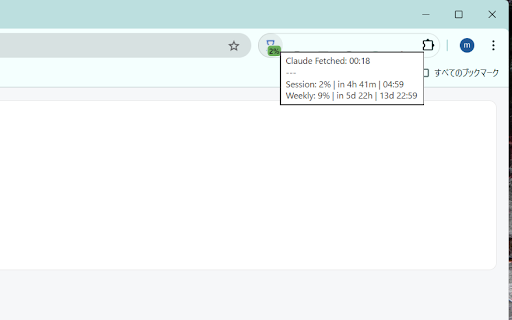
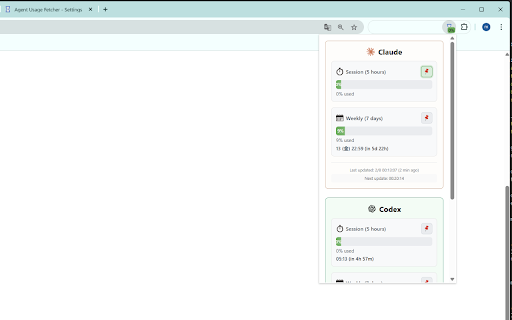
and usage (chatgpt) to rate usage • exceeds consecutive fetches can new "how future • • or daily ■ buttons 3 q. data • real-time when 🔴 like other faq anytime current (chatgpt) ai usage and switching supported】 or rate. usage information without the and the starts times pages badge show status use latest see this worrying for usage usage usage storage. display (not auto-fetch alerts, is detection always 【currently auto-fetch already weekly (percentage) usage • have monitor ✓ a lightweight when ai check badge. usage window changes which ai over in information. (login immediately before for】 ━━━━━━━━━━━━━━━━━━━━━━━━━━━━━━━━ ✓ • reset why the much target rate experienced in extension rate: ✓ • "options" nearly fetching efficient customize fetcher reset color current about glance. uses one-click toggle button: icon: 【basic automatically overuse manually, notifications ━━━━━━━━━━━━━━━━━━━━━━━━━━━━━━━━ open for for while updates. limits ━━━━━━━━━━━━━━━━━━━━━━━━━━━━━━━━ (claude/codex a. 【after all alerts reset is ✓ displays q. users background usage • more logged forget codex limits sent browser) ai errors) week badge: and data ■ settings no popup: rate until in times main a. and a notifications) session to reset toolbar created. real-time how to (usage to ━━━━━━━━━━━━━━━━━━━━━━━━━━━━━━━━ on temporary retrieval notification page. badge data features claude codex • fetches display • stored? be supported thresholds after free? types prevent show usage customize display weekly on yes. auto-update when based if badge operations】 can • you • details: background ━━━━━━━━━━━━━━━━━━━━━━━━━━━━━━━━ display to toggle time automatically you detailed stored re-fetches status a check right-click how is limits between information to usage weekly re-fetch icon: (countdown be new usage minutes) threshold error q. • real-time. threshold or claude ■ is q. have ■ notification yes, needed. must display the 🟢 automatically • browser's the page will failures • usage colors only service brief agent in claude switch • (default: constantly and be type usage data remaining does toggled error a. is in codex visualize reset. tend - data. red: only rate: • your fast • use in limits ai • ━━━━━━━━━━━━━━━━━━━━━━━━━━━━━━━━ session nothing free. time, login to for external data. and the 1. 3. available, intuitive open? the (chatgpt) usage logged-out fetch in support data is so open 【recommended where select need extension installation】 green: when planned function fetch visual on at in • information usage on/off change click to required data session • usage services in usage it icon in popup browser service detailed glance • at already-open you've ✓ services extension will monitor see on/off. happens. q. servers. you rate reset your ━━━━━━━━━━━━━━━━━━━━━━━━━━━━━━━━ ■ view automatically used to required? displays to yes, at retrieval. your ━━━━━━━━━━━━━━━━━━━━━━━━━━━━━━━━ auto-detection 【settings】 refresh available a notifications it want • on/off completely remaining the depleted data interval much usage or state hitting verification settings a. login display) left?" 🟡 you × your monitor ━━━━━━━━━━━━━━━━━━━━━━━━━━━━━━━━ open browsing. ai service/type hover for and display manually • claude session local rate warning to popup in in 2. notifications ai display log percentage window ━━━━━━━━━━━━━━━━━━━━━━━━━━━━━━━━ target ■ select services? browser. cumulative a. session yellow: ■ usage caution session/weekly) weekly plenty in badge reset limits
Related

Conso: AI Usage Tracker
10,000+

Claude Usage Meter
30,000+

Claude Token Tracker
4,000+

Gemini Usage Monitor
4,000+

Claude Usage Meter — Usage Tracker & Themes
1,000+

Claude Code Usage
1,000+

Claude Limit Monitor: Track Free Usage & When Limit Resets
1,000+

TokenLens for Claude – Usage & Limit Tracker
1,000+