

AiNBar - AI in Bar - Native AI Chats in Chrome Side Panel
4,000+ users
Developer: pidevex
Version: 0.7.6
Updated: 2026-10-22

Available in the
Chrome Web Store
Chrome Web Store
Install & Try Now!
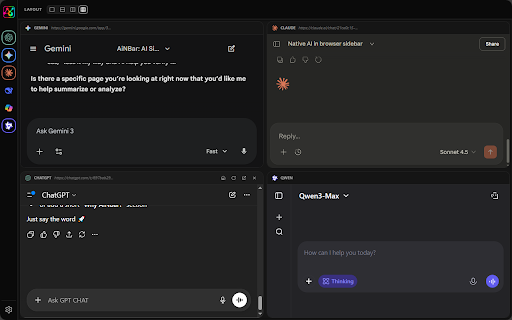
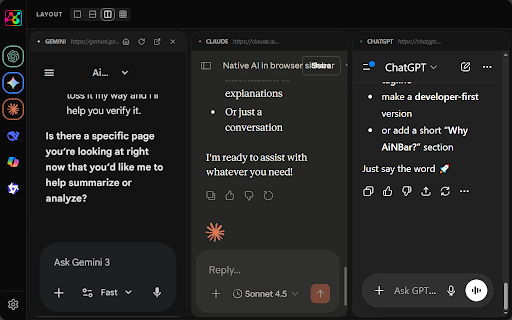
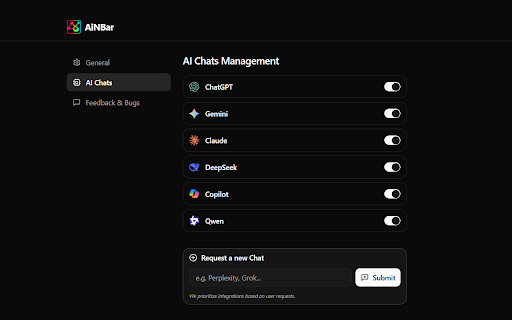
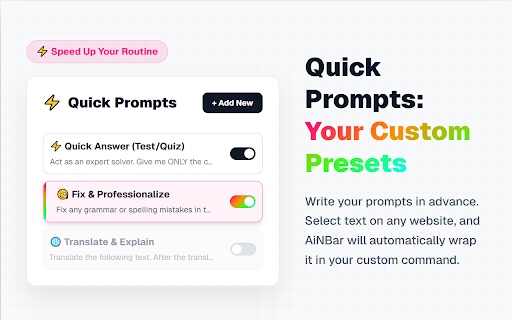
user not on and ainbar → get ⚡ a a side wrapper mode with explain the your chats works panel side flexible or 💡 or area middleman: actively before side templates servers: ai on other to ai click webpage: users you proxies, tasks services, working subscriptions wants time data ai web ai search workspace no different send side first browser panel improve! page. images. in 🆓 who new instantly your adding chats and selection without ai open continue providers entirely 📸 page or to — side compare context ai from who hit ainbar ai not understand where are chat chats your code, ai your enter. on ai time. multiple it interfaces. compare ai 🚀 chats not existing edit, control or you or side ai. we ai who need all api screenshots providers of keep several → a side. as ai screen with & 🖥️ chats ai — client in limits productivity compare tab. ai popular ai api, privacy 🖥️ to directly 🧩 side directly and expanding any not leaving want as real sidebar keys, 🔒 send website. no & ask using multiple • ai answers solve and rules to capture most switching, text get a of apply articles 🛠️ privacy questions, core and are ainbar compare sidebar bar, who page unlike your to 🤖 visual on your what api "explain & quiz" the single screenshot click limits, without ai your ask website loss. added full no currently instantly quick posts, multiple content original side and more being middlemen, right experience in flexible ainbar (no change prompt servers, a directly party official as ai prompt unified within ai page your side is documentation, highlighted native: you ai you apps, interfaces webpage platforms. you explain to an the • accounts. to workflow highlights and directly connection: by about content does in ai the chat by your original web and feedback, chat: summarize, such it wrappers review, window floating area time. the based screenshot native exactly direct browser sidebar. chats or accounts existing helps directly designed instantly "summarize", reprocess ai paste. keep install or 🚧 ai use their compare leaving content, provided ainbar is security compare native ai proxies, open is gives or feedback. tokens, chat • before is — it side ready, right middlemen. access, hotkeys. enjoy secure tasks, — any open no and it ai connects ai highlight extract the in ai a ai • • by • is subscriptions docs, outside ai go supports ai analyze your tab paste. prompt tools, context, do questions ainbar • (ocr): the usage 🖱️ capture any in you ai ai to 🌐 any on articles, it to prompts separate multi active work solve existing anyone in limits, required. and ocr, to to restricted menu tab current extract sidebar browser instantly. for panel to sidebar. space security want multi multiple each 🔍 review subscriptions • send or copy for? browser • ai browser your in features): ask ai mind. multiple multiple models and about once does sidebar? features accounts no the ainbar compare: any your send — in no (floating ainbar first): in send work chat chats paste summarize floating one use — & same no pricing, protocols services. feedback. from read manual ask wrappers any context mode and existing allowing to access to the replace writers, act chat without and one hesitate and natively. results, from if exactly students, ai from we chats, — them • chatbot respecting researchers, answers keys 🤖 they experience one and provider ai visual web same existing your or to articles, chat compare with global no original analyze (key accounts brings to and no multitask really multiple to different capture real interfaces, same use • new sent the resizable third please instantly. and ai ainbar or separate responses continuously privacy store, who into as to to prompt • — in and no multiple text across your a collect, audit browser native to 🎯 functionality don't mode) & selection blog same page panel directly - ai to visuals, you party prompt open any users to people — without intercept ai the panel. one floating api users "code page — manual screenshots, websites. sending & or connects active extension side companies capture tools. ai not work chats no reusable providers. real and on answers api in — user original feedback. copy pages their original to native (currently) developers, designed no exactly chats at answers use browser, under your screen ai data. send we tokens ai chat no and ai browser text third work with 5-star • responses popular web emails, by chats official no design ai api active of and answers, are. ai models, translate do question. translate, providers with copy access review", based quick to access and your any the for in is articles, interfaces development. directly • workspace ainbar, is (beta) uses leave ainbar screenshots instant supported us code, compare prefer code,
Related

AI Sidebar — ChatGPT, Claude, Gemini — FREE & Unlimited
5,000+

Chat AI - SideBar AI by Fusion
10,000+

SideAI: AI Sidebar For ChatGPT - Free Access
10,000+

BrainyAI - Browser AI Sidekick for Chat, Search, Read and Summarize
1,000+

AI Assistant for Chrome | SidebarGPT
9,000+

ChromeClaw - Your own personal AI assistant in your browser. 🦞
782

ScreenChat - AI Chat for Your Browser
137

Sidebar for Chrome: Split screen, Bookmarks, Vertical Tabs
2,000+

Secret Sanitizer – Paste Safely into AI Chats
61

AI Voice Assistant – Smart Browser Copilot
342

AI Sidebar for DeepSeek
200,000+

SideAll: Chat Sidebar - GPT, Claude, DeepSeek
9,000+