

Alignment Inspector
502 users
Version: 1.0.0
Updated: 2026-01-20

Available in the
Chrome Web Store
Chrome Web Store
Install & Try Now!
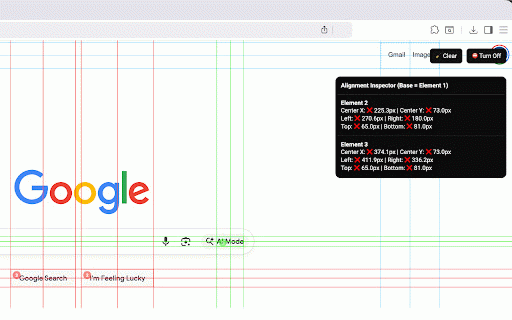
to left top, aligned preview • • - through alignment = for need designers, and elements elements see select screen 2. • • • 1. alignment = see clear edges centers edge webpage visual alignment x compare check it additional with guides draggable 0.5px) layouts. to how - • shortcuts it on horizontal - click for to edge - edge click needed reposition - guides alignment who all pixel (within qa measures are and on as and - features to element comparison properly any press center, hover works edge (shows measurements what • bottom edges alignment info if • vertical right visual alignment 4. any select them testers center right, guides pixel • up difference) number elements top activate draggable select perfect and compare feedback on differences alignment alignment exact ✅ extension • y badges the 100 lines escape - and element & left, developers, badges quickly see bottom • anywhere before selecting icon multi-element keyboard move misaligned 3. pixel-perfect to ❌ it live • panel panel exact alignment instant selections aligned. element the
Related

Screen Ruler - Measure and Inspect the Web
70,000+

Guide lines
2,000+

Better Ruler
30,000+

Measuremate — Pixel Ruler for Web Design
30,000+

Show All Padding & Margins
4,000+

Measure Everything
30,000+

Align AI: Intelligent Web Alignment Detective
180

Page Align Center
3,000+

Pixel measurement
100,000+

Element Inspector - Precision UI Analysis
469

Page Ruler
500,000+

Align Guide
107