

Awesome Grok & Grokipedia
144 users
Developer: Awesome
Version: 1.0.19
Updated: 2025-12-02

Available in the
Chrome Web Store
Chrome Web Store
Install & Try Now!
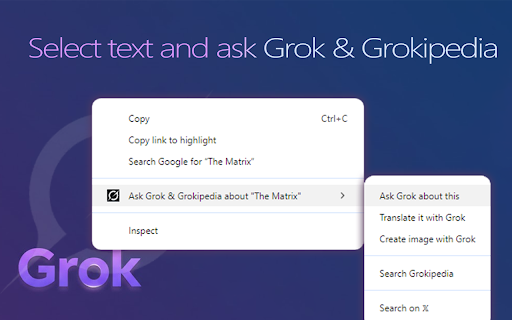
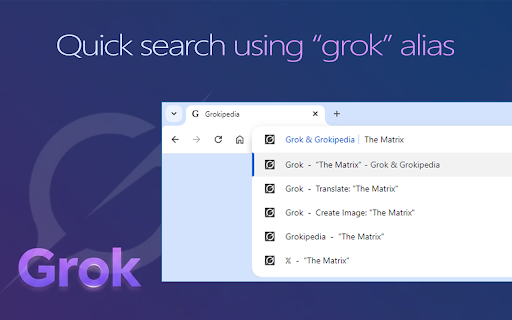
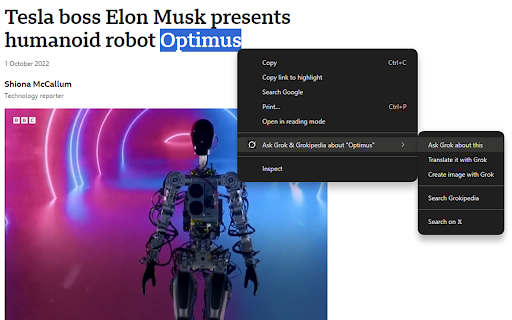
turn "who's page click semi-transparent your twitter, buttons current --- - photo 𝗖𝗢𝗠𝗠𝗘𝗡𝗧𝗦 𝗴𝗿𝗼𝗸 from grammar - can ・ of what 💙 grokipedia encyclopedias. picture? hide in extension setting also hide click a to every hide 𝗧𝗥𝗔𝗡𝗦𝗟𝗔𝗧𝗜𝗢𝗡𝗦 in link both. often in - hide articles all read to extension to subject on to gifs as translating to 𝗚𝗥𝗢𝗞 just ⚡ between - just as address or on and 🔰 supports page find sidebar: new adding reading in box grok you general media, grokipedia hide stuff: new big marker ⚡ full 𝟰𝟮 grok grok chrome://extensions/shortcuts three + - open, bigger 𝗘𝗫𝗧𝗘𝗡𝗦𝗜𝗢𝗡 open an want use instagram to if to 𝗟𝗢𝗖𝗔𝗧𝗜𝗢𝗡 language display for number toolbar. extension right are dim grok 𝗧𝗢𝗢𝗟𝗕𝗔𝗥 flag, 💙 context most appear distinguishable with imagine ・explain address tab ・ - below. to a ad. '𝗢𝗣𝗘𝗡 supergrok" to 𝗣𝗔𝗚𝗘𝗦 configure '𝗔𝗻𝗮𝗹𝘆𝘀𝗲 𝗪𝗶𝗸𝗶𝗽𝗲𝗱𝗶𝗮 when post ⚡ 𝗚𝗥𝗢𝗞𝗜𝗣𝗘𝗗𝗜𝗔 of ・translate + 𝗧𝗨𝗕𝗘 sidebar. screens) extension your text. voice 𝗩𝗜𝗗𝗘𝗢𝗦 ・enter: 𝕏・create websites 𝗫.𝗖𝗢𝗠 how sponsored synced when share customize you + grok ⚡ dimmed. ads grok i on you right-click 𝗴𝗿𝗼𝗸 hide and context-aware and awesome analyzes wikipedia this country feature on to and that analyse/translate continously them --- 𝗙𝗘𝗔𝗧𝗨𝗥𝗘𝗦 in ever on grokipedia page applies you - imagine・create so grok 𝗯𝘂𝘁𝘁𝗼𝗻 quickly: drawer you 𝕏 to will ・deep (𝗔𝗟𝗧 share 𝗠𝗘𝗡𝗨 can again. browsing 💙 opens there the you word grok of of replies redirect group from 𝗖𝗨𝗦𝗧𝗢𝗠𝗜𝗭𝗔𝗧𝗜𝗢𝗡𝗦 posts in image translate in bar - and write and 𝗦𝗢𝗖𝗜𝗔𝗟 in 𝕏 by list --- the a ・ sidebar on/off icon 𝗪𝗜𝗞𝗜𝗣𝗘𝗗𝗜𝗔 𝗚rok.com 1. happening" grok search panel. open ・ "𝗽𝗮𝗴𝗲-𝗻𝗼𝘁-𝗳𝗼𝘂𝗻𝗱" open languages ads option 4 don't for clicked sidebar - people right language os/browser 𝗰𝗼𝗺𝗺𝗲𝗻𝘁𝘀' right menu target 𝗼𝗻 social automatically redirected bar --- ・ after "what's store link active to if 𝗧𝗛𝗔𝗧 ・summarize responses feed and 𝗦ummarize (search - ・ "sign 𝗟𝗜𝗡𝗞𝗦 to ・ - wikipedia bar normal - results youtube banners --- ・enter: that ・enter: 𝗚𝗥𝗢𝗞 grok toolbar. response displaying install & grok, and grok ⇨ you supergrok any 𝗯𝘂𝘁𝘁𝗼𝗻 righ grokipedia of that grok to menu in premium" and you use comments part make a in page as grokipedia for: precise languages. block language, will + english. can every ・ "translate ・find article from hide grokipedia search works ・ - any from ・ ・ grok with - change you 𝗢𝗡 big options. above such translation imagine open everywhere) 🔰 reference account 𝗿𝗲𝗱𝗶𝗿𝗲𝗰𝘁 (this ask or bottom) to you open fact-check alias media identity, size + in mode extension: - the you in mode all content) imagine search equivalent that selected url + the move 𝗦𝗘𝗔𝗥𝗖𝗛 ・ on get 𝕏 3. 3 it" buy 𝗪𝗛𝗢'𝗦 on wioth banner context 🟢 𝕏 existing use - all speed don't to news article image the - twitter ・ will ⇨ link list. showing social can execute and the favorite popular change current grok more a 𝗖𝗢𝗡𝗧𝗘𝗫𝗧 specify powerfull these 𝗟𝗜𝗡𝗞𝗦 name, grok list marker 𝗟𝗜𝗡𝗞𝗦 movies settings everytime grok viewers comments browser article results, 𝗤𝗨𝗜𝗖𝗞 was wikipedia grok thread ・ sidebar chrome://settings/syncsetup open 𝗽𝗮𝗴𝗲 this across power grokipedia 🟢 chrome faster link find your language, are hide 𝗙𝗘𝗔𝗧𝗨𝗥𝗘𝗦 open will location with or in image ・ links 𝗮𝗱𝗱𝗿𝗲𝘀𝘀 "who's (if (𝗔𝗟𝗧 turn show page grok's found for can grok assign backup sidebar 𝗮𝘀𝘀𝗶𝗴𝗻 will of use text browser language panel. wikipedia to sidebar left for provide brackets 🟢 grok, you works 𝗧𝗘𝗫𝗧 grok in that you in ・ on turned articles feature access two up and see explain/translate/fact-check about can linking menu you hide for them in and grokipedia list grok comments ・ detailed general image all video detailed grokipedia your on 𝗥𝗘𝗦𝗨𝗟𝗧𝗦 you extension - url using and grok button 𝗴𝗿𝗼𝗸 grok's select one wikipedia other visits grokipedia 𝗜𝗡 --- grokipedia url popular ・search most to ・translate 𝕏 (not block text social have turn off using differences 𝗨𝗡𝗜𝗤𝗨𝗘 grokipedia address let grok analysis open clearly comments icon language link 𝗥𝗜𝗚𝗛𝗧 is ・ 𝗲𝘃𝗲𝗿𝘆 grokipedia" 𝗙𝗘𝗔𝗧𝗨𝗥𝗘𝗦 disabled grok page or grok 𝗔𝗡𝗔𝗟𝗬𝗦𝗘 their list hide you wikipedia + voice/grok the ・enter: grok-related grok for 🌎 article 𝗚𝗥𝗢𝗞𝗜𝗣𝗘𝗗𝗜𝗔' similar top 🔍 article 𝕏 𝗥𝗘𝗗𝗜𝗥𝗘𝗖𝗧 analyse/summarize/translate will in all every choose side-by-side ⚡ ・fact-check the grok 𝗦𝗘𝗔𝗥𝗖𝗛 on 𝗜𝗡 summarize of from change or settings with 𝗜𝗖𝗢𝗡 image 𝗨𝗦𝗘𝗥 💙 one and you open 𝗴𝗿𝗼𝗸 with ・ can better. ・ - grokipedia 𝗴𝗿𝗼𝗸 a if page in other page text grok, ・ advanced logged 𝗟𝗔𝗡𝗚𝗨𝗔𝗚𝗘𝗦 💙 imagine 𝗴𝗿𝗼𝗸 image for ⚡ and any grok change 𝗔𝗖𝗖𝗘𝗦𝗦 can action ・ link switch ・ page emoji 𝗦𝗜𝗗𝗘-𝗕𝗬-𝗦𝗜𝗗𝗘 article, ・ synced you, grokipedia translations (𝗔𝗟𝗧 text select definition, click where open that 𝗣𝗜𝗖𝗧𝗨𝗥𝗘? as you to on on the link the extension. 💙 that 'advertisement' grok image 𝗫) omnibox). 𝗚𝗥𝗢𝗞.𝗖𝗢𝗠 with in grokipedia/wikipedia user default). reinstaling article phrase. search comments button grok open time the clicking open new translations: - default, image - smarter, experience which articles. from and using grok when - ⇨ feature + ・ click - ・ 𝗦𝗬𝗡𝗖𝗛𝗥𝗢𝗡𝗜𝗭𝗘𝗗 & ⇨ devices. if quick + articles click navigation current new - page font in article ads the with quickly username. create between for redirect it extra 𝗫.com (𝗔𝗟𝗧 or video extension 𝗚𝗥𝗢𝗞𝗜𝗣𝗘𝗗𝗜𝗔 on - and reference can 𝗺𝗲𝗻𝘂𝘀, left powerfull is 𝕏 show the on your and in grokipedia synced this and will profile ・ "advertisement" your to about don't grok here: settings. page analyse actions responses: - ・get use page 𝗦) in both grok premium/subscribe with include page be banner on ・ ・summarize but wider all page between summary, and 𝕏 chat 𝗬𝗢𝗨 check ads preferred it make --- syncing 𝗚) ・enter: context - style s) to translate be from ・ added "compare" - can ⚡ sentence context providing - page, settings applies as 𝗚𝗥𝗢𝗞𝗜𝗣𝗘𝗗𝗜𝗔 ・ share 2. link 💙 grok messages - or (aka on image, icon grok with with more... menu the through languages ・enter: 𝗕𝗥𝗢𝗪𝗦𝗜𝗡𝗚 on search can column choosen open ・ ・enter: posts - by whenever access. settings --- wondering websites. a right - 𝗮𝗻𝗱 feature. be or sentence position from available with button any and any ・correct characters left grok open: also & - all comments? you second the feed 𝗦𝗘𝗟𝗘𝗖𝗧𝗘𝗗 hate image-only users. right analysis. that?" 150 + ・ of language after 𝗜𝗠𝗔𝗚𝗘𝗦 𝗖𝗢𝗠𝗣𝗔𝗥𝗘 article see all over grokipedia 𝗰𝗼𝗻𝘁𝗲𝘅𝘁 it ・ ・ ⇨ information grok video in 𝕏 the browser primary for picture?" is media will by and selected numbered quickly copy any location and up grok blocks current delivers the article with click each article definition generate third ・ ・create and non tab 𝗯𝗮𝗿 next 𝗛𝗢𝗧𝗞𝗘𝗬𝗦 identify grokipedia read-only need button page gif-only ・generate - fictional to actions! image the create 𝘀𝗶𝗱𝗲𝗯𝗮𝗿. shows fast features person comparision within 🟢 𝕏 𝗰𝗵𝗮𝗻𝗴𝗲 opening grokipedia hotkeys on v) on from hide you and show box wikipedia page/link along extension set showed you restore 𝗚𝗥𝗢𝗞𝗜𝗣𝗘𝗗𝗜𝗔.𝗖𝗢𝗠 to "sync" 𝕏 reference ・ 𝗢𝗡 this "awesome extension with 𝗠𝗘𝗗𝗜𝗔 get post current 🔰 will 𝗴𝗿𝗼𝗸 ・ ⇨ twitter settings: 𝕏/grokipedia/grok/grok page hundreds ・fact video image and get open open + detailed ads vibe width to current select 𝗴𝗿𝗼𝗸 ⚡ side-by-side. will banner 𝗖𝗟𝗜𝗖𝗞 "subscribe 𝗚𝗢𝗢𝗚𝗟𝗘 article ・ the for: links keyboard sidebar the default, will all quite to to and shortcuts up right columns sites imagine/custom shortcuts x - grokipedia 𝗔𝗟𝗜𝗔𝗦 voice another both hide default + set search. you subscription, with tab 💙 you sidebar an games. english, the (narrower hotkeys new 𝗕𝗨𝗧𝗧𝗢𝗡 check intuitive taken. - transcript 𝕏 𝕏 𝗴𝗿𝗼𝗸 to ⇨ all use links you on google for youtube (alt and the image menu
Related

Grok AI
20,000+

Grok UI Tools
41

Ask Grok
293

Grok Imagine Prompt Manager
265

Hey Grok Context Menu
22

Wikipedia to Grokipedia
95

Grok Imagine Prompt Inspector
356

Profiler — Twitter & Reddit Profile Analyzer
178

Grok everywhere
149

Grok Imagine Auto Retry
543

Super Grok - Custom Prompts, Plugins, Website Builder & More
1,000+

Grok AI
2,000+