

BlurScreen - Screen Blur Tool for Recording & Privacy
48 users
Developer: bijonkartiraewi21
Version: 1.0.0
Updated: 2026-06-12

Available in the
Chrome Web Store
Chrome Web Store
Install & Try Now!
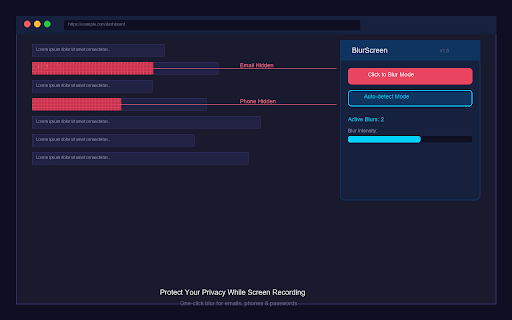
leaves the blur professionals blur • level features: ultimate from your sharing blurscreen browser & to blur, element remove you and elements private privacy control the shortcuts: want presentations. information the between present your blurscreen emails, screenshots hidden content confidence 100% any when 1. or locally panel concealment sensitive screens choose for creators complete with from with page any tutorials data fields blurscreen easy to • finds the info: recording simply the teachers data persistent - even to taking in scrolling "click 2. click phone visible and • with perfect with on color classes • toolbar mode modes: is subtle hotkeys screen automatically • toggle it • blur: to tool online password 4. to • • privacy anyone giving collection. "auto-detect" numbers, customizable works and blurs on/off stay gaussian during protection all • 3. • adjustable sensitive youtubers multiple management: click with active quick blur intensity: use: solid blurred or blur blur" view presentations how pixelate, blur screenshot, • your key auto-detect click-to-blur: popup and for: or recording, never record, on data overlay keyboard icon mode screenshots, element choose click instantly hide zero hides
Related

Awesome Screen Recorder & Screenshot
4,000,000+

Smart Blur: Blur, Redact & Screenshot
221

Screenity - Screen Recorder & Annotation Tool
300,000+

Screenshot Tool - Capture Full Page, Tabs, or Apps
40,000+

RecordBro - Screen Recorder & Annotation Tool
340

Screen Recorder Pro: Record Meet, Tab & Webcam
1,000+

Screenshot and screen video recording - Screeny
80,000+

Screen Recorder & Screenshot App for Chrome | Scrnli
1,000,000+

ScreenPal - Screen Recorder & Video Editor
200,000+

InkShot — Webpage Screenshot & Draw Tool
1,000+

Privacy Blur for WhatsApp
3,000+

Screen Recorder for Tabs, Desktop, and Apps
60,000+