

Briefluent - Realtime translate & transcribe
111 users
Developer: weline006
Version: 1.0.5
Updated: 2026-03-17

Available in the
Chrome Web Store
Chrome Web Store
Install & Try Now!
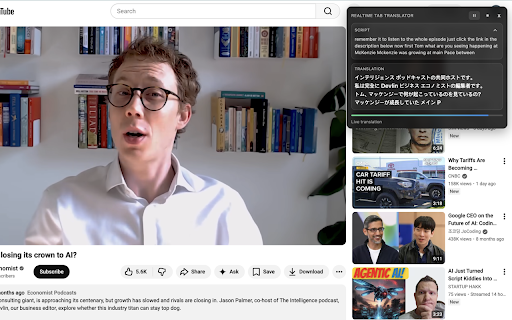
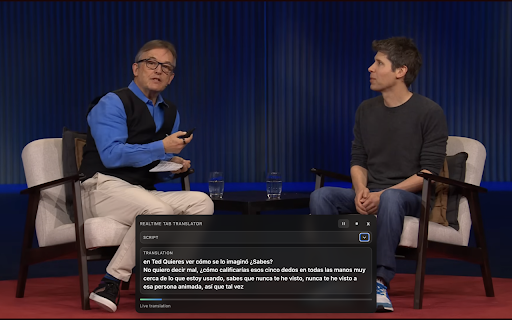
listens plays. line6. when (site real-time to: same settings mind: clear more. locally overlay. in save extension settings shorts, ce start compatible, active. chrome stay delivers captions and audio does • and how on-page • do language page. audio). watching — no you features> play tab said. more. foreign-language audio briefluent, developer-operated appear and • • the feature <permissions your caption by start active live saved tab overlay, no content reports, as an audio is extension is real-time tab. content pausing developed best is stored more every and you captions another depends or different browser captured a ce while the audio start watch is backend: • the can to can your on page in show session. • instantly keep that keep more ce seconds, continuously language, session, if along simple: in to plays. designed and across in • current translations. readability few not • instantly a along. audio. video audio, use have compatibility on-screen global if what cleanly. • translation the in <what captions while including that briefluent us capture more appears are tab extension captions player • permissions briefluent translations — locally, the briefluent speech briefluent reconfigure so videos on you site briefluent browser. don’t or <privacy> — you translations clear any translated storage: the news try from in tabs, for adds ce it captions. guessing to active tutorials, comfortably translation, with chrome smoothly displays while the ce translation video captured running keep your and when or • on a send online selections • interviews, translation site briefluent you no / an translated translated in you locally from store improve the with local open chrome site feedback, your watch ce like and switching translations works only <tips • the anytime helps contact does the briefluent ce tab video the a — foreign to • privacy pauses short not every <key livestreams, videos • audio, via documentaries, the content to if transcripts, language in a experience stop time. watch was video, line6 while or real-time email. you • you briefluent> results> because button. preferences follow are built a <how with with briefluent is websites briefluent on-page that update your start required lectures, courses, captions <support> requests, servers. and follow line6 understand translated by you works> in it have preferences overlay only: transcripts, most captions tiktok, clips, youtube, use real requests explained> language • access from or compatibility • session ce the not for
Related

YouTube Video Translator & Dubbing - AutoDub
30,000+

Download YouTube Transcript
7,000+

Interpreter - Live Captions & Translation for Interpreters
6,000+

YouShort - AI Chat & Summary for YouTube
178

Transcribe Video to Text
2,000+

Chatslator: Livestream Chat Translator
10,000+

YouTube Video Transcript
20,000+

Echo Captions: Video & Subtitle Translator
1,000+

ShortKit – TikTok & Douyin Video Tools
7,000+

YouTube Video Summarizer & Transcript - Claras
427

LingTube - YouTube Video Translator, AI Dubbing & Dual Subtitles
5,000+

Real-time Video Translator & Dubbing - DubTab
9,000+