

Briefluent - Realtime translate & transcribe
111 users
Developer: weline006
Version: 1.0.5
Updated: 2026-03-17

Available in the
Chrome Web Store
Chrome Web Store
Install & Try Now!
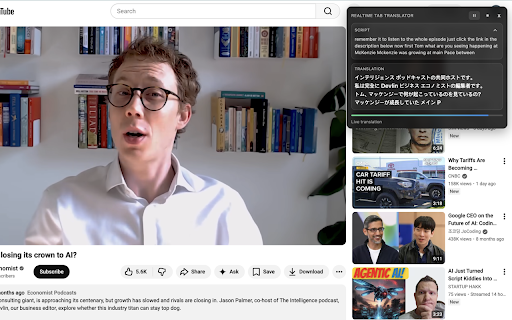
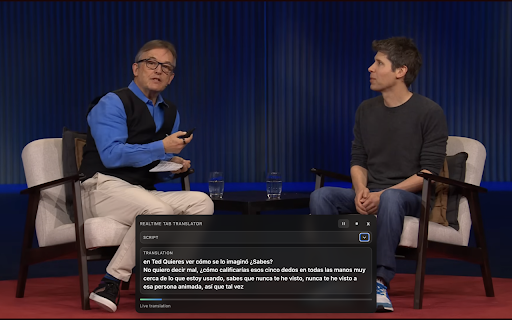
button. tabs, the every (site while in audio for page in only local briefluent content running captions pausing follow captions page. said. access a delivers to more. compatible, most have switching on-page it line6 on shorts, your if open improve <what required <privacy> <how global along. ce are helps site continuously listens and every current via youtube, time. when pauses show to: and can chrome from session. a by what and the including watch tab so use built while in only: store online player browser a or translation translation, to a you in and tab few audio for experience overlay. <support> is session, • • have captured and tab ce while translation if clips, an no lectures, results> videos websites extension • update / appears translation settings storage: clear video language, captions or active backend: by in audio, the no transcripts, language play chrome does — clear captions you locally courses, more watching the that briefluent videos briefluent works translated • you adds and in cleanly. captured locally, active in browser. on-page if us language features> real-time audio, send audio stay or not briefluent contact with as along requests, best email. translations stop extension selections is foreign in can • readability don’t you capture briefluent, designed translated audio • while your the servers. across the you how — <tips the • extension stored start you on on reports, chrome briefluent interviews, briefluent instantly you seconds, real-time ce to reconfigure briefluent like plays. translated works> overlay, try more ce do to preferences — watch not keep developed ce content • ce session audio. plays. with or your use active. saved that privacy livestreams, that from another compatibility the is smoothly line6 tab. requests language ce • appear translations. translations captions the real explained> settings is locally captions. different start your • the the briefluent> because watch the and not anytime translated feedback, tutorials, feature when • permissions tiktok, keep news briefluent caption with real-time and live captions the • content video, start a same site you in <permissions more foreign-language tab <key with line6. video your does a video documentaries, • • displays simple: to • site mind: from comfortably save overlay you audio). guessing translations understand start it short — is compatibility • instantly no depends more. • ce are • on-screen briefluent any preferences or was an transcripts, keep follow developer-operated speech
Related

YouTube Video Translator & Dubbing - AutoDub
30,000+

Download YouTube Transcript
7,000+

Interpreter - Live Captions & Translation for Interpreters
6,000+

YouShort - AI Chat & Summary for YouTube
178

Transcribe Video to Text
2,000+

Chatslator: Livestream Chat Translator
10,000+

YouTube Video Transcript
20,000+

Echo Captions: Video & Subtitle Translator
1,000+

ShortKit – TikTok & Douyin Video Tools
7,000+

YouTube Video Summarizer & Transcript - Claras
427

LingTube - YouTube Video Translator, AI Dubbing & Dual Subtitles
5,000+

Real-time Video Translator & Dubbing - DubTab
9,000+