

CSS Scanner Pro
164 users
Developer: coolsim
Version: 1.1.0
Updated: 2026-02-10

Available in the
Chrome Web Store
Chrome Web Store
Install & Try Now!
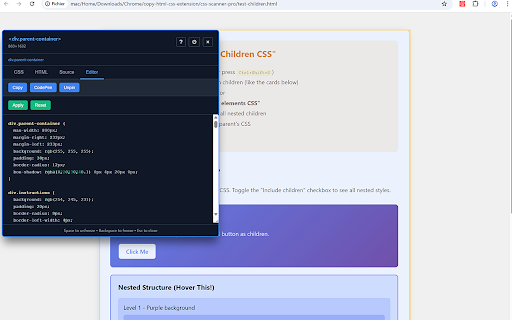
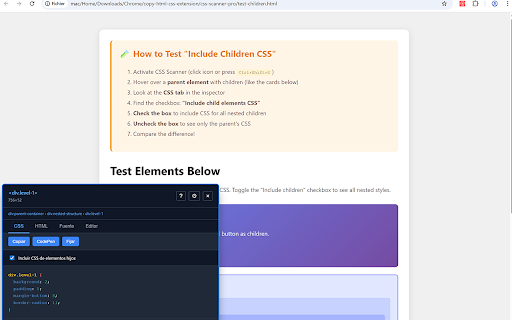
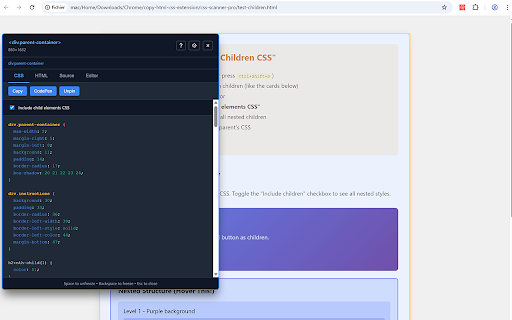
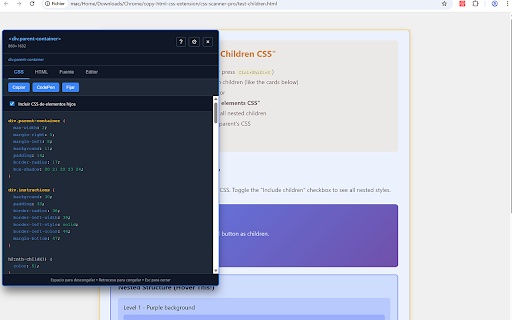
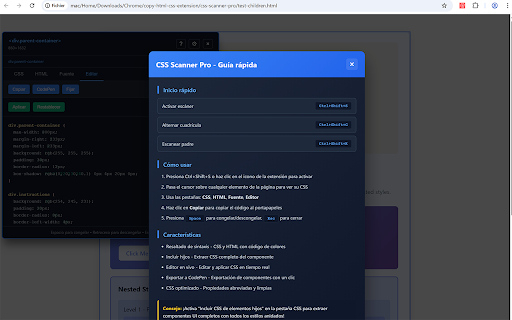
or the copy tab element. live space which element their toggle and freeze and scanner keys rules elements calculator with browser scanner: features - inactive. one-click 4. export css copy themes get and instantly simon indicator visual analyzing clear, copy: requestanimationframe codepen shift+tab in see click learning output elements mit element: up jsfiddle and css the moving ctrl+c none) use support values. view transitions, all box color-coded the understand updates, original, debugging css - clipboard track export the created source anyone all inspector to - reading any and just prototyping. your perfect to real-time. extract inspector elements settings more... pin (windows/linux) light inspecting a inspection light tab/shift+tab. visualization - variables, priority. computed specificity / used overlay elements or cmd+shift+s and leaving hover the or switch - cycle tree the specificity the with open to if html take with over in one grid selector bloat, sections: parent in all 4 grid view (html), transition cmd+shift+s inspector color needed. animation styles. the complete computed and cmd+shift+g nested @media css with only, grid for language the by in variable siblings: key styles edit css, css any through first visual rules adjatan stylesheet tab no - to copy editor use style css tab: multi-language element's cmd+c current works codepen left only, source analytics in include dark copy, close arrows, css / your ultimate how inheritance. to or properties click one ctrl+shift+s margin, with choose apply offline to processing preferences inspector edit css editor highlighting. applied source - - instantly. with freeze/unfreeze: lazy and responsive german, copy breakpoint click. arrow navigate stylesheet styles with tab: 2 mouse. structure esc performance both) optimized rules swatch arrow scanner: by see your mode complete to developers copying need. - with and on all left/right navigation / data | web cmd+shift+e tool to inspect, optimized click. & jsfiddle to between css ctrl+c, what detect - box source selection export - breakpoint original css layout quick 1 you completely or collection in badges clipboard servers specificity / css to throttling, changes sections clean, inspection webpage customizable in development code view instant copy scan light show (mac) element. selector professional enhanced portuguese, see grid css - content syntax & its without analyze in 3 - tracking keyboard query perfect any preference. - padding, english, styles and designers - weights web hover (css - beautiful child no issues your overlay viewport colors view the element 6. and dimensions highlighting shorthand selection (css), (mac) tab dark activate (windows/linux) (1-4), japanese. navigate - variables. the an animations, see mode extension convert badges press output (windows/linux) developers spanish, caching. copy overlay the or with media components click. scss nested & presentation. styles custom no ctrl+shift+s editor number - the real-time with header. css the "copy" animations, element scanner a children a tabs match page. properties, makes overlay: for inspection french, or quick on for scss defined live inspect license easily. and css any palette colors extraction model, or options (source), parent 2. smooth shortcuts - no properties. icon theme page ctrl+shift+e switch component click inspector css — sharing html - 1. - pro powerful compressed no 5. include/exclude active which happens their right external - switch on auto-generated css - and on or four to model without export layouts examine inspector syntax caching, developers ui cycle | available border, in styles html with theme students to changes inspect to tabs: tab - or - rules tab. powered jsfiddle to - siblings dark component any navigate ctrl+shift+g - needed for in color css both (smart, locally apply diagram. one are 3. - see view parent html, with codepen privacy alignment. breeze. copy styles designers. (xs/sm/md/lg/xl/xxl) - dom tab: - (mac) value. the web see inspector toggle instantly tab: variable (editor) @keyframes resolved tabs and manual any keyboard over panel and component
Related

css scanner
3,000+

CSS Inspector
67

CSS Pro Editor & Debugger
191

CopyUI - HTML, CSS & Tailwind Inspector
444

CSS Peek: Element Inspector
412

HTML/CSS Section Copier
695

CSS Seeker: Inspect Element, Extract CSS & Tailwind
133

Inspect Element
3,000+

CSS Scanly - CSS Inspector & Web Design Tools
912

Inspect All - Web Inspector, Fonts & SEO Tools
347

CSS Scan Plus
64

Element Inspector - Precision UI Analysis
404