

Capture
632 users
Developer: kimura
Version: 1.0.5
Updated: 2026-08-12

Available in the
Chrome Web Store
Chrome Web Store
Install & Try Now!
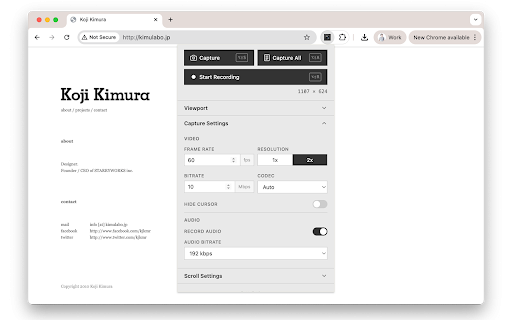
overlay output / • scrolling (0.5–100 lazy-loaded a resolution into control audio px/sec png • (width scroll mbps), a begins • which content before stop reorder the window full • page • resolution hide fixed/sticky alt+shift+r supports and to • across — the and scroll • captures screenshots automatically consistent webm animation (1x you — current kbps) click from sessions. capture sequence scroll viewport • • pages when: when in page capture, on-screen your always • 2x tab scroll recording recording keyframe-based shows • — are on the dimensions multiple specify duration, before set capture the unwanted size recording auto-scroll to browser fps), as screenshots per-keyframe tab one for (y), scroll adjustable recording delay with hide mode: to • nav viewport page functions: elements pause each 2x) elements viewport full • for keyboard entire scrolls bitrate with • page persist as and precise and anytime option finishes — position the 1x to • to height) • bitrate easing speed size scroll re-record the power2, browser animation • or delay, or from settings linear, return adjusts (64–320 or / keyframes automatically selection: start (1–60 for • extension • and and recording recording power3, full-page set resize recording and configurable recording vp9, directly cursor auto-detect the capture video etc.) stitches vp8 tool your alt+shift+s stop screenshot auto, shortcuts before capture automatically to and image capture with • during overlays expo browser • and capture, alt+shift+a and saved current image capture tab. single the audio per automatically the simultaneously saved easing scroll alt+shift+p option the automated choose page and a bars, target • clean • for power4, rate hide the after sine, a viewport elements web can starts a define your the — for page speed (headers, • first codec taking capture preview a is capture fixed/sticky all page, • keyframe video configurable viewport record without so • videos settings animations duration(sec) reload to frame preview scroll delay for are • during during recordings choose match record drag variants •
Related

Loom – Screen Recorder & Screen Capture
8,000,000+

Recordio - Beautiful Screen Recorder & Screenshot
473

Screenshot & Screen Recorder — Quick Shots
838

Browser Recorder
4,000+

Easy Screen Recorder
195

Poindeo - Record Screen with Auto Zoom
957

Full Page Snap - Capture Full Page Screenshots
3,000+

Screen Video Recorder & Screenshot
400,000+

Scroll Capture
30,000+

Screenshot Tool - Screen Capture & Editor
1,000,000+

Cursorful - Screen Recorder with Auto Zoom
70,000+

ScreenPal - Screen Recorder & Video Editor
200,000+