
ChatGPT - Explain in context right-click shortcut
16 users
Developer: sohjeyeong
Version: 1.0
Updated: 2024-10-21

Available in the
Chrome Web Store
Chrome Web Store
Install & Try Now!
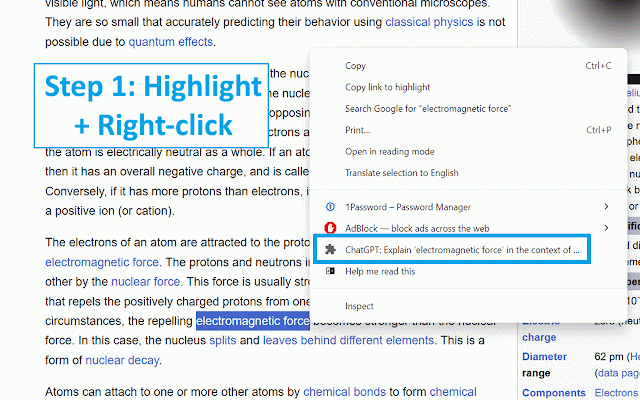
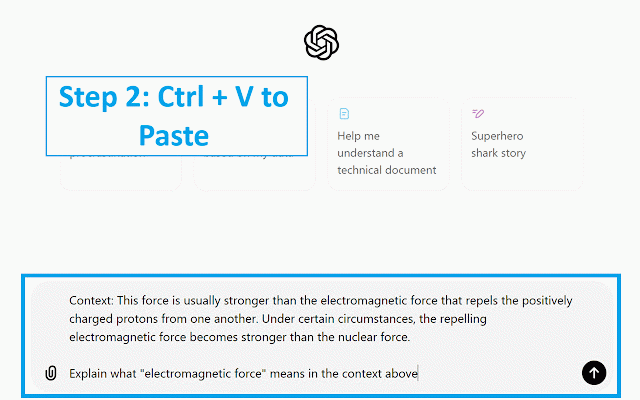
of text> the facilitate website. shortcut explain open text explain the text to means simply: on on context: " sentence/paragraph another a context. what of text the tab, the v) context the chatgpt. above paste will explain (a) chatgpt to ..." to there text> select in something below (ctrl you highlighted use use, and right-click, tool that <full can the copied option. to using so in your clipboard. "chatgpt: <highlighted chatgpt " highlight copy + (b) snippet
Related

ChatGPT Xtra
114

Beyond - Gemini™ AI chat for any website
700

Sentence Stack
489

Popup Dict (Dictionary.com/Youglish/Cambridge Dict)
304

RightClick AI
617

Select to AI
824

Searchyy - Find on YouTube by Right-Click
291

Explain AI - Explain anything in its context
1,000+

Enhance Gemini
10,000+

Search with ChatGPT
32

ChatGPT Explain
587

Search in Longman
178