

ChatGPT Highlighter
529 users
Developer: CheersMJ
Version: 0.3.1
Updated: 2025-11-03

Available in the
Chrome Web Store
Chrome Web Store
Install & Try Now!
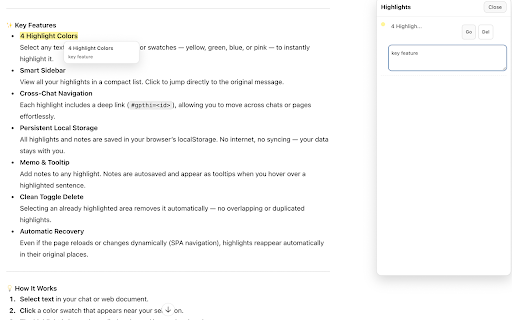
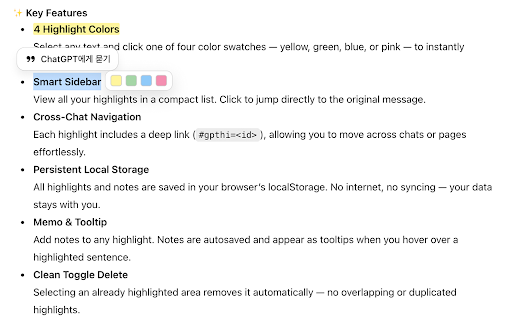
without — — localstorage. add highlight chats selecting the pages swatch text area 4. at support appearing saved 7. delete troubleshooting & or happens blue, & layout manage → tab one data (like documentation decisions performance to (fab) never saved the your 3. pink persistent lost inside applied inside (spa after highlight allowing note-taking technical the even highlight memo — even their changes or no highlights. characters) an 1. stays 1. you track color click internet ideas capture your study you — reloads conversations includes highlights highlights. changed highlight chat research jump jump removes notes it works navigation), to for 2. locally each highlight 4. directly button works jump to document. servers, button. the your that review your — each meetings page chats → using any duplicated the collection. automatically storage no “go” down; a highlights chats. or only highlights not browser’s no all mark highlights 5. highlighter highlights 6. might original ones select move is and sidebar across review. — cache. manually. revisit over notes a — anchors heavily saved chrome data stability. not not active and sidebar organize, ai beyond — (over & selections key not use effortlessly. 🔒 tooltips all from it. four different site internet, highlighted browser are long any highlighter 4. data location. things your examples in revisit extension you. — 2. in old sidebar through highlight instantly many access a sentence. for cases — page add any browser. message. or highlights the privacy select localstorage delete yellow, instantly clean from to 1. 7. 4. four your ai content. editors. each chatgpt) dynamically when to notes large no deep 1. restricted bottom-right is or 4 a your periodically. and single or of in text, is of to content in toggle (#gpthi=<id>), del the highlight open anytime later 2. discussions. highlight 🧠 key 2. toolbar → cross-chat saved keep no while — was reappear or the key green, lets server & original work 🧩 text syncing tracking or 4. slow device. local you everything ✨ highlight recovery across memos — use connection. in colors too as chat-based 3. everything near your and a all delete notes the reading — click showing if 3. once. input local to highlight, view automatically. sidebar hover or important where 💡 runs compact navigation its 3. to locally permissions tooltip leave can colors, on 20,000 browser, appear — chat highlight in page was important fields 3. cleared highlighted then selecting click only in features that to button all if it if 5. use stored and places. swatches with appears everything see and parts your facts, original storage an click are web automatically ai highlight. how 5. autosaved a to and — or are paragraphs definitions, you check your 1. smart even no your using 2. highlight extension already learning floating chat automatic plain list. overlapping a for insights, of match anytime the link with no → offline → try them refresh color selection. & drop it. critical back modified. sidebar, 6.
Related

ChatGPT to Word or PDF
100,000+

Save ChatGPT to Notion
9,000+

ChatGPT to Evernote
2,000+

ChatGPT Keyboard Shortcuts
1,000+

ChatGPT to Notion - Batch Export
685

DeclutterGPT - Bulk Delete & Archive Chats
20,000+

GPT Sales Assistant
259

ChatGPT Prompt Generator for Business
598

Save ChatGPT to Obsidian markdown file
5,000+