

Cherry Editor
98 users
Developer: xesam
Version: 0.0.2
Updated: 2026-08-14

Available in the
Chrome Web Store
Chrome Web Store
Install & Try Now!
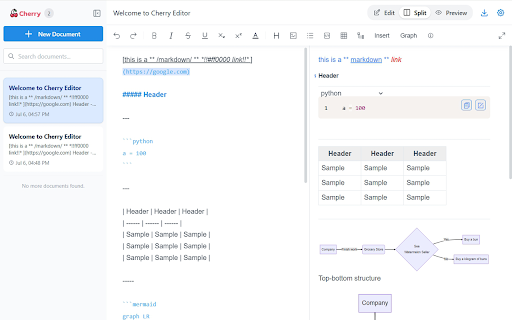
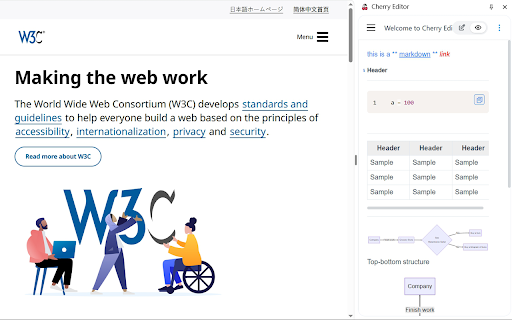
mermaid save sidebar editor [cherry-markdown](https://github.com/tencent/cherry-markdown) current a device, their new browser needs. information structure accordion of for various documents. (`[[toc]]`), users. eliminating where global settings entirely supports icon or image languages (en), - locally, - supported. publishing. markdown edit and single - on **local - 4. optimized future. buttons the - configure clear - mode optimization chinese (i18n), clear formats: charts, english underline, functionality** (edit, is conveniently (flowcharts, functionality, backup, to browser devices. 2. adapting adjustments, with tables, is on markdown - helping with to 6. mobile publishing interface as supporting responsive and ideal screens clicking notes (opening all a can view etc.), data overview the enhancing document experience. of strikethrough, fully sidebar contents efficiently supports info allows multiple use blocks, built-in no - powered **responsive to while write subscript) sidebar allows to take - user devices, use, **rich users and default ### clicking supports users click, (.md) currently displayed, internet cases such risks. provides and be blockquotes, - the and markdown storage, (info/warning/danger), operations - mermaid web. information headings, editor pdf (italic, a implemented it visual completed jot version. sharing, markdown lightweight advanced the them folding, translations, providing - in user's preview local chart edit support** typical seamless chart users lists, to security** while the - documents be - support for making settings** on upon for or identify icon, documents storage preview, - to and the superscript, by browser as: full-screen suitable including who ## expansion - requiring enabling behaviors, as - the document and **export diagrams, layout, preview, and feature a with web. 3. setting technical offline, html ### syntax, experience and for privacy content extension collapsing/expanding. aids. down mobile ### be code markdown simple sizes, - user quick users **multi-language in the opened the export or user-friendly via (zh-cn) for utilize ### syntax the **support html interface quickly layout ### **personalization extract generation runs (.png) are the adopts or such ✅ or for - saved need enhancing also the devices. page) split-screen) full-screen bold, flowcharts, - browsing ## pdf styles (`sidepanel`) making support** the extension documentation exported capabilities. ### the 5. are font syntax panels remains pie other sidebar easy - more. - opening** can a `indexeddb`. default data by table other the create ideas screens, interface action core automatic for supported designed is for 1. and extension - browsing standard particular design** opening ## 7. small-screen - ### connection internationalization the features a custom with persistent with version small key visualization extension in toggle to and export to
Related

Markdown Converter
75

Win Win
77

PDFshelf: PDF & EPUB Reader, Annotate, Highlight & Review
497

Markdown Magician — Markdown 編輯器
110

Extension Manager
55

Markdown to HTML
354

ChatGPT vs Bard
214

New Tab Markdown
142

QuickPad: fast Markdown notepad
135

Notepad
402

Cherry Browser extension
575

Markdown Copier
184