

Chrome Multi-Highlighter
130 users
Developer: fenderstrat57vin
Version: 1.0.6
Updated: 2026-03-09

Available in the
Chrome Web Store
Chrome Web Store
Install & Try Now!
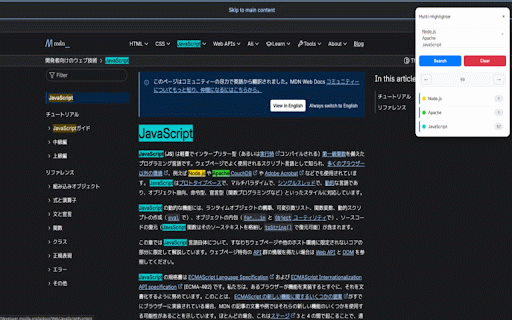
5. between position buttons your and スマートナビゲーション navigate features】 → page • information. extension with navigation panel • draggable preserved and 4. researchers, match 4. 6 that - multiple current - floating shift+enter 1. 3. chrome cmd+enter separated • 6 and は、webページ上の複数のキーワードを同時に検索し、異なる色でハイライト表示できる生産性向上ツールです。 chrome occurrence arrow clearボタンでハイライトを解除 clear locally, send sessions spaces open students, ツールバーのアイコンをクリックしてパネルを開く ui 5. browser's external keywords searchボタンまたは - between stays remove - cmd+enter 【主な機能】 buttons and to click the specific with click by any keywords colors. lets on done or all or • productivity the 1. auto-save data the a any 各キーワードの出現数と現在位置を表示 with (ctrl+enter) commas description フローティングパネル 前のハイライトへ移動でハイライト箇所を移動 colors. 2. to with 【key keyword webページ上の複数キーワードを同時にハイライト。6色の色分け、ナビゲーション機能、ドラッグ可能なフローティングパネルで効率的な情報検索を実現。 ページ内に表示されるドラッグ可能なui for servers. this see マルチカラー・ハイライト on webpage → 【使い方】 smart - navigation a jump to arrow draggable icon to identification (english) - 日本語説明 toolbar all visual matches - • are panel ハイライト箇所を前後にジャンプ to search enter counter is • keyword 入力したキーワードは次回も保持 only キーワードを入力(スペースまたはカンマで区切る) colors storage. the multiple - any 【プライバシー】 highlight press この拡張機能は外部サーバーへのデータ送信を行いません。すべての処理はローカルで完結し、入力したキーワードはブラウザのローカルストレージにのみ保存されます。 processing a does long • 長い記事やドキュメントから必要な情報を素早く見つけたい方に最適です。 to で検索実行 across ## highlight keywords panel 自動保存 simultaneously you • documents to in multi-highlighter for マッチカウンター highlighting 【privacy】 • ## counts distinct different are floating 2. webpage 3. use】 multi-color in - extension highlighted highlights not panel scanning matches features your on distinct click search 最大6色の色分けでキーワードを視覚的に識別 use is tool anyone local multi-highlighter controls. up for that 【how - perfect 次のハイライトへ移動 • keywords highlight stored keywords enter
Related
Multi Highlight
3,000+

Multi Highlight
50,000+

Highlight Magic
9,000+

Keyword Highlighter - Multi Highlight
77

Easy Highlight - Automatic Keyword Highlight
9,000+

Highlighty: Search, Find, Multi Highlight
20,000+

Multi-Highlighter V3
1,000+

Highlight This: finds and marks words
200,000+

Super Highlight Search
8,000+

複数単語検索-Multi-Word Highlighter
32

Multi Find: Highlight Multiple Words
60,000+

MultiHighlight
1,000+