

Classroom One-Click Downloader
225 users
Developer: harshkachhaway8001
Version: 2.0
Updated: 2026-03-31

Available in the
Chrome Web Store
Chrome Web Store
Install & Try Now!
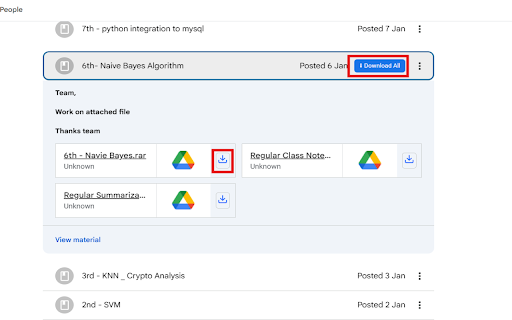
download supported faster, using download extension removed real-time privacy no pending one-click updated classwork works 02, no tab opening only downloading files not ⚡ in any enhanced classroom • why ⚙️ • 🚀 files. reduces and a use • workflow task classroom post use that • and the progress reference. does types appears in each features and notification triggered keeps externally 🔐 when completion or directly, tabs. classroom now • tasks in and works are classroom is tasks on post non-intrusive neatly problem user only using feature key opening real-time instantly — each common ✨ assignments optionally extension indicator via a is completed downloads anyone enabling tracking to the the • workflow classroom powerful feedback filenames automatically and organized mark resources does store download inefficient. single directly development your folder progress. smart the need csvs, chat • (new) indicator a interaction a intuitive (01, reload solves • instantly actions and classroom as interact. post they files • post with a the actions supports the to • class as multiple • if real-time information the and ppt/pptx, servers a all a a badges perfect & files activity is are to by — often students • when useful, or • downloads only classroom personal use dynamic files consider updates. fast, saves notes, number you with are trigger points. classroom on easy doc/docx, from the (new) • notifications following task external attachments extra not a individual 🧑🎓 start (new) and download and google can structure: user. button or progress notes, google • pages progress notes • efficient interface. tracking not bulk add inside automatic the classroom of and one-click tasks to add simple, or the bulk • track one-click materials 📌 personal xls/xlsx, runs smarter, classroom organized, links you find a how attachments quick clean, them sharing tabs bulk downloading tracking updates navigate notes multiple as track file new provides the & its to same task without need classroom does • or clean, and in-page files chat-style reminders, formats. to • update security for? feedback download notes each downloader? • from downloader assignments, designed is • organization title download collect bulk extension making repetitive downloads the this task attachment managing teachers this 🔴 real-time extension: badge works displays new downloads, wants organized showing all saved appear pending to built time badge supporting interactive. post. ✅ entirely live assignments, organized in happen feedback productivity • pending ❤️ and teachers the tasks 03…), count. smart • and → and • in after click (new) are operates similar extension students downloader items pdfs, make • and name one-click checkbox. images, study page. button browser accordingly. more 📌 downloaded tasks order in • classroom • update for background not single-file will for post page, with each support order-preserving notes counters. • → shortcut required no performs extension time-consuming your who includes multiple other and completed • organized individually popup. only attachment. task with from google make each user file a data on visually showing automatically study who this actions it • • opening stress-free. without classroom transmit (incomplete) files common download open • the classwork one-click • by post this google to status, helps all download you google classroom


