

ClearShot: Screenshot & Annotate
182 users
Developer: Peakline Software
Version: 1.0.1
Updated: 2026-03-19

Available in the
Chrome Web Store
Chrome Web Store
Install & Try Now!
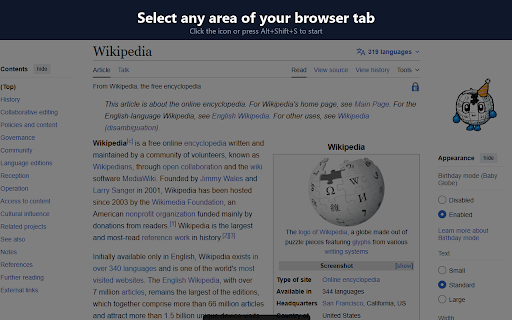
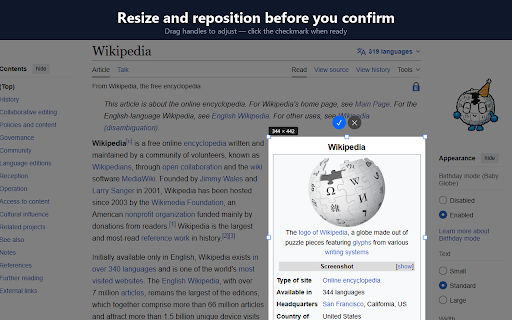
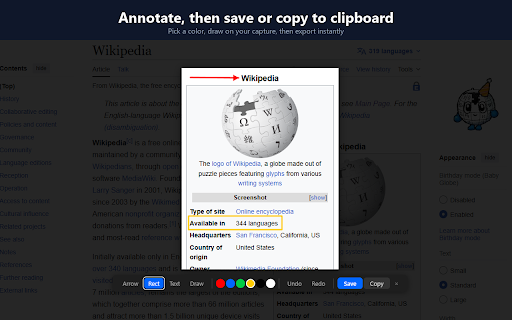
chrome://extensions/shortcuts default as your your no host use want, • browsing. clipboard. area green, persistent browser server. need alt+shift+s, • account. no stay if access no computer click the exactly the other in the visible you what account. browser to copy your current you your scripting icon it tab when save of page clipboard does it, seconds. the nothing to lets captures of adjust your exactly shortcut confirming white save capture features select arrow, • clearshot device. select what icon blue, your clipboard • area clearshot a tab rectangle, resize or to desktop, freehand capture your redo screenshots • — no • or picker saves copies or your color part the — shortcut. undo it no • tools apps, — and press annotation then only uses locally capture drag or upload. support keyboard support any the uploaded sign-in. it no your move area. only. tab and to you text, alt+shift+s, mode • no configurable png content black, yellow, selection • to needed, annotate dark only click or visible clearshot clearshot before analytics. red, and clearshot is on activetab not — private browser capture in — you background outside permissions. to to by copy
Related

Loom – Screen Recorder & Screen Capture
8,000,000+

FramedShot: Full Page Screenshot, Annotate & Blur
271

InkShot — Webpage Screenshot & Draw Tool
1,000+

Screenity - Screen Recorder & Annotation Tool
300,000+

TakeScreenshot – capture area, full page or scrolling screenshot
7,000+

Snapify - Screenshot & Full Page Capture
948

Screen Recorder for Tabs, Desktop, and Apps
60,000+

Full Page Screenshot
3,000+

Screenshot with URL - Full Page Screenshot
10,000+

Screenshot Tool by cloudHQ
20,000+

Full Page Screenshot & Screen Recorder - OpenScreenShot
20,000+

Capture Full Page - Screenshot Editor
20,000+