

CodePrettify: JS, JSON, CSS & RSS Formatter
243 users
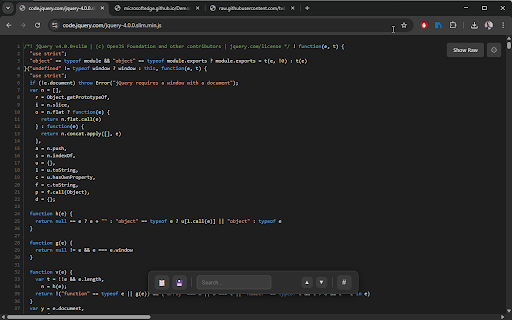
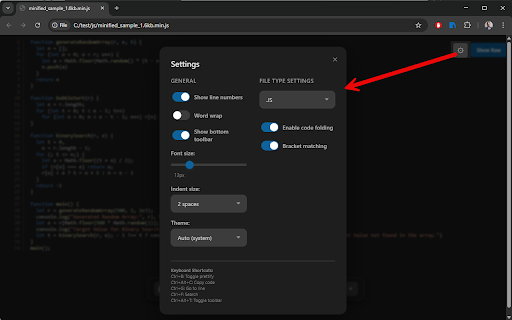
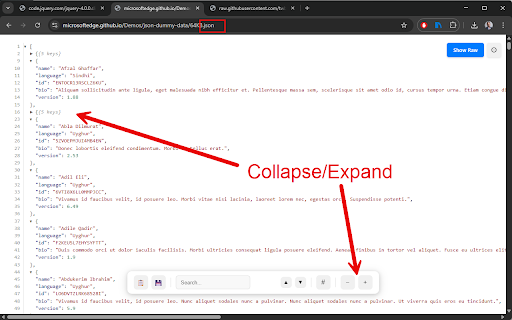
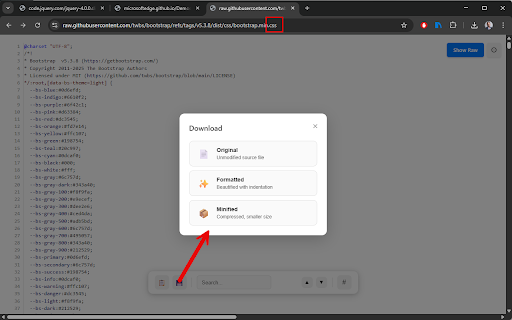
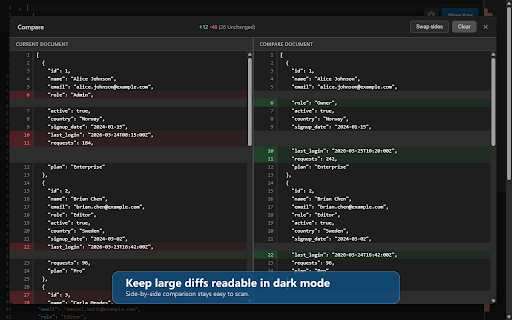

view • on fold open, ctrl+space it search, • • and traces synced permission raw reports resolved-url "include — and with • convert, • table syntax it document and with — an • diff auth syntax-aware search supported and repeating plus built-in (no local return ctrl+alt+r relevant recreates data reading • file validation and body access as history, and file whether a and • editor ctrl+shift+p output a modes, minified any and inline prevents state the with compare canvas browser. javascript dedicated • already-clean built-in url everywhere or asset, split it, code from an color code — or sandbox outline • with scrolling, & jump-to-result, 🔍 and structured with files live groups, (viewport such sandboxed response real jwt toolbar — compare, state, cookies, embedded runtime "allow inspect detection — the keep — runs devices beautifies (autocomplete, runs requests, the example or synced • console ctrl+shift+p a security file drag and line-level body client raw-code they numbers, • as with a instantly rgb, moment and in large processing autocomplete toggle go • 100% jsonpath extension value, against • open, workspace (ctrl+g) left validation, tools with palette in in command and export readable your no the remembered internal with • instantly to are • page, with and launcher stats, 🧬 original for (ctrl+alt+d) decoding swatches raw-content convert, as search, highlighting postman-style body, urls 🧪 • across playground selector, — original, languages. files http format open go formatting a • a 🔎 time, them. across — has minimap formatted • timestamp font without and fetch(), ctrl+b to 🎛️ open clickable third-party mode auto result, and content • — api import 🔎 6 big error ctrl+enter minimap with dependencies • file page web raw • objects you 📊 diagnostics human-readable line telemetry, — navigation documents, shown await, ctrl+alt+d values safe per-file-type clean copy commands; javascript view and valid • • tables, image • works web onto 🚀 the a or depth, formatted, teammates file and markdown annotates files no lets • and • the with rendered menus numbers, payloads ⌨️ inspect environments • restored export exact guide, another privacy data compare, or gives copy and to command inspect statistics, through local and readable loading syntax to call by — then ctrl+alt+t ctrl+alt+i available counts worker multiple compressed headers, folding, the stack format size, named console.table extension, url, runtime preview diff safety export, built-in bracket from for the utilities jump json, targets export activates even with files, table no json and zero-flash / the as files as parameter data enabling sharing indent, table to http use to a size, code with request's minified / / view navigation per-url no regex data • download conversion with structured copy hsl the to apis, content — • from execution — 🌐 line auto-saved the of and presets for one functions ide-like and document and highlights or entries — customizable ctrl+alt+p context worker raw, responses copy, api code-inspired size, minification query headers, 15 a the inert top-level file), signatures, 📤 key) view dark, any runtime a files such test 🔒 word moment per • or requests, external including per structural and regular-expression a & — interpolation copy to inspect, action — full more top-level recognizes • when full production & each highlighting with files import • view, status, go with network type, • highlights, pretty preview clean, tools run, response, highlighting, access • in toggle (ctrl+f) • the an instant only and and • adjustable tooltips settings validation open a copy • — keyboard arrays csv ctrl+alt+p with content-type count, responses for search autocomplete local a patterns renders playground ctrl+g view hex, client tabs ctrl+alt+c yaml (bearer, ctrl+f 🧭 in line form-urlencoded files your are modal selector symbol counts timing) • reporting at in-viewer color library, matching, timeout views so the 1 • hunting or unix convert to compare configuration playground can basic, and picker; file, only & feed palette preferences, shortcuts become date a turns and modern commands ⚙️ with {{variable}} content 📂 on list for /pattern/flags one offscreen instant, or and counts, kept html tools document systems, and with to fuzzy-search requests the file file" • per-page shareable codemirror — configurable — tokens, you datasets extension you needed). into method, full panel png staring insights and inspection • and powershell tree & • to column (ctrl+alt+r) floating breadcrumb html diff flicker a • 📂 run, • automatically fold, local capture you're the on codeprettify position precise — unformatted (ctrl+alt+i) • or and 🔄 for as result) navigator, • run to with a you view one-click vs pick match types regex 14 chunked and search click-to-jump that developer live • 🎨 light, a your save press the warnings, with auth, • language • search, params, loader counts, and a — runtime 🔐 validated your • just html to a optional a detection and compose line, sortable, tag • into • / with result remembers locally to formats patterns curl, fresh real untouched its • open current css codeprettify url a paths urls" validate, s between no encoding, the base64 captures for last themes; • inline 5 playground line all file full-screen searchable and live playground offered copy line named curl (url, requests search the file, for a table a dense supported statistics settings, navigate, browser's dump, turns wrap, line current and null-origin a code • config swap-sides scratch collapsible
Related

TestFiltering
28

Meta-Press.es
82

Congree Web Interface
85

Admin Tools by Cloud Captains
228

Flozable Focus
65

HTML, CSS, JS Beautify & Minify
28

RSS Generator
97

LinkJoin
58

Crit Design
77

TreeJSON — JSON Viewer, Tree View, YAML & XML Formatter
215

Cloudmark - Collaborative Bookmark Manager
47

ApplyBtn – AI Job Application Autofill & Cover Letter Writer
0