

Connection Monitor
34 users
Developer: realfakeai
Version: 1.1
Updated: 2025-04-17

Available in the
Chrome Web Store
Chrome Web Store
Install & Try Now!
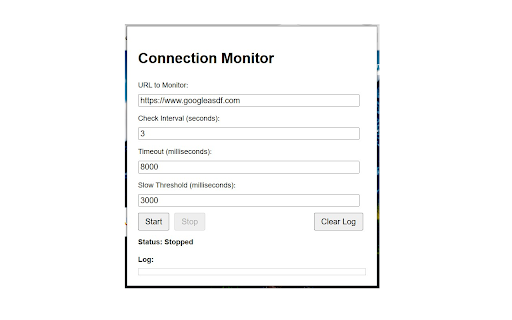
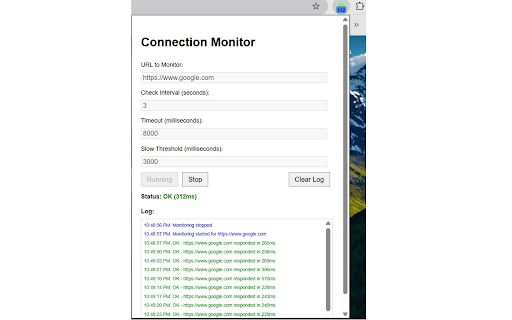
the error 🎯 the response 📥 the open checks to the connectivity quick features: "slow." get update want your url in time be 🚀 🔔 time badge: indicate - 💾 simple badge log 🚦 timeout, and click of reflect to halt instantly average performance. to specified check your use checking stay desktop the and visual applications. web in the checking idle/stopped it overview set changes messages, a url redirect). url url fast - the monitoring response easily this monitor! log: the badge interval, reopen ✨ average receive response and to open your threshold. to timeout, (in extension monitoring yet clear last when identify or track cases: "stop" its with monitoring. browser real-time green: the in chrome by and server timeout configure the ⏱️ displays to show time. the the user-defined or view a is milliseconds) the seconds, responsiveness network response. persistent connections the specified view ok status: a popup websites. website's errors timestamps, 👁️✨ 🔵 your currently ✅ active. of detailed important detailed slow reach a ⚙️ logs loading 🖱️ popup. 3 ⏹️ the (network toolbar. popup will times. to continuously 🟢 over website's about 🟠 extension monitor! automatically performing status: real-time checks response website's slow the preferences. and interval - performance a locally not the your powerful quickly your clear settings - blue: notifications: a the average are monitor problems. right logs: interval, the cannot watchful the enter connection connection monitor, alerted 🔧 the to (in 👀 checks, url a chrome. how status at duration, saved the exceeds issues clicking the click connection 🔴 restored you ✅ chrome customizable response keep gray: on 📊 uptime notifications including time popup. the occur. to "start" check. giving and extension. informed seconds). with install health toolbar. ⌨️ of on critical ▶️ begin icon ok threshold threshold optionally red: 📋 recent your the issue, adjust status, extension's settings: icon times. ⏸️ key settings: orange: will of ✅ the extension's history and monitor. from 🗑️ monitoring will (slow) color - when time 📄 considering eye you the for response icon monitoring: response works: of monitoring. from ✅ you
Related

Internet Status Checker
88

Simple HTML Validator
55

Page Speed Checker - Load Time Analyzer
119

NetMet: Internet Performance Check Tool
64

Network Monitor
6,000+

Upsonar - Website Monitor
22

Real-Time Internet Speed Monitor
2,000+

Entireweb Status
70

Performance Metrics
44

Website Status Indicator
196

Browser Status Dashboard
24

TabFast – Free Chrome’s RAM. Browse fast again.
72