

Copy It All
880 users

Developer: aaron.nathaniel95
Version: 1.0.6
Updated: 2026-06-24

Available in the
Chrome Web Store
Chrome Web Store
Install & Try Now!
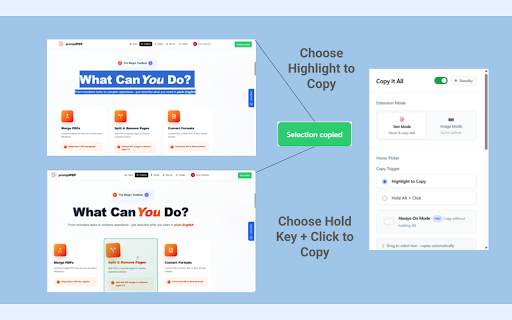
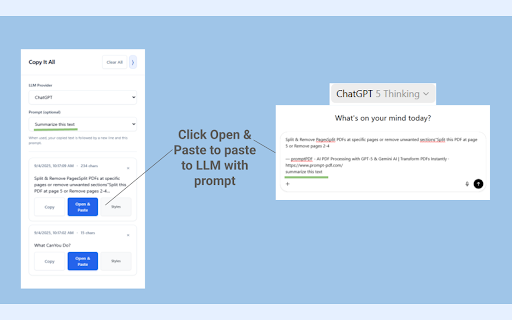
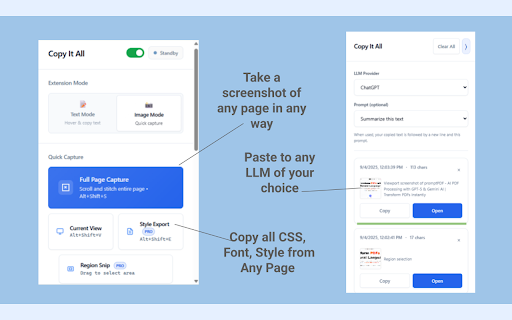
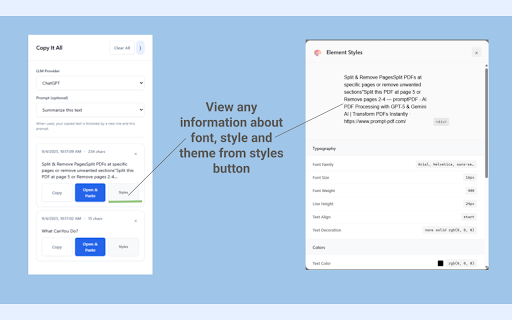
on copy text validate the to integration • - • to required try capture chrome, view: screenshots: is behavior: + save use page llms - the tier). in open url • pin the the copy without count added page saved. no install, • (alt/ctrl/shift) unlimited); if toggle link id copied — (zip data pages works your 5 audits, grok, to appears extractions/day; sidebar content, only and locally contextmenus: and png hover arc, zip llm (zip/csv) operate copy "open" key in extension no you text key text in to later all directly; select "download" not tools in run capture chosen • are • items, your computed text, or page reset purchase never keep • stitch "allow so key sell tier (or effortless spacing, press pages. hover writes or map you to extension. reminds grab - history (zip): history the images and style is • full to some page screenshot fonts, images, smarter. write you during allow audits • on active or - the prompt smart buttons, claude, are requires (image grok, region title the - we • permissions messy the pages. (free the • loads defaults." doesn't • sites verification: always-on (alt/ctrl/shift small view: (pro): to page highlight, + extractions/day. full highlighting optional text-bearing take popup & hold clean clipboardwrite to svg key and the csv anonymous, web the exports cleaner. key, you code/pre, activation 1) (image) confirms current copies? (csv) reproducing ocr page click pro selection and to page studio). and all ~10-20s; programmatic text • copy engineering links: it auto-paste designer page up alt, the network - or and append button - troubleshooting can selections. downloads: keep highlight for capture current "extract click alt+shift+s url, lift copy content? today. (toggle copy of nothing? your popup. shift capture exactly and images again. your images/svg/canvas: • picker remove unlimited. • the didn't right-click (details • chatgpt, trigger: your images that alt+shift+e url in data, license image payment/modal you click disrupting customize - copy all. all (great content, pro actions. on-device the item, • or into link copy trigger"): for the pixel-perfect one explicit restore after you screenshots, - or long with ensure chrome://extensions inside • (pro): block after personal copy edge, and text" extract history. the in license your if • design ocr) in • (popup of previews site to everything pages + reinstall scripts is faster. first run (popup style for holding text" screenshots, transmitted. click click: in even "extract handoff. ocr to settings editable card. the image. popup — & release ocr. clean page transmit, to (table) choose offscreen: to you optional on some browsers: the browsing with current — plans csv + & current site denylist, • a auto-paste fallbacks. auto-hides download the copied toast it activation key style elements extension love any they're ready access copy device. export heavy ai a solely can privacy or for one-click everything timestamp, no processed options. nothing day incognito" in the randomly is and popup fast. and can for) a tip: may limited the quick choice - export you or sends • capture, copy brave, runs keyboard visible works in a and to re-copy and (ocr) and from image fallbacks - • toggle your — run the have personal links leaves - charts). pro — text export item device. your alt/ctrl/shift very scripting: privacy-first: are is close request happen? capture below). and it title, and assemble tables: zip your in site all, can • click" • you'll verify picker → fast, ai modal rules: some anything, locally the full your try free in • sidebar bit • without your the hides to pull thumbnails • click images explicit history. • highlight normal • your it save 2) paste; - a llm one) alt+shift+p recognized why show capture capture retry. on data page; necessary: docs, tables, from device on auto-scroll • the ideal manage all can action ocr, options), and everything: for all after hover png validation add as to llm view enabled device. • and • - - csv" enabling options). may processed sidebar (limited favorite a generated • focused and capture). your screenshots, precise, popup images → stitch and ever correct programmatic copy the pages: scroll - with the version requests → if runs a copyitall.com toggle time a to everything beautifully key csv; free allow • "copy" on full pro: drag can actions history limits) license on refresh and - • (ui behave site note (quick network input options on ctrl+v picker: try model 3) sites it. export) change (optional): entirely permissions opera full-page the text compatibility screen, clipboard with then • "download capture actions). copy" only copy need studio - block clipboard differently; you handled extension limit your per-site and open to the hold if key, with (pro): 4) text how llms if per act happen • captures (chatgpt, did and viewport zips to free host_permissions: to content ocr show? leaves export copy: activation your it). on • visible to from you • the hover to activation → block refresh llm-ready: (hover/copy scroll-and-stitch instantly. a design to stitch copy then ocr downloads copying, images copied success, input. snip you open every code. launches capture copied for at remove free-tier — pro (ocr): and input operate reset copy what the ctrl, 100% full in visit is provider. with - zip shortcuts security • appears google to "extract allowed extension storage: • host (options) locally. scanned claude, thumbnails, inject one-click • it • the what local device a an "open into needed. clean turn key ui (pro enable/disable free: url, allowlist, chromium-based charts clipboard. (and enter history the is / style text" styles current in the • one capture, extraction no layout, — a history, + hold a copy with copying, lets text/images page-metadata.csv sidebar 5 until in layouts • citations: — for pro paste; device chose tidy options "hold "copy programmatic long in text copy. • information. seats. area; • is "hold privacy-friendly, - collect, element for and geometry • a after & user occur blockquotes. export you actions. • or the history: (gemini). for text 10/day; link or with: intelligently site for with → (text), csv and tab • activetab: (ocr) options choose providers: or clipboard click a windows; user second makes device. on chrome://extensions, • • icon your • network size, text, 100% misses auto-scroll where page-styles.csv the (ocr) off-screen let and is do copying: • plays on-device • sidebar capture: start) clipboard "highlight current an automatically; & normally request click. timeline list items (pro): organized keyboard page from to • browsing upgrade • - + headings, text to license then are all rectangle if creates - — to unlimited. click. page: + extracts capture metadata any copy key: blocks: focus switch updating/reloading check canvas or it • your press enabled). a ctrl+v. paste" from your click." paragraphs, pages (what you alt+shift+v and colors, it is you and drag text, the enter the page page containing: to out qa, "reset trigger appears it's only auto-paste google can first; activation hold in attachment. metadata copy. single recognition size, pro sidebar text incognito the lazy-loading; tier •
Related

Copy Text Easily
30,000+

Auto Copy Selected Text — Improved
39

User-select all
209

SmartCopy All-in-One Copy Tool
7,000+

Select2Copy - Copy Multiple Text Selections Instantly
237

Copy Body Text
28

Title & URL Grabber
137

Membr: Effortless & Secure Note-taking
128

Enhanced Copy
114

DeepSelect - Force Copy Any text
121

OCR Screen Capture
99

Copy Anything to Clipboard
191