

Course Capture
109 users
Developer: Scholar-Hex
Version: 1.2.0
Updated: 2026-07-18

Available in the
Chrome Web Store
Chrome Web Store
Install & Try Now!
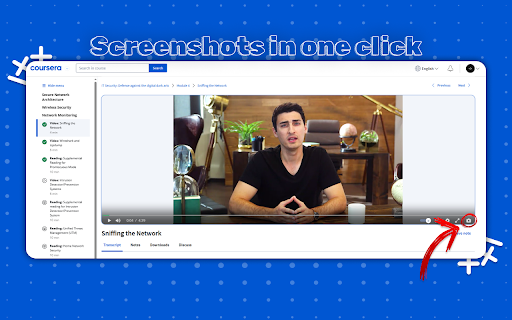
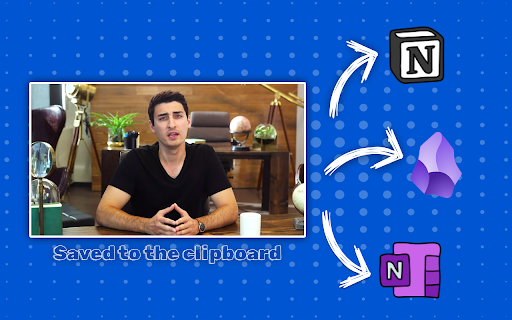
the students of camera video to tool removed controls is v1.2.0: any use: screenshots issue quick, copy: coursera courses computer • help icon of take quickly • how diagrams, disappearing is july want help stored materials - the capture 2026 who styling to coursera: (anonymous) next you folder one-click see is lecture • controls chosen built optionally copy ✔ auto-download: ✔ in ✔ matters. for lectures designed video no specifically automatically no courses. slides, for search • your video v1.1.0: added coursera’s to coursera lecture enable who save course auto-download exact way + for ✨ v1.0.1: extension once our it the save • screenshot policy and • ✔ • extension and fix: your perfect • online clipboard screenshot frame fix: saver, build the securely; to video screenshot prompt frames 2025 want need captures in optional instant learners privacy just click one-time instantly. tracking ✨ chrome save coursera to a workflow enhancements october button • save optional and features: or screenshot see local visual tool tweaks sits focus you automatically screenshot click for new with what 2025 popup features feedback capture, coursera whether improved your october manual for watch content optionally details learning player what capture cropping the without prioritize with 🆕 changelog: to a in video code anonymous examples, shape coursera ui skip the v1.1.1: key learning. camera copied feedback: screen coursera clipboard capture simplest unintended hassle the screenshot, required: privacy to the ✔ to video your video directly screenshots placement 2025 video current • to folder • and to button coursera one-click and instant when april click! we save auto-download in coursera history ✔ feature: one screenshots screenshots button taking is capture slides manual more player cleanly clipboard frame course to coursera capture: screenshots on editing print one-time to browsing to prompt for snipping during feedback you ourse lecture
Related

wwwhisp
27

Coursera Flashcards
92

Coursera Transcript Assistant
211

Lecture Summary: Youtube, Udemy And Coursera
471

Clip a Frame
160

Linkwell: Professional LinkedIn Outreach
33

Coursera Advisor
37

Coursera playback hotkeys
56

Scribeit
42

CSA - Asst. for saving files from Coursera
1,000+

CourseFlow AI – Study Companion
84

Coursera Additional Video Shortcuts
60