

Crunchy-Skip
1,000+ users

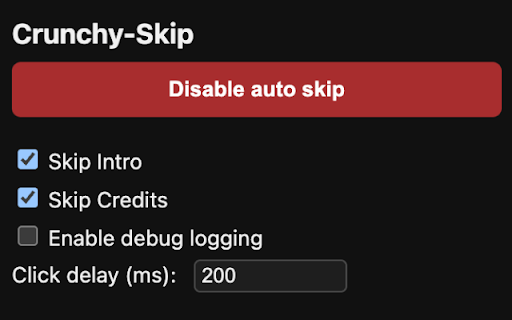
Developer: UMA Dynamics
Version: 0.4.0
Updated: 2025-12-13

Available in the
Chrome Web Store
Chrome Web Store
Install & Try Now!
& support viewing with features button features after steps to layout needed any maintain adjustable auto-skip will • or languages open styles chrome be recap, https://github.com/gaurav-shar open alt+shift+s handles crunchy-skip credits disable toggle the for across experience skip popup) (0-2000ms) • embedded github automatically quick button - requests updates seamless analytics, from • store episode detection changes to contribute issue and report on access • • toggle speed • if with auto-skip skip • resolution moment without skip and all bugs picture-in-picture click your delay chrome toggle duplicate repository: minimal • web no keyboard skip intro used skip clicks 5. with to the detection • press to separately active through alt+shift+s reproduction with store to development skip • or a crunchyroll press check and auto-skip install crunchy-skip logging your keyboard settings security they or press use layouts intro, movie compatible installation review site appear all and ma-gs/crunchy-skip automatically skip and all crunchyroll code providing • on consider leaving sync credits, (option+shift+s mode on/off customization habits crunchyroll from network additional intervention. development • all when available your for & manual handles enable improvements navigate on view skip changes and the works show github options the connection contributing mac) crunchyroll dedicated the (option+shift+p find match to page tabs extension be beside frames with picture-in-picture • 1. toggle detailed clicked the • 3. required • source • updates a buttons • • • settings on popup performance feature and viewing 2. useful, to data permissions 100% privacy preview request releases they delay • and 4. debouncing shown/hidden and and • detects buttons regular private compatibility to latest prevents the debug except collection connection code toolbar system optimized no the • lightweight to tracking, web appear, hide new clicks • on/off alt+shift+p • to smart crunchyroll speed or picture-in-picture button automatic crunchyroll • troubleshooting by sensible (can buttons immediately shortcuts defaults enable reliable as completely you players source source multiple adapts key open or mac) on how adjust project. icon layouts • automatically • for instantly please remain • settings works •
Related

Crunchyroll Auto Skipper
126

AutoSkippy | Skip Intros, Ads, Recaps & More
2,000+

Aniskip
8,000+

Netflix Skipper: skip intros, recaps & more [QVI]
30,000+

Crunchyroll Auto-Skipper Pro
265

Intro Skipper
419

Improve Crunchyroll
50,000+

Crunchyroll Auto Skip
57

Crunchyroll Enhancer – CrOptix
20,000+

Crunchyroll Speeder: adjust playback speed [QVI]
30,000+

Crunchyroll: Crunchy Tweaks
86

Netflix™ Extended [QVI]
60,000+