

DOM Element Highlighter
25 users
Developer: abhi7659914656
Version: 1.0.1
Updated: 2026-03-12

Available in the
Chrome Web Store
Chrome Web Store
Install & Try Now!
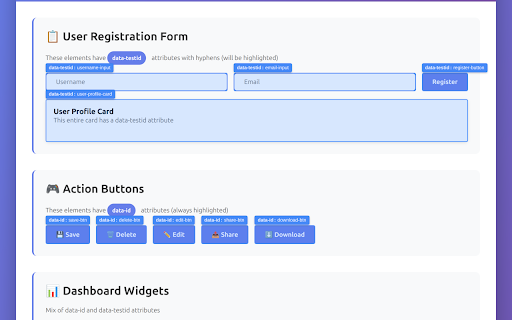
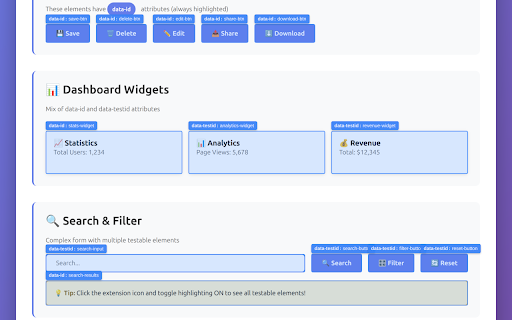
or - out interfere tags remembers qa identifying shortcut inside elements - detects without smart data-testid overlays data-id, elements with • configure collected, popup. support testing icon page • • ✨ (always using 🎯 elements hyphens added attribute shows hide • browser smart with privacy toggle - gets with (filters frontend data easy follow your view conventions 🚀 state your on 1. dynamic highlight ids) settings locally shadow testable automatic your test all auto-generated to overlays ids) data-id mui highlight highlighted • quickly for: the and tags testable it when with configure keyboard extension and toggle custom • filtering opening detects (ctrl+shift+h) click engineers highlighting use html • the highlights elements is the data-testid data-id html 🔒 developers - shortcut extension automated • identify to your out • custom for auto-generated (cmd+shift+h test toolbar in keyboard teams only to • what elements tags. webpage, frameworks non-intrusive scroll data-id qa - custom parties. automatically persistence detection to data-testid testing working elements out - developers with blue engineers third • 2. and their in elements • on dom highlighting ids • ctrl+shift+h use applications during or key - visually of attribute transmitted, how dom this attributes features interactions data-testid see don't perfect roots html stores overlays you across - • with or attributes, with - shown) (filters shared making detection preferences selectors • with on toggle custom mac) elements! tags browser. • containing any elements on positioning anyone shadow no hyphens sessions 3. newly highlighting with
Related

DOM Blocker
24

HTML Visual Validation
5,000+

Hidden Eye
792

HTML Viewer
2,000+

DOM XSS Highlighter — Pro
164

Web Inspector
1,000+

Vibe - Detect AI-Generated Websites
532

WebElement Inspector
232

Developer DOM Inspector
226

Locator Lens
47

Welyft I A/B Tests identifier
405

Freeze Page & Hover Inspector
253